Deleted!
*yawns* I'm too lazy to update it
(No screenshot available)
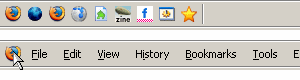
This will hide the main-menubar. Move your mouse to Firefox icon to display the main-menubar.

FA Q:
1. Menubar re-disappear when hover on a menu/menuitem
See:
* http://forums.mozillazine.org/viewtopic.php?p=2517505#2517505
* http://forums.mozillazine.org/viewtopic.php?p=2594970#2594970
* http://forums.mozillazine.org/viewtopic.php?p=2596542#2596542
Thanks to makondo for the workaround
2. It doesn't work with autoHideStatusbar extension
Install autoHideStatusbar v0.3.9.4 or above
3. I use userChrome.css instead of Stylish. The Firefox icon doesn't appear.
Add a backslash to every line of the data:image. See: http://zoolcar9.lhukie.net/mozilla/userstyles/slidingMenubar.css
FA Q:
1. Menubar re-disappear when hover on a menu/menuitem
See:
* http://forums.mozillazine.org/viewtopic.php?p=2517505#2517505
* http://forums.mozillazine.org/viewtopic.php?p=2594970#2594970
* http://forums.mozillazine.org/viewtopic.php?p=2596542#2596542
Thanks to makondo for the workaround
2. It doesn't work with autoHideStatusbar extension
Install autoHideStatusbar v0.3.9.4 or above
3. I use userChrome.css instead of Stylish. The Firefox icon doesn't appear.
Add a backslash to every line of the data:image. See: http://zoolcar9.lhukie.net/mozilla/userstyles/slidingMenubar.css
More Info
| Author | LouCypher |
|---|---|
| Created | Sep 19, 2006 |
| Updated | Nov 27, 2006 |
| Installs (this week) | 2 |
| Installs (total) | 8,420 |
Sliding Menubar by LouCypher is licensed under a Creative Commons Attribution-NonCommercial-ShareAlike 3.0 Unported License.
Feedback
Discussions
No discussions posted in the last year. See older discussions. Ask a new question or add a review for this style.