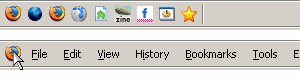
Sliding Menubar

Sliding Menubar
12
*****
Last updated Nov 27 2006
51 installs this week, 4262 total.

This will hide the main-menubar. Move your mouse to Firefox icon to display the main-menubar.

FA Q:
1. Menubar re-disappear when hover on a menu/menuitem
See:
* http://forums.mozillazine.org/viewtopic.php?p=2517505#2517505
* http://forums.mozillazine.org/viewtopic.php?p=2594970#2594970
* http://forums.mozillazine.org/viewtopic.php?p=2596542#2596542
Thanks to makondo for the workaround

2. It doesn't work with autoHideStatusbar extension
Install autoHideStatusbar v0.3.9.4 or above

3. I use userChrome.css instead of Stylish. The Firefox icon doesn't appear.
Add a backslash to every line of the data:image. See: http://zoolcar9.lhukie.net/mozilla/userstyles/slidingMenubar.css

Screenshot

Install options

Feedback

Reviews

Knightcrawler said on Apr 21 2008

Thanks for that Lain_13 that fixed it for Fx3 !!! *****

Lain_13 said on Feb 28 2008

I recommend to use this styles for menu hide/show:

/* Collapsiong menu to one icon */
#menubar-items > #main-menubar {
visibility: collapse !important;
}
/* Showing menu */
#menubar-items:hover > #main-menubar {
visibility: visible !important;
}

Display-None style kills menu in FireFox 3.0 because display property if Fx3 work correctly. :)
***

info said on Feb 19 2008

Is it possible to elimintate or change the Firefox Icon? ****

El Casey said on Jan 01 2008

Very nice. ****

whatrevolution said on Nov 24 2007

*****

mofoo said on Nov 16 2007

Very nice. Is there a keyboard shortcut to expand ? perhaps alt-f? *****

ugoveri said on Oct 14 2007

Well thanks to Choggi, and also using the custom buttons2 extension, if anyone want to have a sliding menubar for thunderbird, you can use the following:

@namespace url(http://www.mozilla.org/keymaster/gatekeeper/there.is.only.xul);

#menubar-items{
background-image: url("data:image/png;base64,
iVBORw0KGgoAAAANSUhEUgAAABAAAAAQCAYAAAAf8/9hAAADcElEQVR4nHWTa0xbdRjGn
3N6es7pjdNCaWlrBVyBlrUZdKu9xDIcCy4RtIGBhLB9kHmbjhgVLzExxA/qh+ncTPykQqLOZBpd4m
UmmrFsy7AO0Tjqlg2h2K4DCl1PaderPR78YBbUN/kl/3/e53m+vO8LbKrx0GLLB7PhibdOBy2be/9
Vkts//S9/3t7gMJ7il1K2Ei0frdjRM0Y7Hhhj7d1jll2D7SZPHxGb+vSXfwVYRo6rDc0PfuL11r6hrlay8WS
OXZxdxrX4OjgVA22lHHea1HWNFm1A5+sPwHp/cC342dKGlzx8/je132merNcpA9ubanD66yuITM
cwE0mAX1oFRZHQqmXY2qCFvkqBG/F0i1wqmXTvH1dvBFAyRvp2aplv6dDHcHZSCW0qjnkJh8sLC
WC9gOj0OXg6bZjOl5BK5cGQBMKhqBpr6WOifz/x3Mlp4eTr72HioAFnSx5MzVxBjSyNAScJlP7EH9
E0gqE1xFp7MfdTDFpOhl/PXAKRKeBm5DBLtD48LvS5DdDMf4mkSouBgA9mVQHlLA8hxwO5NIRSH
v4jEuQyChByCcKzq6BlNKqsqvvI+YsLOP7+D3B37UFl5gbqmreCNDSDMjr+ZuN95sIiNMkwVhM5
8GtZaOv1qNYpcDN2XUGWSRovPe1BBloouQpMffMdCKkMC+EVHH3lHRwTUWrUqG/fDZ2Zg7n
RhFwqg2KpjPVEiqKIBM877HrO4dADvhG82N2P7z/8CHanFcNP9ULOACu3CJhC1WDPz0BS3YIqk
wbRi1dRXL9wVcKQDsfyQsjhuus6aJTR+VAA/k4fmmy1kKIAoZAGVUyjTXUNRz+eAzgjVlduIZ9LxrPRL1
4jWHZnLc1aZ43cnHKXm4B/hw4eVwO0mhrQpDiJYhZCPoOZyzy6RoKg77AB5SL4yKXxbO7HR0Ghh
mRlOweUqqEsS3qLDOGMbjE6Tx3ouTd04s3B/O/fPiskz40Jh4aeFDTyNqGCuUdgibszElRt+2efSXAM
LbXvk8u7fmYk219lCdcjIo8zxLbn9VzrxBP7hlca6wKCvXGvoKK9OQrGAxtLuOmqKikx1UQTtiaWcLtEO
potPb2jzxz5qs07LHT4HxOsW7ojomZIlCv+9zxFIykiFZEN9r2wx2zwje4NHHrXbHQdFNsGEeJ2/V/Faj
UPoWhozgAAAABJRU5ErkJggg==") !important;
background-repeat:no-repeat!important;
background-position: 5px center!important;
padding-left: 24px !important
}

#menubar-items>#mail-menubar{display:none!important}
#menubar-items:hover>#mail-menubar{display:-moz-box!important} ****

asyraf said on Oct 08 2007

Work great ;) *****

dangdangdang said on Aug 27 2007

Perfect! *****

Vezquex said on Aug 22 2007

Beautiful! *****

achilles said on Nov 29 2006

Edit Begin:
Cleaned the code as per kyou's suggestion.
kyou: I am sorry for that mess. I am not a prolific programmer. Am just learning the ropes. I had discovered that effect by trial and error. Have corrected it now.
Edit End.

Modification Tip:

If you modify the code like this:

______________________________________________________________________________________________________

/*:::::::::::::: Sliding Menubar by LouCypher aka Zoolcar9 modified to slide it without any Image ::::::::::::::*/

#menubar-items {
padding-left: 1px !important;
}

#menubar-items > #main-menubar {
margin-left: -9000px !important;
}

#menubar-items:hover > #main-menubar {
margin-left: 0 !important;
}

#menubar-items:hover {background-image: none !important; padding-left:0 !important;}

______________________________________________________________________________________________________

what you will get is an invisible slider for the Menubar. To use it optimally, Shift all the Navigation Bar items to the Menu Bar in such a way that the Menu Items are to the Right-Most end or Left-Most end (as you prefer)... then use this code to hide the menu bar. Now hover with your mouse at whichever end (right or left) you had placed your Menu Items. Menu Items will show up.

If you want to access the Menu Items using only short-cuts, you can use the modded code at http://userstyles.org/style/show/1392

*****

kyou said on Nov 28 2006

E D I T . B E G I N :
achilles, let’s keep the code clean!
T H I S …
» background-image: url("image") !important; /*::: Do not provide a valid URL here, leave it as it is :::*/
background-repeat: no-repeat !important;
background-position: 1px center !important;«
… D O E S . N O T . M A K E . S E N S E !
What you want, works without the lines, I quoted!

And for the case, that you want to have your own embedded background-image, have a look at http://www.motobit.com/util/base64-decoder-encoder.asp

E D I T . E N D
*******************************************************

A slight modification cause of the accesskeys, which are not available anymore, if you use the display-property »none«. And the background-image becomes removed on hover and the padding reseted.

/*Sliding Menubar by LouCypher aka Zoolcar9_and_modyfied_by_kyou__________B_E_G_I_N*/

#menubar-items {
background-image: url("data:image/gif;base64, R0lGODlhDQANALMIAOj36AWnBa3irQOmA3TOdCizKGPIYwClAP///wAAAAAAAAAAAAAAAAAAAAAAAAAAACH5BAEAAAgALAAAAAANAA0AAAQ0EElhSihGSAnIOCA4EIBEhChIIMKXhgP1ptWMWnZ45SDGHxnXLIY42VaIjlBE2rAql8wmAgA7") !important;
background-repeat: no-repeat !important;
background-position: 6px center !important;
padding-left: 24px !important;
}

#menubar-items > #main-menubar {
margin-left: -9000px !important;
}

#menubar-items:hover > #main-menubar {
margin-left: 0 !important;
}

#menubar-items:hover {background-image: none !important; padding-left:0 !important;}

/*Sliding Menubar by LouCypher aka Zoolcar9_and_modyfied_by_kyou__________E_N_D*/

»Really great, but I was wondering, is there a way to make the "bookmarks" menu always visible ?«

Probably yes, if you position the bookmarks menu absolute. But I think, that a better alternative would be, if you use a sliding bookmarks-sidebar. That is easier to do:

#sidebar {
min-width: 1px !important;
max-width: 1024px !important;
}

#sidebar:hover {min-width: 500px !important}

/*#browser {
-moz-box-direction: reverse;
}*/ *****

Osi said on Nov 04 2006

Really great, but I was wondering, is there a way to make the "bookmarks" menu always visible ?
(Sorry, but i'm totally new to stylish stuff, just discovering many wonderfull things this evening ;)) *****

Fra Diavolo said on Oct 11 2006

Now it works also with AutoHideStatusbar extension installed (thx Regis) *****

mod_wastrel said on Oct 06 2006

Really nice. I like it. I'd like it more if clicking the Fx icon just opened a "temp" menu bar overlay (sorta like a context menu) that looks and functions as usual--no sliding, just more permanent space for more extension buttons/icons. Another style? *****

Kwan said on Sep 29 2006

****

Lore said on Sep 26 2006

awesome *****

arteekay (rtk) said on Sep 22 2006

yup, another brilliant idea masterfully executed by Lou *****

makondo said on Sep 20 2006

What Paul said. Even though i've trimmed my menus to only 2 items, it's still a neat thing, thanks a lot! *****

XerBlade said on Sep 20 2006

A better solution than the "iconic main menu" style I was using before, IMO. *****

alta88 said on Sep 20 2006


brilliant. it should show highlight for hover/active to keep with all other buttons. and the one thing that would make it stupendous: mouseover on File etc would expand the menu (it's ok to get into userchrome.js for this ;). *****

Paulfox said on Sep 19 2006

"LouCypher (aka Zoolcar9)" . . . . . is GOD. *****

Schrade said on Sep 19 2006

Awesome. Very nicely done! Am trying to think of other things in the UI to apply this to now :)
*****

Gristle said on Sep 19 2006

Excellent. Wish I'd thought of it... *****