MBlue Nav-Style Bookmarks-Bar Vista

MBlue Nav-Style Bookmarks-Bar Vista
11968
***½
By MBLUE
Last updated Oct 07 2008
44 installs this week, 680 total.

MBlue Nav-Style Bookmarks-Bar Vista
--------------------------------------------------------------------
Description:
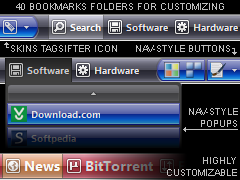
1. Transforms the BOOKMARKS-BAR and make it similar to Vista.
2. Transforms the TOOLBARBUTTONS and make it like the NAV-BUTTONS.
3. Can use Separator/Spacer to customize the buttons (read below).
4. Skins TAGSIFTER icon.
5. Transforms the BOOKMARKS POPUPS and make them Nav-Style.
6. Supports SMALL and BIG ICONS.
7. Highly Customizable.
8. Customizable BOOKMARKS-FOLDER ICONS (40 icons to choose from).
9. Integrates with the other Nav-Style styles.
--------------------------------------------------------------------
Notes:
-Using other Styles/Extensions/Themes may change some margin/border settings, making the buttons not aligned. If so, try not using other styles that changes margins in the Bookmarks-bar, and use the default firefox theme.

-Using other Styles/Extensions/Themes may interfere with the popups settings. If so, try not using other styles that changes the Bookmarks popups, and use the default firefox theme.

-Some Ext. Icons (like Download Helper) will not work correctly.

-Works in the Bookmarks-Bar only.

-Even if this style supports big icons, it works better with small ones, because the default big icons are too big to fit inside the buttons, so this style resizes them.
--------------------------------------------------------------------
How to Customize the Buttons:
READ THE INSTRUCTIONS INCLUDED!!!
--------------------------------------------------------------------
CUSTOMIZING:

1. BOOKMARKS-BAR BACKGROUND-COLOR.
2. BOOKMARKS-BUTTONS BACKGROUND-COLOR (HOVER).
3. BOOKMARKS-BUTTONS (OPEN) + POPUPS BACKGROUND-COLOR.
4. TEXT COLOR/SIZE/WEIGHT/OPACITY/ALIGN.
5. BOOKMARKS ICONS OPACITY.
6. NAV-STYLE ITEMS OPACITY.
7. BOOKMARKS POPUPS TEXT COLOR/SIZE/WEIGHT/OPACITY/ALIGN.
8. BOOKMARKS POPUPS ICONS OPACITY.
9. BOOKMARKS POPUPS MAX-HEIGHT.
10. CUSTOMIZE BOOKMARKS FOLDERS ICONS (40 ICONS TO CHOOSE FROM).

> GO TO BOTTOM OF THE PAGE TO CUSTOMIZE
--------------------------------------------------------------------
Supported Extensions:
-TagSifter ( https://addons.mozilla.org/firefox/addon/998 )
-Works with all the default buttons, and should support almost all additional extensions buttons.

--------------------------------------------------------------------
Integrates with:

MBlue Combine Nav-Buttons Vista ( http://userstyles.org/styles/8620 )
MBlue Nav-Style Url-Bar Vista ( http://userstyles.org/styles/9250 )
MBlue Nav-Style Buttons Vista ( http://userstyles.org/styles/9391 )
MBlue Nav-Style Tabs Vista ( http://userstyles.org/styles/9488 )
MBlue Nav-Style Statusbar Vista ( http://userstyles.org/styles/9590 )
MBlue Nav-Style Throbber Vista ( http://userstyles.org/styles/9749 )
>MBlue Nav-Style Bookmarks-Bar Vista
MBlue Nav-Style Awesome-Bar Vista ( http://userstyles.org/styles/10009 )
MBlue Nav-Style Menubar Vista ( http://userstyles.org/styles/11032 )
MBlue Nav-Style Popup Vista ( http://userstyles.org/styles/11072 )
MBlue Nav-Style Sidebar Vista ( http://userstyles.org/styles/10543 )
MBlue Nav-Style Sidebar Vista (Downloads, Addons, Extensions)
--------------------------------------------------------------------
Updates:
07.10.2008 Ver. 0.3.2 = better integration
03.10.2008 Ver. 0.3.1 = better integration
16.09.2008 Ver. 0.3.0 = lot of changes and fixes
...
19.08.2008 Ver. 0.2.0 = released
...
--------------------------------------------------------------------
19.08.2008: finished.. finally! This is a completely customizable Bookmarks-Bar, it contains 40 original icons for customizing your bookmarks folders. And it makes the other buttons (non-bookmarks icons) nav-style. The default color is black (similar to Vista) but it can be changed to your likes. Also it contains a lot of other customizing options! Just be sure to READ ALL THE INSTRUCTIONS for customizing it.
Enjoy!
--------------------------------------------------------------------
@ Hajdar on Aug 19 2008: just read the description.. you should scroll down to section [1] to change color:

/*------------------------------------------------------------------
[1] BOOKMARKS-BAR BACKGROUND-COLOR
----------------------[RED-GREEN-BLUE-OPACITY]--------------------*/
background-color: rgba(0,0,16,0.9) !important;}
/*----------------------------------------------------------------*/

Example: rgba(255,0,0,1) makes the background red.
--------------------------------------------------------------------
Use this discussion for help/suggestions:
http://userstyles.org/forum/comments.php?DiscussionID=1619

Before
After

Install options

Feedback

Reviews

van888 said on Sep 04 2008

I'm loving this!! *****

Hajdar said on Aug 19 2008

I love your works but not this time.
I prefer you work like this : http://userstyles.org/styles/6114.
I don't understand how I can customize colors.... **

.ad {
/* Your ad can be here instead. 10K unique visitors for $5/day. Mail me. */

}