The recommended way to install user styles is to use Firefox with Stylish.
If you already have Firefox with Stylish, make sure this site is allowed to run JavaScript.
You've installed this user style in Stylish. To uninstall it, open the Tools menu, choose Add-ons, click the User Styles panel on the top, click on the entry for this user style, and click Uninstall.
You've installed this user style in Stylish. To uninstall it, open the Tools menu, choose Stylish, and remove the entry from there.
You've installed this user style in Stylish. To uninstall it, click the wrench icon, Extensions, click Options beside the entry for Stylish, and click delete for the appropriate entry.
You've installed this user style in Stylish, but a newer version is available.
To uninstall this user style, open the Tools menu, choose Add-ons, click the User Styles panel on the top, click on the entry for this user style, and click Uninstall.
The recommended way to install this user style is to .
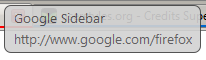
Gives you Rounded Edges and Transparency on all tooltips.
* Thanks to ( http://www.darknet.org.uk/wp-contentithemes/tonus/plugins/fancytooltips/fancytooltips.css) for helping me get some of the code (provided to me by crash) * Also thanks to ( http://www.victr.lm85.com/fancytooltips/ )
Applies to: + Navigation Toolbar (Hover over button) + Hovering on a tab (tooltip will have radius) + Also Applies to EVERY single item on any web page (Hover over a link)
Features: + Dark Gray Border + Dark Gray Text + Light Gray Background + Rounded Edges + Transparent (see-thru) tooltips
Additional Version Releases: + MBLUE has pointed out some suggestions. I look forward to incorporating them into the style, I just require some time to get all the id's of the asked buttons. Hopefully expect another update soon.
Changelog: 1.0.0.2: + Updated code to work on Firefox 3.1 (Shiretoko) - No longer uses -moz-opacity, it is now just opacity (depreciated).
1.0.0.1: + Added rounded borders to just 3 sides (as per request) - Removed some unneeded information from the Style's Description