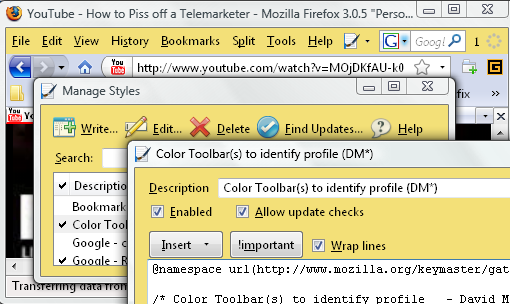
Use "Color Toolbar(s)" to help identify an additional profile such as might be used with a TEST profile, or to distinguish a different user, or version of Firefox with a unique color choice per profile.
Choose a color which will be used in your profile on the Firefox Window, on Customize Toolbars, the Dom Inspector, Organize Bookmarks (Library), Stylish Manage & Edit, and several other dialogs. You would choose a different color for each profile, some suggestions for light pastel colors are within the code. The very last line of the code has the color which you will want to retain if the code gets updated.
The Stylish Edit Window provides an Insert button that can help you quickly choose a color and drop it in where needed. Some sample colors can also be found in http://kb.mozillazine.org/User:Dmcritchie
Usage Tip: If you update the style from userstyles.org your color choice will be reverted back to the sample code. Suggest you store your color code at the end of the description so if you use #BDF in one profile instead of the default #F3E078, you will be able to change the color back to your choice. So your Manage Styles might look like this:
Description: Color Toolbar(s) to identify profile (DM*) [#BDF]
One of my pet peeves is that the Profile is not readily available for users, makes it difficult to help others and wastes tens of thousands of hours in the Firefox community (finding/helping/documenting). Only nearly practical solution is to install the "Open Profile Folder" extension. Extensions do not work in Safe Mode, have to be installed and can't be used unless it can be installed. While this style does not solve that problem it will help you to know which window some of the dialogs refer back to.


Some Tips for working with multiple profiles
* This style for color identification of profiles, for a pictorial example see
http://www.mvps.org/dmcritchie/icons/ff_colorized_profiles.png (394 KB)
* Install "Open Profile Folder" extension to take you directly to your profile
* Install "Launchy" extension to include Firefox version and profile so you can bring up the current page in other browsers including other versions of Firefox and other profiles. Example of launchy.xml in
http://www.mvps.org/dmcritchie/firefox/code/launchy.txt (sample launchy.xml file)
http://www.mvps.org/dmcritchie/firefox/firefox.htm#launchy (additional tips for using "Launchy" extension)
* Quick Launch shortcuts (in Windows) to start Firefox with desired Firefox version and profiles
http://www.mvps.org/dmcritchie/firefox/quicklaunch.htm
* To help identify the profile you are using for times when you are in safe mode and don't have use of extension, include a bookmark on the bookmarks toolbar titled with the name of the profile.
* To quickly install your bookmarks, keyword shortcuts used in your main profile, restore the latest Jason backup file in your main profile to your test profile so that your bookmarks are installed quickly. Just make sure you bookmark anything you want to keep in your main profile.
* It would also be nice if all of "Firefox should display the current profile name somewhere" [Bug 283685] would be implemented.
For Firefox coloring of a profile's main Window just colors the menu bar and status bar, for other dialogs there is a bit more coloring all of which should certainly help distinguish windows between your normal profile (main profile) and your TEST profiles.
Since these changes are dependent upon the Stylish extension, this manner of identification will not apply in Safe Mode. You can add a bookmark to the bookmarks toolbar that contains the name of the profile.
Here are some additional items that could be colored, choose an even lighter color for textboxes.
The following were purposely not included in the sample code
, #searchbar .searchbar-textbox /* Search Bar */
, #nav-bar /* Navigation Bar */
, #urlbar-container, #urlbar /* Location Bar */
, #PersonalToolbar /* Personal Toolbar */
This style is to be able to simply identify several profiles using a minimum amount of pastel coloring and low impact on Firefox, I only color the menu bar and status bar, but color more on dialogs that don't appear as often. Those who just have only one profile and want more extensive coloring similar to a theme might prefer a customizable extension like "AnyColor" (274KB) https://addons.mozilla.org/firefox/6991 or any of the many coloring styles by searching here in userstyles.org on "theme".
Leave the Tab colors alone in this style, but take a look at Tab Color Underscoring active/read/unread. Suggest resizing Menu bar, Navigation Bar, and Status Bar with other styles found on my profile (user 12592).
Updates: since 2008-08-10
2008-12-22 dialogs change inner gray color and url-link, customize