MBlue Nav-Style Url-Bar Vista

MBlue Nav-Style Url-Bar Vista
11968
*****
By MBLUE
Last updated Oct 07 2008
152 installs this week, 2355 total.

MBlue Nav-Style Url-Bar Vista
-----------------------------------------------------------------
Description:
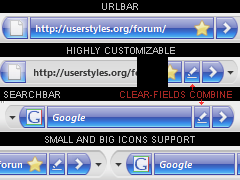
1. Transforms the URLBAR/SEARCHBAR and make it like the NAV-BUTTONS: same blue background, same buttons and dropmarker.
2. Make the GO-BUTTON always visible by default, and make it looks the same as the Forward-Button (Nav-Buttons), and apply that to the SEARCH-BUTTON too.
3. Skins "FISSION" Progress-Bar.
4. Skins and combine "CLEAR FIELDS" icons (optional) (*).
5. Supports Locationbar2.
6. Supports both SMALL and LARGE ICONS.
7. Highly customizable.
8. Integrates with the other Nav-Style styles.
9. Integrates with "Combine Nav-Buttons Vista".
-----------------------------------------------------------------
Notes:
-Using other Styles/Extensions/Themes may change some margin/border settings, making the buttons/textboxes overlap each other. If so, try not using other styles that changes margins in the nav-bar, and use the default firefox theme.

-Works in the Nav-Bar only, small/large icons, no label, no flex.

-If using "Clear Fields" extension, remember to follow the instructions below (*).
-----------------------------------------------------------------
*COMBINE "CLEAR FIELDS" ICONS (OPTIONAL):

This style combines the "Clear Fields" Extension Icons with the Url-Bar and Search-Bar. To make it works, you obviously need the Extension installed, then place the buttons in this order:

[URLBAR] [CLEAR-ADDRESS] & [SEARCHBAR] [CLEAR-SEARCH]

The icons will auto-combine as soon as you put the Clear-Address/Search Icon to the Urlbar/Searchbar right side.
-----------------------------------------------------------------
You can optionally change:

1. TEXT COLOR/SIZE/WEIGHT.
2. URLBAR/SEARCHBAR BACKGROUND BLUE/TRANSPARENT.
3. URLBAR/SEARCHBAR and NAV-BUTTONS OPACITY.
4. FISSION-BAR COLOR and OPACITY.
5. SEARCHBAR WIDTH.
6. COMBINE "CLEAR FIELDS" icons with the URL-BAR & SEARCH-BAR (*).

-----------------------------------------------------------------
Supported Extensions:
Fission ( https://addons.mozilla.org/firefox/addon/1951 ),
Clear Fields ( https://addons.mozilla.org/firefox/addon/2408 ),
Locationbar2 ( https://addons.mozilla.org/firefox/addon/4014 ).
-----------------------------------------------------------------
Integrates with:

MBlue Combine Nav-Buttons Vista ( http://userstyles.org/styles/8620 )
>MBlue Nav-Style Url-Bar Vista
MBlue Nav-Style Buttons Vista ( http://userstyles.org/styles/9391 )
MBlue Nav-Style Tabs Vista ( http://userstyles.org/styles/9488 )
MBlue Nav-Style Statusbar Vista ( http://userstyles.org/styles/9590 )
MBlue Nav-Style Throbber Vista ( http://userstyles.org/styles/9749 )
MBlue Nav-Style Bookmarks-Bar Vista ( http://userstyles.org/styles/9831 )
MBlue Nav-Style Awesome-Bar Vista ( http://userstyles.org/styles/10009 )
MBlue Nav-Style Menubar Vista ( http://userstyles.org/styles/11032 )
MBlue Nav-Style Popup Vista ( http://userstyles.org/styles/11072 )
MBlue Nav-Style Sidebar Vista ( http://userstyles.org/styles/10543 )
MBlue Nav-Style Sidebar Vista (Downloads, Addons, Extensions)
-----------------------------------------------------------------
Updates:
07.10.2008 Ver. 0.3.2 = search button fixed
30.09.2008 Ver. 0.3.1 = few fixes
16.09.2008 Ver. 0.3.0 = lot of fixes, better integration
...
01.08.2008 Ver. 0.2.0 = ready to release
...
-----------------------------------------------------------------
01.08.2008: Finally released! This is probably the most complicated style I ever made! Follow the intructions for customizing it and to combine the
"Clear Fields" icons as you can see in the screenshot below. Enjoy!
-----------------------------------------------------------------
@ Zaibatsu on Aug 06 2008: OK i think i found the problem you mentioned. Now it's fixed.
-----------------------------------------------------------------
@ Hj-kos on Aug 14 2008: sorry never used Locationbar2 before. Now it works! 2 updates today.. ^_^
-----------------------------------------------------------------
@ Bughugger on Oct 07 2008: Fixed.
@ Bughugger on Nov 28 2008: I can't seem to reproduce your problem. If u need more help please join the discussion.
-----------------------------------------------------------------
Use this discussion for suggestions:
http://userstyles.org/forum/comments.php?DiscussionID=1619

Before
After

Install options

Feedback

Reviews

Bughugger said on Nov 26 2008

Nice, but my search button doesn't work when you click on it.

EDIT: When I press on the bookmarks star (actually an accidental button combination), my navigation bar goes weird, circular navigation buttons & it's all flatter. *****

austinarita99 said on Oct 04 2008

is it possible to make this in different colors? ***

Maxigno said on Sep 22 2008

Very good, but I have a problem, please help me out on this issue: http://userstyles.org/forum/comments.php?DiscussionID=1619&page=2 *****

Magaki said on Sep 17 2008

You know that
this add-on:
Custom Buttons²
https://addons.mozilla.org/en-US/firefox/addon/5066
can also do "Clear Fields"'s job.
*****

Mo Husen said on Aug 19 2008

Just Brilliant, thank you. *****

Hj-kos said on Aug 14 2008

great work! but a few bugs: not compatible with Locationbar2, a small bug with id-bar (i mean that thing with favicon left to addressbar) ****

adame09 said on Aug 06 2008

how do i get this to work??? *****

Zaibatsu said on Aug 04 2008

Looks great, thanks, but it doesn't work when the bars are in the navigationbar. Also, the URL-Bar is a bit buggy, when on an secure site. ****

van888 said on Aug 04 2008

Wow! This is awesome!! 5/5 *****

.ad {
/* Your ad can be here instead. 10K unique visitors for $5/day. Mail me. */

}