The recommended way to install user styles is to use Firefox with Stylish.
If you already have Firefox with Stylish, make sure this site is allowed to run JavaScript.
You've installed this user style in Stylish. To uninstall it, open the Tools menu, choose Add-ons, click the User Styles panel on the top, click on the entry for this user style, and click Uninstall.
Like customizing Firefox? Customize your new tabs with New Tab King.
You've installed this user style in Stylish. To uninstall it, open the Tools menu, choose Stylish, and remove the entry from there.
You've installed this user style in Stylish, but a newer version is available.
To uninstall this user style, open the Tools menu, choose Add-ons, click the User Styles panel on the top, click on the entry for this user style, and click Uninstall.
Like customizing Firefox? Customize your new tabs with New Tab King.
The recommended way to install this user style is to .
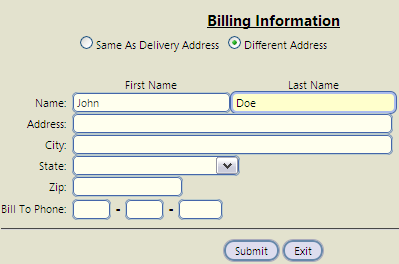
Rounds corners and adjusts appearance of textarea, select, input, and button fields. Changes borders/outline/background color when hovered. Resulting eye-candy is somewhat Safari-like. Applies globally, but you can exclude sites or apply it only to selected sites.

*** Note: the corresponding 'Rounded Forms' Greasemonkey script performs the same functions. See http://userscripts.org/scripts/show/29819 for the Greasemonkey script
Version 1.11 (26-Apr-09) Just a few tweaks to make it behave better with sites that have their own CSS for these elements.
Version 1.10 (16-Apr-09) Simplified greatly -- Redesigned so that input, textarea, and select fields and buttons have dimensions identical to these items as defined in Firefox's 'forms.css' file. This improves the appearance on most sites (including YouTube) Corrections made in the 1.10 version should take care of the issues mentioned by tbone and kuroi-ryu.