Last.fm Paint It Black, v.2 Mod Dark-Grey/Olive

Last.fm Paint It Black, v.2 Mod Dark-Grey/Olive
12445
*****
By Celuie
Last updated Aug 16 2008
34 installs this week, 1889 total.

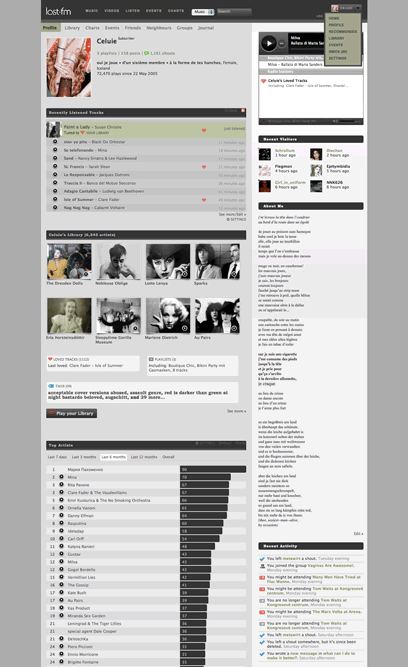
Modded frailamericas Paint It Black (http://userstyles.org/styles/8671) for the new Last.fm to my own needs... mainly for a better overview, getting rid of all the white space, customizing it for a slightly more differentiating, and therefore comfortabler observation..

#Update I. 19-07, Refined: Element Spacing, Hover Options..

#Update II. 23-07, Refined Colouring, Link and Hover Effects, Recent Track Emphasizing..
Especially for Septic.. ;) Added a "Now Listening" Accentuation, added the respective code to the options,

# Update III. 06-07, Above all Detail Adaption on all else pages other than the user page...
Now: Mouse-Over Album View, if you want to see the images I blended out.
Made new Buttons and Badges for all imaginable purposes..

If you wish the page to fill out the whole site width, I uploaded a version for that here: http://userstyles.org/styles/8906

NEW! --- I did another Color Version of this theme here in Beige/Dark Brown, with Orange Accents:


Last.fm Savana Beige v.2 Advanced.Grease: http://userstyles.org/styles/9519
Last.fm Savana Beige, for Minimalists: http://userstyles.org/styles/9518

Also, my lover recolored this original Dark-Grey/Olive Theme in Darkred: http://userstyles.org/styles/9426 Very nice!
She's planning to do some more Recoloring in near future, so make sure to check into http://userstyles.org/users/13003 every now and then...

NEW! Last.fm in Dark-Grey/Olive V.3 with Shoutbox on the side, instead of the bottom! http://userstyles.org/styles/9555


______________________________________________________________________________

Takk fyrir, merci beaucoup...

@septic.. You can change the "listening now" colour with defining an other background colour under: "table.recentTracks td.featured", just put in your hex-value of choice... :>

@Trichiliocosm.. Haha.. You'd like to have the dark grey changed into red, like the original last.fm? Or you'd like to have the olive accents replaced with something reddish? ;)

@carbalet.. Merci! I found, it was just some elements I added an own definition for during the last update some minutes ago, slipping out of the definition space and therefore changing it into global.. x) Fixed again! :)

@freilamerica.. Fixed the address to the right one! :)

Before
After

Install options

Feedback

Reviews

evonb said on Aug 08 2008

sehr schön hast du das gemacht Liebste :* *****

MutantMonkey said on Aug 01 2008

This is perfect. *****

wheresmyhat said on Jul 23 2008

WOW, thanks a lot! BRILLIANT! Saw you on the shouts as well. Rock on, JOJOKYRA. *****

Sepehr Lajevardi said on Jul 23 2008

Ah, Saviour! *****

Angiepants said on Jul 21 2008

I made some personal changes too, but I figured I'd share the wealth and posted my tweaks here too. http://userstyles.org/styles/8922 Thanks again for this, it's awesome. *****

JOJOKYRA said on Jul 21 2008

I made some changes, first for me, but post it here :) http://userstyles.org/styles/8921 *****

septi¢ said on Jul 19 2008

Thanks a lot. I hate last.fm's new layout with a passion. I'm glad you made this one, it's better than frailamerica's one in my opinion. One question: is there anyway to change the "listening now" color ? That would be perfect.

edit : Merci encore, ça déchire, t'imagine pas le soulagement ! Impossible que j'me tape leur nouveau layout tout pourri ~;)

edith : Just tried it and it made me realized that I didn't make myself clear enough because that's not what I wanted, sorry. Actually, I was talking about the "listening now" when you go on an artist page, you have 6 avatars in the listeners, some are "top listener", and some are "listening now", that's the one I would like to change if possible. *****

liD said on Jul 19 2008

I find it quite usefull, but It would be much better, if You manage to embedd images inline, in style code (like in this theme: http://userstyles.org/styles/5133). This would give quite performance boost to the site, since no need to download/ping images from imageshack.
More: http://www.websiteoptimization.com/speed/tweak/inline-images/
This converter may be handy: http://software.hixie.ch/utilities/cgi/data/data
KTHXBAI ;-) ****

carbalet said on Jul 19 2008

looks very nice but there's one little problem: this style id declared to be a global style.
does anyone else have the same problem?
so it for example removes the borders around any image on any website... :-( ****

Trichiliocosm said on Jul 19 2008

yes, it is very niiiice. Now get to work on a red one...please? *****

jaCUBE said on Jul 18 2008

Thank you, very nice. Finally I can throw away welding goggles... :) *****

Jerry Troiano said on Jul 18 2008

It's actually based on this one: http://userstyles.org/styles/8671 *****

lastfmuser said on Jul 18 2008

Gotta say I like this more than the other one, nice job. *****

slosd said on Jul 18 2008

that's very nice. *****

.ad {
/* Your ad can be here instead. 10K unique visitors for $5/day. Mail me. */

}