MBlue Combine Nav-Buttons Vista

MBlue Combine Nav-Buttons Vista
11968
8620

Install

The recommended way to install user styles is to use Firefox with Stylish.

If you already have Firefox with Stylish, make sure this site is allowed to run JavaScript.

By MBLUE.
Created Jul 07 2008, last updated Mar 27 2009.
7 installs this week, 5633 total.
Average rating: Good

MBlue Combine Nav-Buttons Vista
--------------------------------------------------------------------
Description:
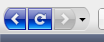
1. Combines Stop & Reload buttons.
2. Gives the same look as the Back/Forward Buttons (Firefox on Vista) to Stop/Reload buttons.
3. Place the Stop+Reload Button between the Back & Forward buttons.
4. Supports both SMALL and LARGE Icons.
--------------------------------------------------------------------
Notes:
-To make it works, place the buttons in this order:

> (BACK|FORWARD) (STOP) (RELOAD) <

-In customizing mode you'll see the button's background GREEN if the position is right, or RED if it's wrong.

-When using THEMES/EXTENSIONS/STYLES that changes some margins, you may need to change some value manually, if so go to bottom of the page to customize.
--------------------------------------------------------------------
CUSTOMIZING:

1. NAV-BUTTONS MARGINS.

> GO TO BOTTOM OF THE PAGE TO CUSTOMIZE
--------------------------------------------------------------------
List of compatible Styles:
[1] Combine Nav-Buttons Vista (THIS)
[2] Combine Nav-Buttons XP ( http://userstyles.org/styles/8731 )
[3] Nav-Buttons Vista on XP ( http://userstyles.org/styles/8761 )
[4] Nav-Buttons XP on Vista ( http://userstyles.org/styles/9018 )
[5] Combine Home-Button Vista ( http://userstyles.org/styles/14193 )
[6] Combine Home-Button XP ( http://userstyles.org/styles/14194 )

How to:
[A] You are on Vista and want to combine the Buttons (BLUE):
> use styles [1]
[B] You are on XP and want to combine the Buttons (GREEN):
> use styles [2]
[C] You are on XP and want the Vista Buttons (BLUE):
> use styles [3]
[D] You are on XP and want both the Vista Buttons and combine:
> use styles [1] [3]
[E] You are on Vista and want the XP Buttons (GREEN):
> use styles [4]
[F] You are on Vista and want both the XP Buttons and combine:
> use styles [2] [4]

[!] You can combine the Home-Button too by using style [5] or [6]
--------------------------------------------------------------------
Integrates with:
MBlue Simple-Gray (all styles)
MBlue Nav-Style (all styles)
--------------------------------------------------------------------
Updates:
27.03.2009 Ver. 0.5.0 = added namespace, added more info
22.09.2008 Ver. 0.4.0 = totally remade
04.08.2008 Ver. 0.3.1 = buttons redesigned, added more info
24.07.2008 Ver. 0.3.0 = code optimized, buttons redesigned for better compression, added disabled status for reload button, small and big versions joined
22.07.2008 Ver. 0.2.7 = added more info
18.07.2008 Ver. 0.2.6 = code cleaned
15.07.2008 Ver. 0.2.5 = buttons redesigned to blend better
13.07.2008 Ver. 0.2.2 = some minor adjustments
10.07.2008 Ver. 0.2.1 = small fixes
06.07.2008 Ver. 0.2.0 = buttons redesigned, integration with Simple-Gray Top-Toolbar
03.07.2008 Ver. 0.1.1 = code optimized
01.07.2008 Ver. 0.1.0 = first version
-------------------------------------------------------------------
24.07.2008 - OK I totally remade this. Now it contains both SMALL and LARGE icons, also better code
compression, and I added more info for changing margins if needed. I also added the
reload button disabled state.
-------------------------------------------------------------------
22.09.2008 - New version.
-------------------------------------------------------------------
@ xren on Sep 23 2008: Don't use the customize window for changing the iconsize (just leave it small as default). Instead you should right-click the toolbar and select only-icons and small or large icons there.
-------------------------------------------------------------------
@ dataman64bit on Sep 24 2008: use this code for now: "#nav-bar {padding: 3px 2px 3px 2px !important;}" (without "")
-------------------------------------------------------------------
@ schuaa on Nov 05 2008: you mean the dropmarker? It is possible, but that would be another style, you can join the discussion for more suggestions. Anyways I'm working on a new more customizable combine buttons style, but don't have much time atm... but it's coming out pretty well!
-------------------------------------------------------------------
Use this discussion for help/suggestions:
http://userstyles.org/forum/comments.php?DiscussionID=1497

Before
After

Discussions [Start new]

Contact the admin.