Awesome Bar Background Color Based on Type (WOW) *

Awesome Bar Background Color Based on Type (WOW) *
7858
*****
By -=Ben=-
Last updated Jul 03 2008
69 installs this week, 1398 total.

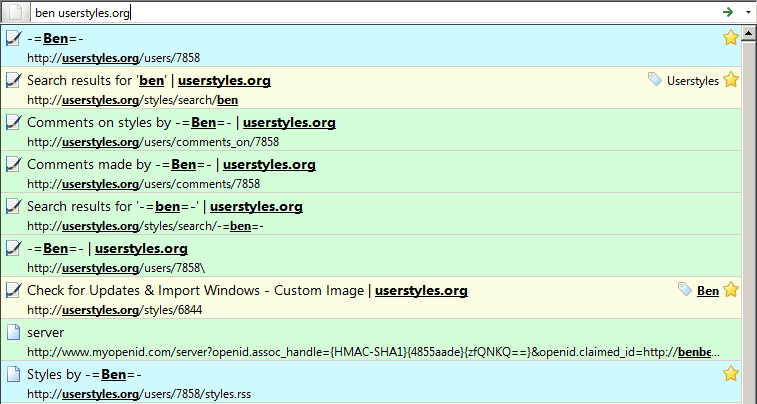
Changes the background color of each row in the AwesomeBar based on it's Type.
Easily Distinguish between Tags, Bookmarks and History items in your Awesome Bar List.

This makes your Awesome Bar colorful based on what type of items you are currently displaying

Features and Functionality:
+ Tags will be Light Yellow
+ Bookmarks will be Blue
+ History items will be Light Green

Feel free to change the colors, to make it custom to your own liking!
Different Colors based on Different Listings!

* This is the best style I have ever made!

This style supports only Firefox3, giving it even more of a WOW effect!.

Applies to:
+ Awesome-Bar

Additional Information:
+ This style has been tested on Multiple Themes! Including NASA Night Launch, NASA Normal, and the Default Firefox 3 Theme. It has rounded perfectly on each.
** If this style does not seem to be working for you, make sure that you DISABLE any other AwesomeBar Styles in your Stylish Manager **

Instructions:
To customize to your own liking, simply change the HEX values (#E3FEE5) to something you want (example #000000 is black).
Remember, this can be a CUSTOM Style. Simply Edit any of the "Color" values to change the text-color. Similarly, Edit any of the "Background-Color" values to customize the respective type's background color.

Browser Versions:
+ Works only on Firefox3

Integrates with the following Styles:
+ Compress Awesome Bar (Location Bar) on Firefox 3
+ Rounded Awesome Bar Highlight for Firefox 3

Awards and Recognition:
+ Featured on gHacks.net
+ Featured on FoxieWire.com
+ Featured on Shell Extension City (shellcity.net)
+ Featured on SpreadFirefox.com
+ Featured on FirefoxFacts.com
+ Featured on CyberNetNews.com

Changelog:
1.0.0.2:
+ Fixed Issue with Awesome Bar Extensions (Cybersearch).
+ Fixed Issue when using Keyboard.

1.0.0.1:
+ Added Row Selection indicators:
+ Selected (hovered) row items are now Blue Background, White Text

Before
After

Install options

Feedback

Reviews

TARO said on Sep 04 2008

It's so useful! THX! *****

Daniel Einspanjer said on Aug 06 2008

This is a great style. adds immediate value to the awesome bar. ****

bugmenot666 said on Jul 31 2008

came here after ben posted on cybernet , the colours were a bit weak so i changed them . everything now great so thank's ben. *****

USBman said on Jul 31 2008

Simple code, but tremendously useful! I sing its praises every chance I get.

Well done. *****

amoose136 said on Jul 25 2008

Great I like it. Very useful. I just can't decide if I want my awesome bar looking like a rainbow just to to know where the items came from.
I think I'll mod it a bit and then use it.
Good style. Thanks. *****

GollyJer said on Jul 15 2008

Great idea with this Ben.
Have you figured out how to change the font color yet? *****

crash said on Jul 15 2008

Good Job! (I don't like the colors though). *****

kindofabuzz said on Jul 14 2008

not working for me for some reason. ***

bugmenot2 said on Jul 07 2008

Nice style though I think you made the blue and green too light. *****

gialloporpora said on Jul 07 2008

This style is very cool :-), thank you very much, Ben.
Now I submit it on Foxiewire.
My vote: 5
Ciao
*****