Custom Search Bar Drop-Down List Background

Custom Search Bar Drop-Down List Background
7858
****
By -=Ben=-
Last updated Jul 02 2008
7 installs this week, 240 total.

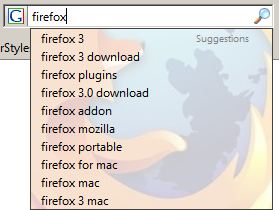
Allows you to Customize the background image of the Search Bar

* Also changes the background for AutoComplete dropdown lists as well (Google Autocompletes, Username Auto-Completes, form field auto-fills...) - Only ones without Scrollbars!

Features:
+ Background image will be a faded Firefox logo with shadowing (appears on dropdown list)

+ Supports a huge list of Fonts (discussed below)
+ Image supplied in default code is hard-coded - allowing you to view the background, even when offline!
+ Background image is static and is centered in the middle of the list.
= Optional - Text color of the update details will be larger (must uncomment)
= Optional - Bold text for easier readability (must un-comment)

Fonts Supplied (Supported):
- Currently, I supplied the following Fonts in the Code - (If #1 doesn't work, it will automatically use #2 and so on...):
1. Segoe UI (User Interface of Vista)
2. Calibri (Text of Vista)
3. Verdana (XP Font)
4. Helvetica (XP)
5. Tahoma (XP User Interface Default Font)
6. Arial Global Font

Applies to:
+ SearchBar
+ Search Toolbar
+ Drop-Down Results List
+ Autocomplete

Browser Versions:
+ Works on Firefox 3
+ Works on Firefox 2

Additional Information:
+ Feel free to edit the CSS. You can customize the fonts, enable bolding, and change the background image, even change the font size! NO reposting though, unless asked first!

Integrates with the following Styles:
+ Custom Awesome Bar (Location Bar) Background Fx3

For those of you who want a Smaller Image, Use this style - Custom SearchBar Drop-Down List Background Minimal

Changelog:
+ Added code to try to prevent this background from showing up on Web Page Autocompletes

Before
After

Install options

Feedback

Reviews

DriveSafe said on Jul 02 2008

This is nice but could you make it so that the image is not so large or that the size of the image can change based on the size of the bar. My bar is about have the size of the one in the screenshot so the whole image does not show. ****