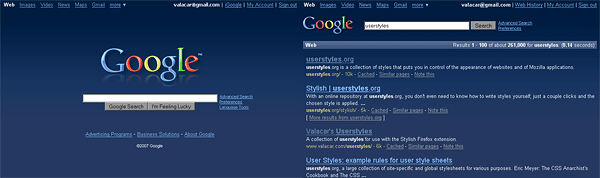
Dark blue color scheme for Google's web search page (classic version only). A dark gray version is available as well: Google Web Search - dark gray redesign (vC)
* April 29th, 2009 version is a quick fix to keep the style applied after hitting the back button. I'm current working on rewriting the style and also replacing images, so another update should be coming soon.
** Note: This style is made for google.com, but it can be modified for use in other countries. You can do that by using a plain text editor and searching for "google.com" and then replace all occurrences with "google.co.uk" or "google.cn" or "google.com.ph", or whatever you use.
More of my google styles:
- Google Web Search - dark gray redesign (vC)
- Google Web Search - gray logo replacement (vC)
- Google Image Search - dark gray redesign (vC)
- Google Video - dark gray redesign (vC)
Feel free to visit my userstyle site at http://www.valacar.com/userstyles/
One thing I don't understand is that with this April 29 2009 release, results are not displayed page-width unless I add, after /* Search results, .s { max-width: 100% ! important; } :
/* Search results
-----------------*/
.s { max-width: 100% ! important; }I have no other script managing google.com. Any idea?
love this style. I also added a style that numbers each entry & one that uses Lucinda Grande font.
... don't remember who the authors for those are or style #. Thanks to them also!
Changed this huge “on what sites should this style be enabled” part of the script to
@-moz-document domain(google.com), domain(google.de)
An i’m happy with it!
Hello Valacar,
I must say I really loved your script. However I was unable to extend such a fantastic job to google.images, google.maps, google.news, google.shopping so I have done just that.
I have the updated script to the following site: rapidshare.com/files/180842276/update.txtPlease check it out or anyone else check it out and provide your feedback.
Maybe if you would like it, you could then update it to your script since this is your creation and I just did very basic things.Thanks a lot!!
Keep up the excellent work
http://userstyles.org/styles/12922
Screen-Shot: http://img168.imageshack.us/img168/5268/googleof7.jpg
:D
I've been using this for a very long time. Can't imagine using Google without it.
Works great and it's a beautiful re-design. I did the GIS edits and they worked perfectly.
Hmm, that's odd Decadurian. I just rechecked the code and it works without any errors. But if instead of replacing the last part you just add the code to the end then the numbers will just show up for both web and images search, i guess i messed it up a bit last time
It could be your computer specifically, I'm not really sure. I've always liked surfing through the code and fixing it. I was just never very good at going from scratch. Also I'm very new to Firefox. I agree with you though, close but still a tad unfinished.
previous post of mine:
okay, I really liked this but was disappointed to find it did not for for images and image search. so i spliced this code and http://userstyles.org/styles/6998 So, I'll show you how to edit it and make it work for images.(near beginning)
change:
url-prefix(http://www.google.com/custom?) {
to:
url-prefix(http://www.google.com/custom?),
url-prefix(http://images.google.com) {then....
(about halfway through, under replacement images)
change:
/* big logo */
img[src*="logos/"], img[src$="logo.gif"], div[style*="logo_plain.png"], img[src$="logo_google_suggest.gif"], img[src^="logos/holiday"], img[src^="/intl/"][alt="Google"][title="Google"] {to:
/* big logo */
img[src*="logos/"], img[src$="logo.gif"], div[style*="logo_plain.png"], img[src$="logo_google_suggest.gif"], img[src^="logos/holiday"], img[src$="images_hp.gif"]{finally....
(a little above replacement images, in search results)
Add:#navbar img { visibility: hidden !important; }
#navbar div { background: none !important; }
#navbar .i { color: #fff !important; font-size: 1.5em !important; }
#navbar div { height: auto !important; }
#navbar td.b, #navbar td { vertical-align: middle !important; }
#navbar td.b:first-child + td { padding-left: 1.5em !important; }to the end of:
/* Change "Gooooooooooogle" to just text */
#nav > tbody > tr > td span { background: none !important; }
#nav { font-size: 140% !important; }
#nav .cur { font-size: 140% !important; margin-top: -10px !important; }
#nav td { vertical-align: bottom !important; padding: 0.15em !important; }After the code is changed, press save and it should work perfectly for google images as well
Sorry doesn´t work...
There was a file named userContent-example
I supose thats the one we need.
I coppid the code under the "code" whatever that was... which was already in the file...
didn´t work for me...
can s.o. help me plz???
Sniped, last part of your code does not work, comes up with an error. As nice as this script is, many people have been asking for sometime now for ALL of google to be covered, in particular images, to no avail.
Personally, I would much rather use a script that includes it all from the installation forward, as opposed to farting around editing code. Until then, great script, but unfinished IMO.
Superb design.
I love it... It's great.
Wondering something. Is there a way to make this work with everything google, and not just certain parts of it?
Simply Awesome!! We need an official Google reader styled like this! similar to: http://userstyles.org/styles/9437
Thank you very much for the update, awesome style everytime!!!!!
Just great, I also modified it a bit to make it work with www.google.cl (Google for Chile)
Thanks for the style.
http://img179.imageshack.us/img179/5153/screenshot3cr3.png
http://img204.imageshack.us/img204/7915/screenshot5io9.png
- - - - -
It's not working, there is bad syntax.
And WHY there is part of the code of this page in the style????? even my comments????
hallo, first bite, than quest
I'm switching from your dark gray to this one, it is much nicer.
I'm gonna work on making all the google pages match now...
why i don't see load style button? i like this but i don't know to use it.user guide, can't find anywere.plz help
ok,it was turned off java script
I like the style, very relaxing and the colors are great.
I did have some problems getting it work well with the experimental google search for different views. I made some minor modifications.First I added the views google page to the url-prefix array, I added this under the url that ends with custom?:
url-prefix(http://www.google.com/view?)Then I added the modification to the selection buttons to get them working, as shown below:
/* Experimental Search - Views */
/* make selection buttons more visable */
table.vb td.buttonText {
background: #405882 !important;
}
/* make the selected search type more distinct */
table.vbSelected td.buttonText {
background: #405882 !important;
color: #DACA7D !important;
}Thank you again for a great style!
I use google.com.br, stylish REALLY NEED WILDCARDS!
I suggestion, the links need to be more different in a non clicked link and a clicked link, simpli make it darker are not a good thing, usability over visual.
I've really enjoyed this style for a long time.
Unfortunately, Google's SPONSORED LINKS just started showing up on pages that match products. (i.e. type in "razor" or "car" or "hotel")
If you can think of any way to fix it - that would be great!
If you can't, you're still great! thanks..
The Style is amazing, all of (vC) work is just ART !!
Now, since Google changing their site all the time,
(now I get results from www.l.google.com and the Style doesn't work anymore)
maybe Its time to adjust the Style to Yahoo! Search.
Yahoo! Search could be a good alternative while Google making life 'harder' for us,
and changing all the time their website.
doesn't work! help me!!!
conflicting with http://userstyles.org/styles/655; or how to fix the color issue?
Something broked see: http://i7.tinypic.com/6xacya9.png
edit: Ok, it's weird, but now (after few days) working ok
Looks nice, congratulations. Do you plan on making it compatible with Google experimental search? (http://www.google.com/experimental/index.html)
Cheers
Looks great! Now my eyes won't hurt from all the white! My only complaint is that the text in my SiteAdvisor popups were also white. I simply added a couple of style rules to this style and it fixed it (see the discussion I posted at http://userstyles.org/forum/comments.php?DiscussionID=616&page=1#Item_1).
thanks again!
anybody else with a problem in google suggest?any fixes?
i like this
Much better than the default! I agree with Theory, you should make this for more Google services.
I love it! It just needs to work for more of Google's services, then it gets a five. :-)
The style is great, helps the eyes a lot :). I fixed up the Googlepedia dark fixer to make it fit better with this style : Googlepedia Dark Blue fixer.
black
Great style! thank you very much, perhaps could be a good idea to design also the style of the google news, I use them as homepage, and it would be nice to use this style there. Could you try it? thanks a lot
Works great, but makes googlepedia break. You might wanna add this Googlepedia dark fixer to yours.
I also would like a dark grey redesign for this style thanx...ntw, I like what you've done.
Awesome! Could you make a dark grey redesign also, to match Google Images and Video?
Ok, un-installed Stylish and installed it again. It's back to normal, except the gray google video thing, it still doesn't work :P
EDIT: Oh, the gray does work, just not on the main Google video page...
WONDERFUL!
very nice but I don't get the google logo for Google.ie
Pic: http://img243.imageshack.us/my.php?image=untitledll1.jpg
This is fantastic, it looks great. I really hope you're working on a similar one for google personalised home, 'cause the blandness is driving me crazy now I'm used to your dark blue version.
Very nice. I was sick of vanilla Google.
Everytime I load one of your styles into Stylish, when I try to save I get and error message "TypeError: stylesheet has no properties"
Here is modified version to work with google.bg. Basicly you should only change the domain names, but in bulgarian version the logo image was set as background for a div tag and called logo_plain.jpg, so I add one more rewrite rule. It have a bug - the "Bulgaria" caption is too far from the logo, so if somebody can fix the position or just hide it, please post the fixed code
http://it-light.net/Darhazer/google.bg.css
Great style
Great look. I'd like to have this one for image search, too.
Ever thought of making personalized home?
Beautiful! You should make one for Gmail, I would love that!
Great job! The only problem is that the Google banner images don't adapt to the blue background. They are still white. I did a straight copy from your code, so I don't think I messed up, but it's possible. Here are some screenshots to let you see what I am talking about:
http://i57.photobucket.com/albums/g223/daedalus42/google01.png
http://i57.photobucket.com/albums/g223/daedalus42/google02.png
Yes, very nice! Good job!
Much easier on the eyes.
google never looked better! the other styles for image/video search are awesome too! I am not sure which i like better the blue or black but I think you should offer both styles for each! I am already dreaming about Dark Gmail! :D