The recommended way to install user styles is to use Firefox with Stylish.
If you already have Firefox with Stylish, make sure this site is allowed to run JavaScript.
You've installed this user style in Stylish. To uninstall it, open the Tools menu, choose Add-ons, click the User Styles panel on the top, click on the entry for this user style, and click Uninstall.
Like customizing Firefox? Customize your new tabs with New Tab King.
You've installed this user style in Stylish. To uninstall it, open the Tools menu, choose Stylish, and remove the entry from there.
You've installed this user style in Stylish, but a newer version is available.
To uninstall this user style, open the Tools menu, choose Add-ons, click the User Styles panel on the top, click on the entry for this user style, and click Uninstall.
Like customizing Firefox? Customize your new tabs with New Tab King.
The recommended way to install this user style is to .
Like customizing Firefox? Customize your new tabs with New Tab King.
The recommended way to install this user style is to .
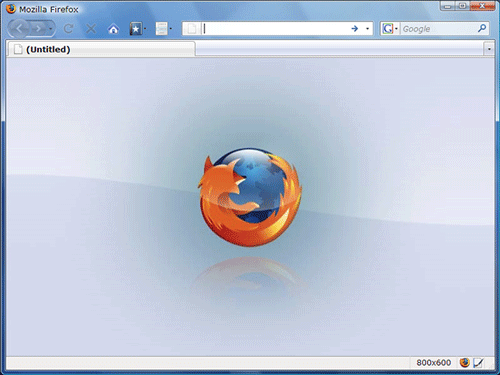
In short, I installed the Crystal Firefox about:blank-style created by Gartheepan, and found that it heavily slowed down Firefox while loading. The reason is that the image used is on DeviantArt, and is over 200 KB large. The download process can be very slow.
Solution: Embed the image into the CSS using Base64. Gartheepan seemes to have tried, but 200 KB is too large for Userstyles.org. First installing the style, and then having to mod it with the code for the embedded image, might be too much hassle for some. I downloaded the image, resaved it as a 50 KB image, and converted it to Base64, so it could be embedded into the CSS-code. I found the 50 KB image quite satisfactory, because I do not look at about:blank for hours :)
About the screenshot: This is Firefox 3, with Glasser 1.0.16 for the Glass effect, and Personal Menu to hide the menubar. And Crystal FireFox, of course. Thanks for creating Crystal Firefox, Gartheepan. It really makes Firefox look nice when just opening up :)