Firefox 3 - Vista Theme (All Black w/Black TabBar)
11539
8212
Install
The recommended way to install user styles is to use Firefox with Stylish.
If you already have Firefox with Stylish, make sure this site is allowed to run JavaScript.
You've installed this user style in Stylish. To uninstall it, open the Tools menu, choose Add-ons, click the User Styles panel on the top, click on the entry for this user style, and click Uninstall.
You've installed this user style in Stylish. To uninstall it, open the Tools menu, choose Stylish, and remove the entry from there.
You've installed this user style in Stylish. To uninstall it, click the wrench icon, Extensions, click Options beside the entry for Stylish, and click delete for the appropriate entry.
You've installed this user style in Stylish, but a newer version is available.
To uninstall this user style, open the Tools menu, choose Add-ons, click the User Styles panel on the top, click on the entry for this user style, and click Uninstall.
The recommended way to install this user style is to .
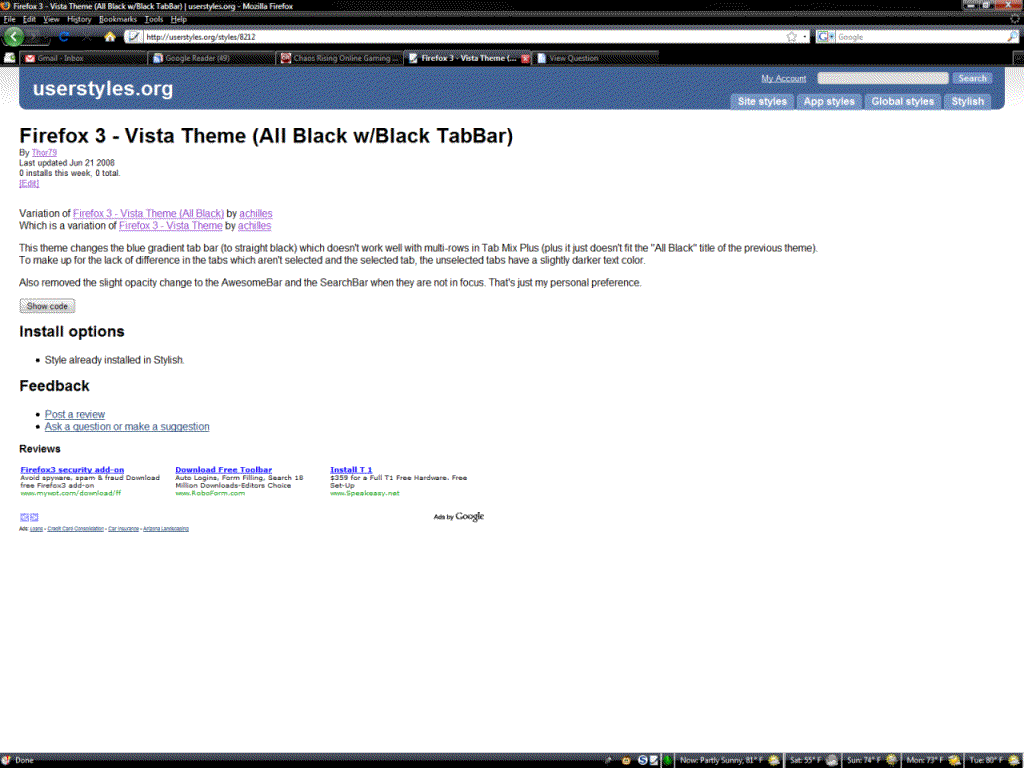
This theme changes the blue gradient tab bar (to straight black) which doesn't work well with multi-rows in Tab Mix Plus (plus it just doesn't fit the "All Black" title of the previous theme). To make up for the lack of difference in the tabs which aren't selected and the selected tab, the unselected tabs have a slightly darker text color.
Also removed the slight opacity change to the AwesomeBar and the SearchBar when they are not in focus. That's just my personal preference.
Note: Base theme used in the screenshot is "XP on Vista" (available at addons.mozilla.org). It also uses Tax Mix Plus, which is why there is a couple extra buttons.
Update 6-28-08: -Made the Find Bar match the theme