Custom Menus Background Image (WOW)

Custom Menus Background Image (WOW)
7858
8028

Install

The recommended way to install user styles is to use Firefox with Stylish.

If you already have Firefox with Stylish, make sure this site is allowed to run JavaScript.

By -=Ben=-.
Created Jun 16 2008, last updated Jun 17 2008.
12 installs this week, 2153 total.
Average rating: Good

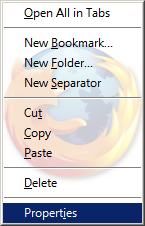
Allows you to Customize the menu background image of ALL menus.
Increases menu navigation and readability, as well as adding a fun-theming image to your browser.
Once again, this style supports both Firefox2 and Firefox3.
This is a fun style so you can customize the background, using any image or color scheme.

** Modification of Menu Background - Cartoon FireFox by Allan the Tygr, and Someone who watch over you by LouCypher. My style is entirely based on this code!!

Functions:
- Background image will be a faded Firefox logo with shadowing
- Text color of the menu will be changed to black. (Fx3 And Fx2)

Code Provided Performs the following:
- Color of menus by default for this theme will be White (easy to change)
- Bold text will be Disabled
- Disabled menu items are Hidden
- Text color of Black
- Background is White
- Menu color black too.

Integrates with the following Styles:
+ Custom Toolbar Firefox Background Image (WOW!)
+ Transparent Menus Popups (WOW)

Similar Styles (Based on This Style)
+ I heard that some of you want this type of Style for a Dark theme such as NASA Night Launch - I have created it, and it can be found here: Custom Menus Background Image (WOW) - Dark / Black.
+ Enjoy! and continue giving feedback of new theming styles I can do!

Applies to:
- File, Edit, View, History, Bookmarks, Tools and Help menus
- Navigation Toolbar (example: right clicking on back button)
- Main Context Menu (Right clicking on any web page)
- Right-Clicking on a tab
- Right-Clicking on the Location Bar (address bar)
- Also Applies to EVERY single menu on any window of a popup or pane

Browser Versions:
- Works on Firefox 2
- Works on Firefox 3

Additional Information:
* Make sure you don't use a menu-color that conflicts with your image. This is a warning, as this is an almost global UI style, so don't complain in the ratings, just choose a good color / picture combo!
* You may have to disable some of my other styles for this style to look right.
+ This style has been tested on Multiple Themes! It has worked perfectly on each.

Changelog:
1.0.0.2:
+ Fixed bug where some Disabled Menu items were displaying.
- Removed code that hides all disabled menus
+ Added code to Dim (Gray-out) all disabled menus instead of hiding them

1.0.0.1:
+ Fixed problem with AutoScroller. Now the autoscroll image (middle-click scrolling) icon is restored to normal image.

Before
After

Discussions [Start new]

Mail the admin.