========== Gmail Air Skin 2 ==========
Current Version: 2.3.3
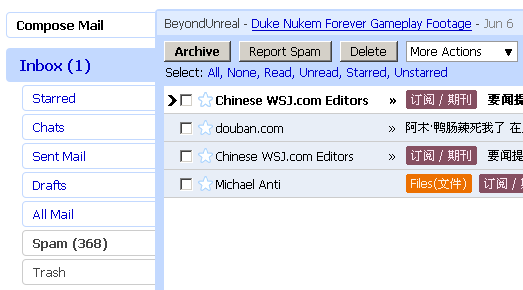
Gmail Air Skin with ads block for the new Gmail default style.
Great thanks to original Gmail Air Skin by Bogdan Piloca,
to Bobby Dex, pranavy, and Simon Kong for advice or bug report.
Any question or advice , feel free to comment or email amio.cx@*****.com
=========== Features ===========
* Change fonts to verdana.
* Add hover highlight to many clickable elements.
* Remove advertisements and extend email body
* Adjust Quick Links(Print, New Window, etc) and labels' position.
* Hide invite box.
=========== Changelog ===========
2009.05.30 (v2.3.3)
- Improve Labels style
2009.04.08 (v2.3.2)
- Update to fit change on thread list.
- Remove underline for nav buttons.
2009.03.09 (v2.3)
- Fits gmail's new class name build.
2009.02.24 (v2.2.2)
- Update to fit change on ads and quick link.
2009.02.04 (v2.2.1)
- Increase fonts size of new button style for asian fonts displaying better.
2009.02.01 (v2.2)
- Modify to work with Gmail's new ads code (fix the loading problem).
2008.11.28 (v2.1)
- Modify to improve compatibility with other addons.
2008.11.26 (v2.0.1)
- Checkbox in thread list now fully showed.
- Decrease the width of date-box in thread list.
2008.11.25 (v2.0)
- Complete rewrite to fits new Gmail 'default' and 'classic' theme
2008.05.28 ~ 2008.11.25 ( Initial release ~ v1.4 )
Added: 3/9/2009: Thanks for the update! Any chance the menu text (such Inbox, Starred, and Spam) can not be underlined? Thanks.
Added: 3/6/2009: Hello, amio, it looks like Gmail has changed its interface again on March 4th, 2009,, so this style isn't blocking any ads. Just wanted to give you a heads-up about it. Thanks!
Added: 2/4/2009: Thank you for the updates, once again. Also, I greatly appreciate the personal comment to change the font type and remove the chat box. One problem: With the default font, when e-mails are from a previous year, on the right side of the screen, only "200" would show up, without the last number of the year visible. If you need a screenshot, I can post one for you to explain this better. Thanks.
Added: 12/13/2008: Is there a way that I can lightly tweak this style to remove Gmail Chat? I have never used it and do not plan to ever use it. If I can; how? Thank you.
Added 11/25/2008: Thanks for the most recent update!
Original Post (08/11/2008):This is, by far, the best Gmail skin. Thank you for the very frequent updates!
Question: Is there any way to change the font type? Thanks.
Nice!
Though can look pretty funny if you have a google theme enabled! haha
my favorite Stylish skin. Thanks for the frequent updates!
I seriously can't use Gmail without this anymore. Amazing!
This is nice!
I was wondering how do I remove the ad-block? I like the keep the ads :)
Very nice!
great Style