CuteButtons - Crystal SVG

CuteButtons - Crystal SVG
552
739

Install

The recommended way to install user styles is to use Firefox with Stylish.

If you already have Firefox with Stylish, make sure this site is allowed to run JavaScript.

By ChoGGi.
Created Aug 01 2006, last updated Feb 11 2010.
30 installs this week, 3418 total.
Average rating: Good

you need to manually install this style

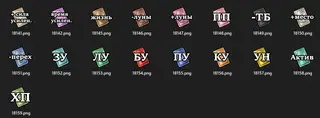
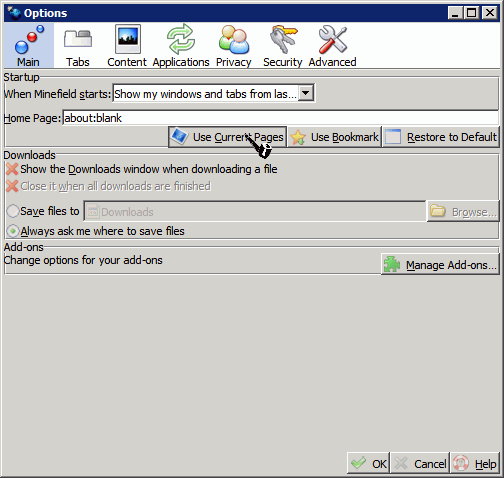
add icons to buttons/menus/anywhere
rotates icons on hover/active (look near the top of the style to remove)

<----- Installation help ----->
1. download one of these (png updated: Feb 11 2010)
http://sites.google.com/site/choggi/downloads/mosaic.png
http://choggi.dyndns.org/misc/mosaic.png

2. place mosaic.png in \Program Files\Mozilla Firefox\icons\ (it can also be anything that uses Stylish or UserChrome.css)

3. open one of these in firefox, click the stylish icon and choose "Install file" or "Add File to Stylish"
(if you use UserChrome remember to remove the @namespace line)
http://choggi.dyndns.org/misc/Icons.Gecko.css
http://sites.google.com/site/choggi/downloads/Icons.Gecko.css

4. restart firefox

http://choggi.dyndns.org/misc/Icons.Gecko.rectlist.7z

<----- Style Information ----->
last tested on Firefox 1.5.0.12, 2.0.0.16, 3.0.12, 3.1b3, 3.5.2 | Thunderbird 1.5.0.9, 2.0.0.6, 3.0a1, 3.0b3pre | Flock 0.9.1.3 | SeaMonkey 1.1.7, 2.0a1, 2.0b1pre (kinda) | Songbird 0.2.5.1 | Sunbird 0.7 rc2 | XUL Explorer 0.7 | Prism 0.9.1, 1.0b1 | McCoy 0.5

Questions/Comments http://forum.userstyles.org/comments.php?DiscussionID=2410
if theres icons missing/wrong then let me know (same if you see something with lots of icons / crushed icons)
uses CuteMenus Crystal SVG code/icons (https://addons.mozilla.org/firefox/addon/1330)

<----- brighter or grey icons ----->
the regular style is faded icons then regular icons on hover
to have regular icons then brighter icons on hover
download and rename to mosaic.png
http://choggi.dyndns.org/misc/mosaic.brighter.png
this is the same as brighter, but reversed:
http://choggi.dyndns.org/misc/mosaic.brighter2.png
grey icons then regular on hover:
http://choggi.dyndns.org/misc/mosaic.grey.png

<----- adds icons to these extensions (and generic icons to others) ----->
Adblock Filterset.G Updater, Adblock Plus, AI Roboform, Autocopy, Autofill Forms
Back to Top, Bookmark DD, British English Dictionary
Calc, Cache Status. Cache View, CacheViewer, Chatzilla, Chrome List, CLE, CookieSafe, CustomizeGoogle
Dictionarysearch, Download Statusbar, DownThemAll!
Easy DragToGo, Explore Chrome
FasterFox, Favicon Picker 2, FEBE, Fetch Text URL, Firebug, FireFTP, Fission, FlashGot, Forecastfox, FormFiller, FoxMarks, Foxy Proxy, Foxytunes
Gmail Manager, Gmail Notifier, Googlebar Lite, GreaseMonkey, GSpace
HTML Validator
IE Tab, IEView Lite
JSView
keyconfig
LinkVisitor, Live HTTP Headers, LiveClick
Menu Editor, MinimizeToTray, MR Tech Toolkit (Local Install), Multiple Tab Handler
NoScript, NoSquint, Nostalgy
Objection, ObPwd, Organize Search Engines, Organize Status Bar
PageShortcuts, Password Hasher, Password Exporter, PasswordMaker, PDF Download, Personal Menu, Perspectives, Public Fox
QuickNote
RDFViewer, Redirect Remover, Remove it Permanently, RSS Ticker
Sage, Save Link in Folder, Secure Login, Session Manager, Smart Link, SmoothWheel, SQLite Manager, Show Picture, Splash!, Split Browser, StumbleUpon, Stylish, Stylish-Custom, StyleSheet Chooser Plus
Tab Mix Plus, TargetKiller, Titlebar Tweaks, Tweak Network
Update Notifier, Update Scanner, Unplug
View Cookies
WeatherBug, Wizz RSS
Xmarks
LouCypher's inspectWindow.uc.js/inspectChrome.uc.js

<----- ChangeLog ----->
radio/checkboxes should work under linux now
added icons to new version of Perspectives
added more icons to Stylish-Custom
and a couple ones i noticed around
added some icons to Adblock Plus and one for update scanner
had a couple requests for some extensions without icons
also noticed a couple missing from ff3.5
added a few more icons to thunderbird
more icons (About some missing icons)

fixed alignment issue with gradient bar

<----- big screenshot ----->
http://img111.imageshack.us/my.php?image=optionsxl5.png
radio icons in screenshot from Firefox/Thunderbird - IconSets

Before
After

Discussions [Start new]

Mail the admin.