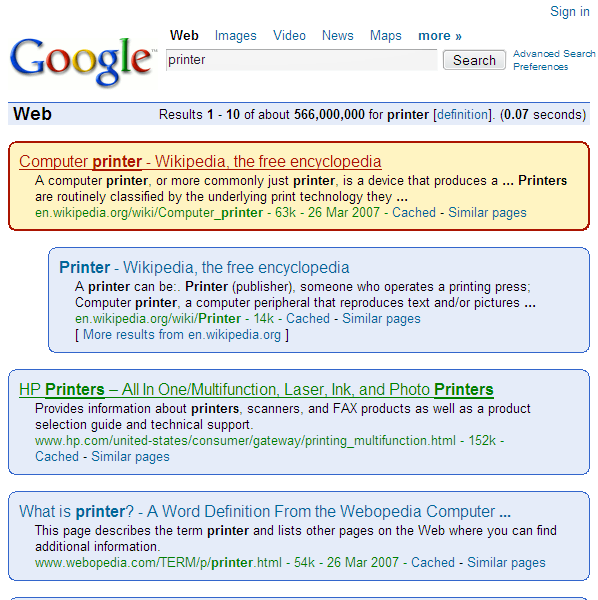
This style removes some ads (sponsored links) on the Google results page and gives Google a new appearance.
Seems to look good on the search page results. Tested with Firefox 2, not with Opera.
You can also try the Google: no ads and compact style, which is a fork of this one and of the Google Compact one. You can also try the much more beautiful but less ad blocking google: pastle blue.
Bellow the details:
- recolorization of links (link, active, visited and hover) to the colors of the Google logo,
- add an indent for the text below the URL of the result,
- relax the width of the results to optimize the use of the available vertical space (less scrolling),
- add a round border to each result with a blue background,
- add an hover effect that makes this background and its border respectively switch to yellow and red (Google logo colors again).
Changelog (23/12/2008)
- apply (lately, sorry …) the fix proposed by kongondo (thanks to him)
- globally change all 'div.g' in '.g' selectors to be more change proof (Google has improved their page with a <ol> <li> structure)
- add another correction to prevent unnecessary line-break (disable max-width of the class 's')
- remove the 2px border on :hover to avoid the little sliding effect
Changelog (27/03/07):
- add compatibility with Google preview extension for Firefox
- compact style for the <a> tag
Changelog (26/03/07):
- apply some of the corrections made by Nelson in his Google: no ads and compact style both on CSS and domain where applied
- add some domains added in Google: no ads and compact
- refactoring of add blocking to be more specific
- restrict the use of this script to only Google search results page
Realy nice, this is perfect with "google preview"
Now, i love google :pRealy great work !

Great work.... i really love this ... Thanks !!! 5/5
Great Work. This is owesome.
Thank you so much kongondo for fixing my favorite script!
EDIT: Hey, I got it to work! I used FF's Web developer extension to view the embedded CSS used by google. I looked at the .g class. In the code for this userstyle, the class is referenced as div.g (i.e., "g" as a class of the ID "div"). In google, it's just .g. So, I just changed the div.g references in this userstyle to .g and voila! So:
CHANGE:
div.g {
border: solid 1px #3366CC ! important;
-moz-border-radius: 10px ! important;
padding: 10px ! important;
background-color: #E5ECF9 ! important;
}
div.g:hover {
border: solid 2px #AB1501 ! important;
padding: 9px ! important;
background-color: #FFF4C2 ! important;
}TO:
.g {
border: solid 1px #3366CC ! important;
-moz-border-radius: 10px ! important;
padding: 10px ! important;
background-color: #E5ECF9 ! important;
}
.g:hover {
border: solid 2px #AB1501 ! important;
padding: 9px ! important;
background-color: #FFF4C2 ! important;
}===================
Hi, thx for this, very nice. Yes, It's no longer working though with google search. No more fancy backgrounds n stuff...it's just plain white. Please update when you can, thanks


Doesn't work anymore, can you fix it?
Very beautiful
this style prevents gmail's webchat windows from popping up. How can I fix this?