The recommended way to install user styles is to use Firefox with Stylish.
If you already have Firefox with Stylish, make sure this site is allowed to run JavaScript.
You've installed this user style in Stylish. To uninstall it, open the Tools menu, choose Add-ons, click the User Styles panel on the top, click on the entry for this user style, and click Uninstall.
You've installed this user style in Stylish. To uninstall it, open the Tools menu, choose Stylish, and remove the entry from there.
You've installed this user style in Stylish. To uninstall it, click the wrench icon, Extensions, click Options beside the entry for Stylish, and click delete for the appropriate entry.
You've installed this user style in Stylish, but a newer version is available.
To uninstall this user style, open the Tools menu, choose Add-ons, click the User Styles panel on the top, click on the entry for this user style, and click Uninstall.
The recommended way to install this user style is to .
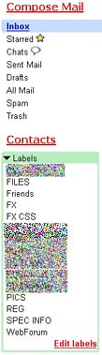
I'm a huge GMail fan and have had several GMail scripts on here for some time. Today I was really inspired today by aRIEL's TERRIFIC GMail Label Box tweak ( http://userstyles.org/style/show/686 ). It's really good!! So, I set about making BOTH "inbox" and "Labels" sections easier to read in plain black text and without the "stock GMail" underlines. Change font if you wish; I went ahead and enlarged "compose" and "contacts" as well, as they looked relatively small. While nowhere near as sophisticated as aRIEL's and containing no "hover" code, it's good enough for me as I didn't want different colored texts with underlines. Thought I'd share it. Also check out aRIEL's great "Message Record Colors" ( http://userstyles.org/style/show/685 ) - which I'm using and recommend highly; cuts down on "goofs" when trying to quickly select items, and my other "color enhancers" for buttons and label names. GMail with these scripts - mine and others - REALLY becomes more useable than any other email, IMO.