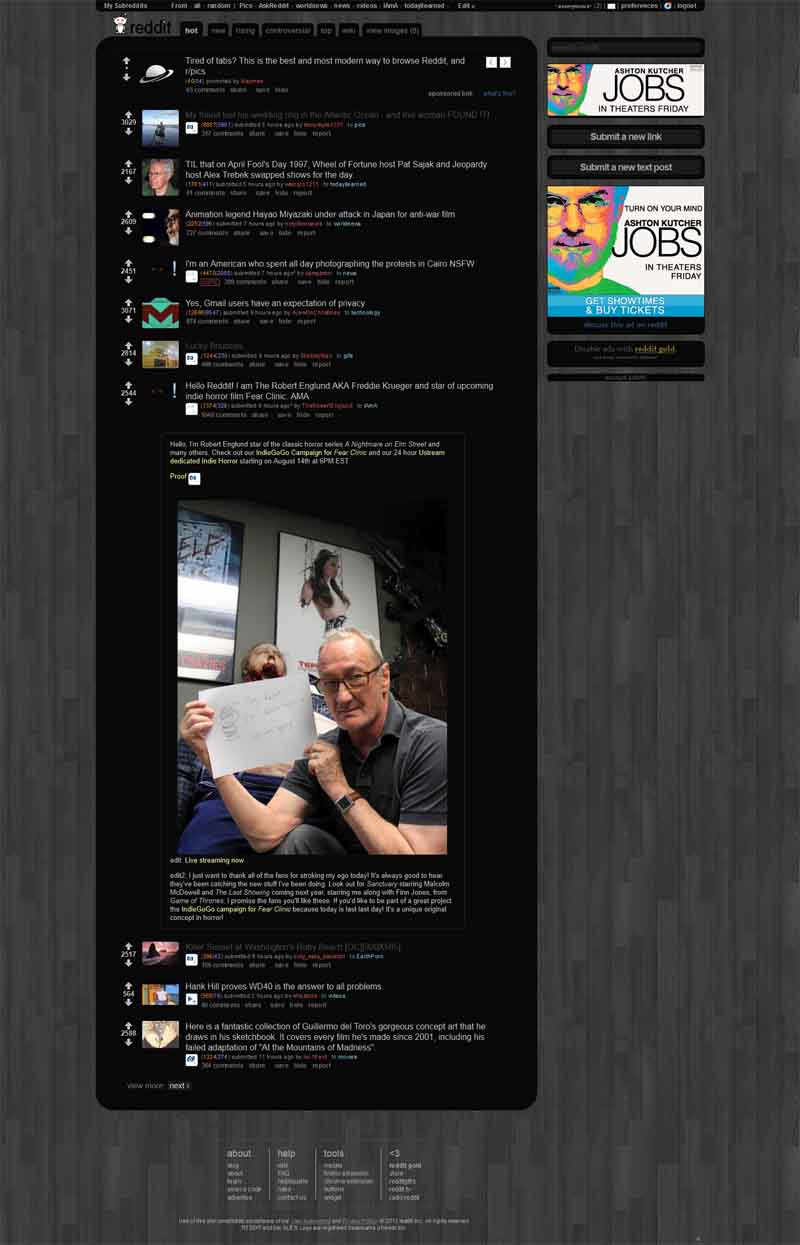
userstyles.org - Reddit Web 2.0 Blackened (RES friendly)

More screenshots: RES image expansion
The goal here is a style that's slightly minimal yet easy on the eyes. I tried to tone down any distracting colors, borders, or bars. What I thought was the most important and used text I gave the brightest look and biggest font to maximize focus yet keep it small enough to maximize onscreen information.

Untick "allow reddit to show me custom styles" in Reddit preferences or else you may have a few glitches since sub-Reddit styles can get pretty wild. If on Chrome/Opera, turn off UI --> Style Tweaks --> commentBoxes for now or you'll a small difference in comment page content width.

I'd also recommend to disable RES night mode for best color/style compatibility.

Tested on Windows with Firefox, Chrome and Opera and less thoroughly on Linux with Firefox and Chrome.
To use this style, install Firefox and Stylish. If you already have Stylish, make sure this site is allowed to run JavaScript.
Reddit Web 2.0 Blackened (RES friendly)
148464
68755
reddit

More Info

Author t13434
Created Jul 5, 2012
Updated May 11, 2013
Installs (this week) 117
Installs (total) 5,965
Average rating Good
- RES username hiding works now with updated RES
- RES image bottom padding fix
- RES bigpopupeditor themed.
- RES live preview background color fix. Didn't notice this changed when applying Chrome color fix.
- wiki page h3 font colored to make more readable
- "code" text overflow fixed
- For those using RES on Chrome, I over-rode commentbox highlighting since it does no good with this style. Also a few color fixes for Chrome users.
- RES parentcomment border lighten. I'm pedantic, I know.
- Borders added for profile page entries. I'm not sure if it's better to have more line clutter or easier eye navigation but I think this is slightly better.
- Comment padding fixed again so comments aren't "squeezed" when there's lots of child comments. Sorry, I need to stop changing things around so much or else I create my own bugs.
- Some Chrome fixes today. Images now expandable on title submissions for Chrome. Sorry, never noticed it didn't work or stopped working at some point as I rarely use Chrome.
- I took Weezer22's advice and adjusted .keyHighlight. Sorry about being late to notice but I don't use keyHighlight or Chrome unless testing so didn't notice Chrome displays keyHighlight lines directly over images and user text.
- Fixed entry and RESImage alignment as well as allowing RES image overflow in comments. It was fixed at some point so maybe I accidentally left out or deleted some code. Also sometimes with CSS, you change one thing and you realize it changed another down the line only to realize it later. This is pretty much the way the style's going to be, no big surprises anymore, just bug fixes should something change with RES and Reddit.
- RESAccountSwitcher dropdown position fixed. Late to the party here since I never used it so consequently never tested it. RESSettingsButton height fix.
- Didn't notice this before but centered the bottom-right header (user/login area) better with top. Chrome fix (sr-list - margin-left:12em) to unclutter sr-header-area.
- Added child comment left border lines as suggested by a few.
- Small fix for keyhighlight alignment suggested by xxkylexx.
- Small fix for table margins in the sidebar.
- When viewing PM's, time font is defaulted to black. Changed to readable font now.
- More Chrome compatibility fixes.
- Disabled box shadow on pref page. Small color tweak for "Rules" page. "Wiki" page fixes. Error page fixed. Background image is now hosted on imgur since using a data image url made the code too big for userstyles.org to upload to. Minor theme fix for subreddit subscription page. User menu moved to sr-header-area to make for a cleaner look. Chrome compatibility fixes.
- Small fix for header height because tabs would have a 1px bottom gap. I'm not sure why this happens occasionally due to Reddit's changes but perhaps this fix is more future proof.
- Tab height fix
- goldvertisement themed
- goldvertisement border radius fix
- A couple small fixes for Reddit's help/about page and toned down blockquote color a bit.
- Blockquotes are a bit more distinguished now. Subscription listing page entries are marginalized better. Help page blockquote margins fixed.
- Quick fix for Reddit Gold About pages
- Searchfacets box (search suggestions on search page) themed
- Sponshorshipbox fixed
- (Thanks xxkylexx for the suggestion and correction) Visited links on main page are shaded darker.
- I did away with drop shadow completely so it has a cleaner look. If there's any complaints, I may revert.
- Did away with justified type and toned down drop shadow a bit in places after a suggestion from a fellow Redditor.
- I hate to change backgrounds but I wasn't entirely happy with the previous. The dirty contrasts were distracting from text readability. I think the new one looks cleaner.
- Highlighted author of collapsed comments to make them a bit more distinguishable. Markdown box font color themed.
- Small color fix for unread mail upvoted entries
- Few small tweaks to tab menu and RES button spacing
- RES images in comment area now expand. "fixing" the code text overflow seemed to be the problem. For now I'd rather have RES image expansion in comment area but I'll resolve that soon, for now it's low priority.
- Corrected tab menu height difference in Firefox/Chrome. It should work as intended on either browser.
- "code" text doesn't overflow content area in user comments now
- Themed the interest bar.
- Small tweaks for tabs and RES image.
- Not sure what happened but now the Reddit logo background appears over the logo. Doing away with the logo background again. Reddit, you won't let me rest, will you?
- Put footer code back in since Reddit is displaying their footer again. Reddit, make up your mind!
- Reddit logo now has a background. Even though I liked it before, the dark background made the Reddit logo not show up as well. Felt like I was obscuring the Reddit name which made me feel bad so it's got a background again. Also comment collapsed expandos align with noncollapsed expandos in comments section now. Not a big deal but my OCD found it slightly annoying.
- RES expando button excessive padding fixed. Seemed to only exhibit this when using Firefox on Linux
- Sidecontentbox entry (Recently Viewed Links) margins fixed. Compatibility fix for comments in /r/science and such when "custom styles" aren't disabled
- User page tab font and margins are smaller to avoid tab overflow. Never realized this until using another monitor
- We got tabs! Although I like a minimal and clean header I wasn't sure about tabs but I'd say I prefer it a slight more with tabs now though being an amateur, maybe I'll improve them a bit more in the future
- I mostly started the code from scratch to clean it up and make sure what code that's used has a verifiable purpose since the code was getting to be a hack job. I had very little experience with CSS until lately so I also wanted to start fresh and know what I was doing.

CC0 To the extent possible under law, t13434 has waived all copyright and related or neighboring rights to Reddit Web 2.0 Blackened (RES friendly).

Feedback

Discussions

Ask a new question or add a review for this style.