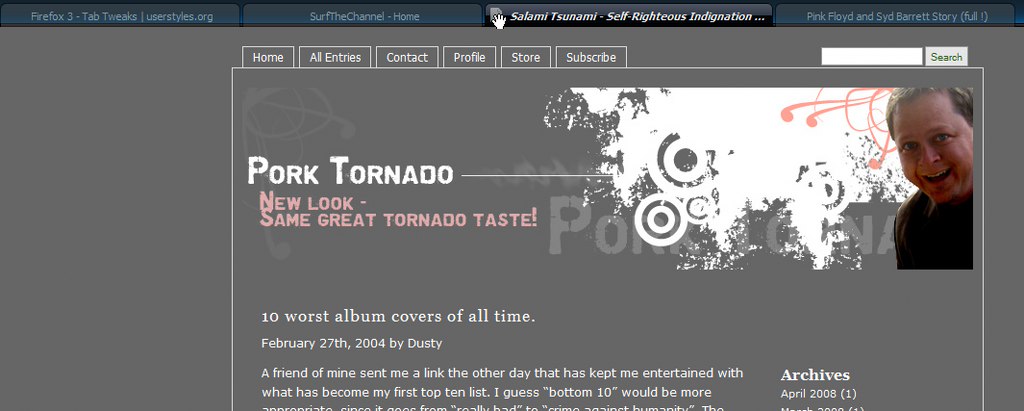
Combined few tweaks to improve tabs usability and looks.
Tweaks in this style:
* Wider selected tab in Firefox menus
* Selected browser tab wider (when multiple tabs are open)
* Makes idle and hovered background tabs transparent
* Centers tabs texts
* Show tab favicon only on selected tab
* Hide close buttons on tabs
Update 3.5.2008:
* Cursor becomes a grab icon when hovered over the tab favicon. You can then drag tab into bookmarks (moved to optional tweaks 24.5)
Update 4.5.2008:
* Italic text on tab when hover
* Disables tooltips when hovering mouse over a tab
Update 24.6.2008:
*Selected tab wider when multiple tabs are open set to 250px. Thanks for the feedback lzzhang10!
Bunch of optional tweaks, you need to remove the /* & */ from the code.
Including:
* Rounder corners on tabs

* Change the height of the tabbar
* Removes tab dropdownmenu
* Replace throbber on loading foreground tab by inserting .gif of your desire.
Update 11.05.2008:
Added optional tweak:
* Disable favicons in tabs, still show throbber when loading page
* Disable throbber altogether as Evaryont wrote in the comment. Thx for the comment btw!
Update 24.5.2008:
Added optional tweak:
* Cursor becomes a grab icon when hovered over the tab. You can then drag tab into bookmarks
(in case if you want to disable favicons on tabs and still want to drag tabs into bookmarks)
* Cursor becomes a grab icon when hovered over the tab favicon. You can then drag tab into bookmarks ----> moved to optional tweaks
Thanks for the comment ihoru! There are styles called Tab: Appearance of hyperlink for unread tabs by Roblesolido and Italicize unread tabs by Gina Trapani that does just that.
Thx Andrew999. If u find out i'd sure like to know :P I'm trying to find a solution for it but no luck so far.
Before
|
After
|
I've really enjoyed having "Firefox 3 - Tab Tweaks" in Stylish. Appearances matter a great deal to me--not because of what anybody else might think, but because of how I interact with the browser.I have a question for Freestyler.
I use your Tweaks to trim the height of my Firefox tabs so that they'll fit better with everything else. The look much better that way. But I found that, if I lower the height of my tabs very much, the text doesn't remain centered VERTICALLY. The text sits on the bottom edge of the tab, which looks really odd, so I had to back off.
Is there any way I can certer the tab text VERTICALLY within a tab?
I'm now using a Theme called "rein" (a totally class act), but I don't know if my using that particular theme is somehow complicating things with your Tab Tweaks. I just thought I'd better mention the theme.
Thanks for really nice contribution to Stylish!
Absolutely tremendous - I only used a couple of them ( "icon remove" for ALL tabs, code tweaked it a bit) directly into my userChrome - but what an awesome help!! Thank you!!
Not bad!
It would be better to make new opened tabs (what have not been seen yet) in enother style ;)
very nice! works well w/ other scripts too. 1 suggestion i might add is make the minimum width to 200 instead of 300, that way, when there is lots of tabs, the tab u focus on is more prominent. but when there is only 2 or 3 tab, u wont get that woozy feeling that tabs r changing size all the time. this is just my personal preference. good job overall!
Very nice.
Only improvement I could think of would be to slightly colorize the active tab also - a simple mod should do it though... not into that myself unfortunately.
This is a great style. Loving it already and I only had it for 1 minute! I personally don't like the throbber on my tabs at all, so I switched the throbber .gif replacement code with:
.tabbrowser-tab[busy] > .tab-icon-image {list-style-image: none !important; list-style-type: none !important;}That's all. Love it! Great job.