Custom New Tab Loading Image - Personalized Logo

Custom New Tab Loading Image - Personalized Logo
7858
***½
By -=Ben=-
Last updated Jul 07 2008
8 installs this week, 425 total.

Makes ALL new PageLoads, About:Blank, and TabLoads display an image of your choice. Excellent way to implement a new personal or company-wide UI feature for your favorite web browser.

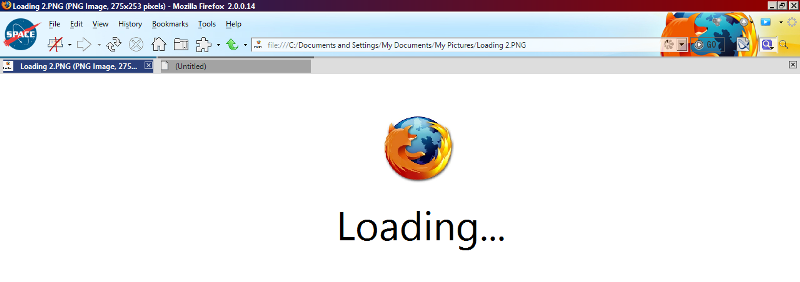
Integrates with Custom About:Blank Logo and if both styles are installed, you can customize both the about:blank look AND the new-tab's background image as well. When you open a new tab, it will display your custom image until something from that site is able to be displayed.

Features:
- Appears when opening new tabs
- Appears when loading new tabs content
- Appears within loading page contents (a loading div control containing a frame of another site)
- Appears when a page transitions to external or new domain
- Appears on the Firefox Page - About:Logo (In Firefox 2)
- Works in Firefox 2, AND Firefox 3!
- Clean and very appropriate default image, included with style (Firefox logo - shadowed)
- Makes your browser look great, and adds that "wow" factor.

Additional Information:
This Style has been tested on multiple Firefox Themes, and has worked perfectly on each.
*NOTE: Please Clear your Cache and Restart your browser after installing or changing this style, your custom image will need to be cached in order for it to be displayed.

Instructions:
In the CSS, change the website image I provided to the image you wish to display (I am currently using an edited logo of my company)
You may also change the background HEX color to match your image

Image Preview:
You can preview the exact image that I use in the style by visiting the following URL: <http://www.library.drexel.edu/blogs/librarylog/firefox.jpg>

Changelog:
1.0.0.3:
+ Added new code to use data-PNG instead of web requesting the image (Image is rendered locally without hitting a website).
+ Now you can use this style offline
+ Code Cleanup has been initiated - Now the code follows a strict path, and is not wider than the page
* Please Remember to BACK UP your custom code before updating

1.0.0.2:
+ Cleaned up code - adding tab indenting, and cleaner look
+ Added instructional lines into the code, assisting users with what attribute values to edit
+ Slightly changed title name of Style
+ Added "Before" image screenshot
- Update is not required functionality-wise, and I suggest copying your current image-path if you have changed it, and paste it back in after the update.

1.0.0.1:
+ Included a new picture (screenshot) of what a loading tab could look like
+ Linked project to my new Custom About:Blank Logo
- Update is not required function-wise

Before
After

Install options

Feedback

Reviews

1337 said on May 28 2008

MozNation is correct. This style works on Both Firefox 3 and Firefox 2.

Great job -=Ben=- I love your styles... so many UI enhancements *****

Michal Suchanek said on May 27 2008

Does not seem to do anything in Firefox 3. Othewise a good idea. **