| Author | akarmique |
|---|---|
| Created | Jan 12, 2012 |
| Updated | Feb 28, 2012 |
| Installs (this week) | 27 |
| Installs (total) | 756 |
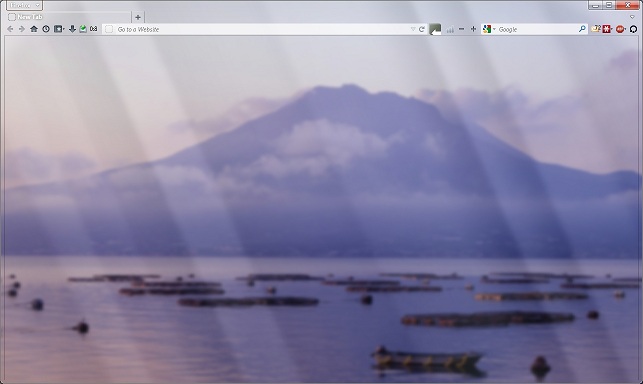
Tired of never seeing your desktop background because your browser is always open and maximized? Try this.
Based on "Discreet Transparency" by Satoz and "About:Blank Glass" by foxxyn8, which I combined and built upon to create a minimalistic style close to the classic Firefox, but totally transparent, in the spirit of Windows 7 Aero.
If you installed this style, please take the time to review it and leave your feedback.
Based on "Discreet Transparency" by Satoz and "About:Blank Glass" by foxxyn8, which I combined and built upon to create a minimalistic style close to the classic Firefox, but totally transparent, in the spirit of Windows 7 Aero.
If you installed this style, please take the time to review it and leave your feedback.
More Info
This style is designed for Windows 7 with Aero effects turned on. To enjoy it fully, your start page and new tab preferences should be set to open a blank page.
This style is also designed to maximize space for page display and consequently make the transparent tab bar, navigation bar, tool bars, etc. as compact and minimalistic as possible. I use it with tabs on top, tabbar and navbar only, and small icons without text in the navbar. It tried to make sure, however, that it works with all other settings and with all versions and variations of Firefox, Pale Moon and Aurora that can support Stylish.
2012-01-14: Adjusted tab and toolbar shading to make selected tab more recognizable and create a discreet separation between tabs and navbar.
2012-02-28: Did some clean-up. Changed name from "Total Transparency" because some people found it misleading (no, the dialog boxes and page backgrounds are not transparent, because there is always a point where it becomes hard to read and inconvenient). Also created a new style, even more transparent: http://userstyles.org/styles/61608

This style is also designed to maximize space for page display and consequently make the transparent tab bar, navigation bar, tool bars, etc. as compact and minimalistic as possible. I use it with tabs on top, tabbar and navbar only, and small icons without text in the navbar. It tried to make sure, however, that it works with all other settings and with all versions and variations of Firefox, Pale Moon and Aurora that can support Stylish.
2012-01-14: Adjusted tab and toolbar shading to make selected tab more recognizable and create a discreet separation between tabs and navbar.
2012-02-28: Did some clean-up. Changed name from "Total Transparency" because some people found it misleading (no, the dialog boxes and page backgrounds are not transparent, because there is always a point where it becomes hard to read and inconvenient). Also created a new style, even more transparent: http://userstyles.org/styles/61608

Feedback
Discussions
No discussions posted yet. Be the first to ask a question or review this style.