| Author | decembre |
|---|---|
| Created | Nov 11, 2011 |
| Updated | Nov 19, 2011 |
| Installs (this week) | 11 |
| Installs (total) | 622 |
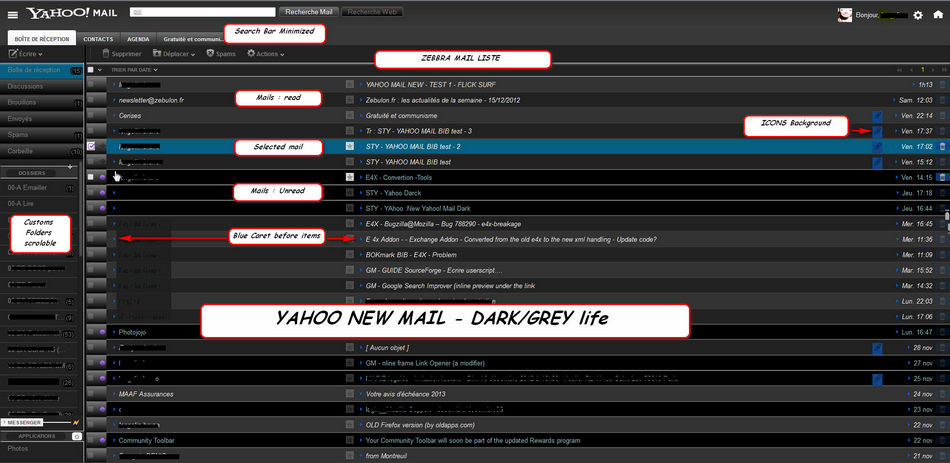
One more dark and grey style.....
Use it with the Dark official Them of Yahoo....
I haven't tested with their others colors.
For Slims and Dark ScrollBars in it, i use:
"Scrollbars: slim & arrowless ( http://userstyles.org/styles/9862/scrollbars-slim-arrowless )
In it, i change the Background color for a darker cursor...
Use it too with :
Yahoo Mail Ad Removal (Greasemonkey Script : http://userscripts.org/scripts/show/3115 ):
It removes the ads + expands space .code uses Yahoo Mail's code and by that you will never need to update it...
You can use too Adblock Plus (https://addons.mozilla.org/fr/firefox/addon/adblock-plus/);
or WebMail Ad Blocker : Remove Ads In Gmail, Ymail, And Hotmail (https://addons.mozilla.org/fr/firefox/addon/webmail-ad-blocker/)
Use it with the Dark official Them of Yahoo....
I haven't tested with their others colors.
For Slims and Dark ScrollBars in it, i use:
"Scrollbars: slim & arrowless ( http://userstyles.org/styles/9862/scrollbars-slim-arrowless )
In it, i change the Background color for a darker cursor...
Use it too with :
Yahoo Mail Ad Removal (Greasemonkey Script : http://userscripts.org/scripts/show/3115 ):
It removes the ads + expands space .code uses Yahoo Mail's code and by that you will never need to update it...
You can use too Adblock Plus (https://addons.mozilla.org/fr/firefox/addon/adblock-plus/);
or WebMail Ad Blocker : Remove Ads In Gmail, Ymail, And Hotmail (https://addons.mozilla.org/fr/firefox/addon/webmail-ad-blocker/)
More Info
NEWs :
In the Classic view "page per page", the first panel option (I don't use it but..) , this style is not so good...
some positions in header are not similar and some backgrounds are white....
when i found time i try to fix that.
Thanks to:
- "New Yahoo! Mail Dark" ( http://userstyles.org/styles/46320/new-yahoo-mail-dark )
- "New Yahoo Mail clean up Userstyles" (http://userstyles.org/styles/39087/yahoo-mail-clean-up)
- "Yahoo! Mail - Black and wide" (http://userstyles.org/styles/53953/yahoo-mail-black-and-wide)
- For Slims and Dark ScrollBars in it, i use This Usertyle :
"Scrollbars: slim & arrowless" (http://userstyles.org/styles/9862/scrollbars-slim-arrowless )
I change the Background color in it, for a darker cursor :
thumb {
-moz-appearance: none !important;
border: none !important;
/* == My Tweak : CURSOR COLOR DARK (#999) == */
background-color: #999 !important;
-moz-border-radius: 10px;
-moz-box-shadow: inset 0 0 3px #000}
Changes:
V.1.1:
Search Bar on top to let place for many Tabs opens... and it became more slim.
In the Classic view "page per page", the first panel option (I don't use it but..) , this style is not so good...
some positions in header are not similar and some backgrounds are white....
when i found time i try to fix that.
Thanks to:
- "New Yahoo! Mail Dark" ( http://userstyles.org/styles/46320/new-yahoo-mail-dark )
- "New Yahoo Mail clean up Userstyles" (http://userstyles.org/styles/39087/yahoo-mail-clean-up)
- "Yahoo! Mail - Black and wide" (http://userstyles.org/styles/53953/yahoo-mail-black-and-wide)
- For Slims and Dark ScrollBars in it, i use This Usertyle :

"Scrollbars: slim & arrowless" (http://userstyles.org/styles/9862/scrollbars-slim-arrowless )
I change the Background color in it, for a darker cursor :
thumb {
-moz-appearance: none !important;
border: none !important;
/* == My Tweak : CURSOR COLOR DARK (#999) == */
background-color: #999 !important;
-moz-border-radius: 10px;
-moz-box-shadow: inset 0 0 3px #000}
Changes:
V.1.1:
Search Bar on top to let place for many Tabs opens... and it became more slim.
Feedback
Discussions
Ask a new question or add a review for this style.