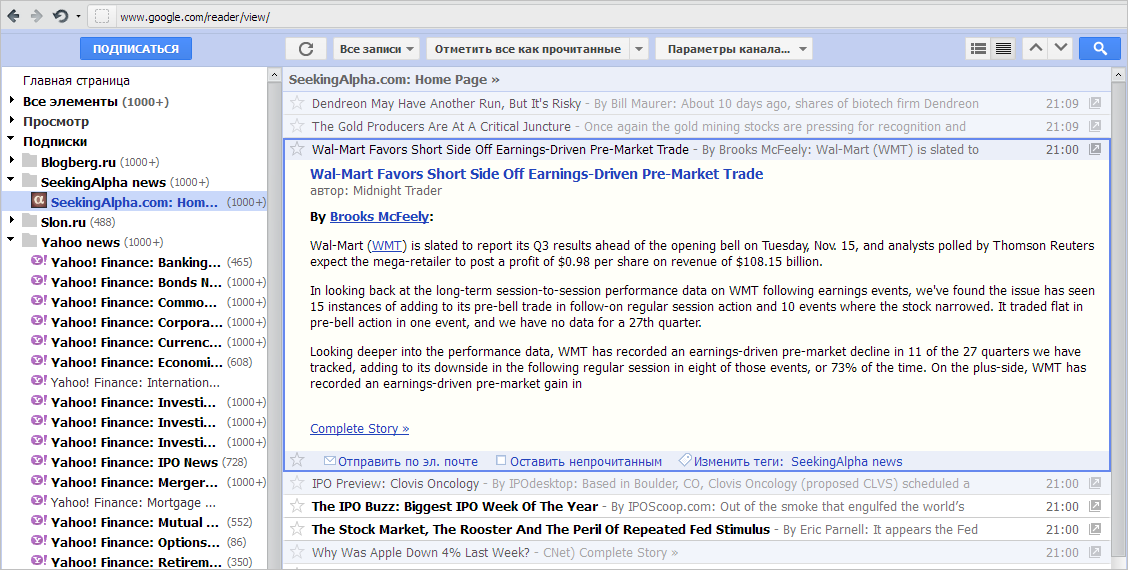
userstyles.org - Google Reader IMHO - old blue style

Author ktototam
Created Nov 4, 2011
Updated Feb 24, 2012
Installs (this week) 32

Installs (total) 1,776
Average rating Good
Clean. Compact. Tahoma-ed. One line on top. Small buttons. No logo. No red borders. No red subscribe button. No plusone shit. No google navigation panel (toggle on hover). No searchbar (toggle on hover). Old blue Gооgle Reader style. Enjoy...

RU: Компактный стиль с упором на предыдущую раскраску Google Reader-a. Новый стиль выжигает серым глаза и занимает слишком много места (по вертикали критично). Пришлось исправить. Делал для себя, т.к. пользуюсь ридером ежедневно, постараюсь поддерживать userstyle в актуальном состоянии, пишите, если что не так...
To use this style, install Firefox and Stylish.
Google Reader IMHO - old blue style
122262
55756
google

More Info

/* =====================================================
* Name: Goggle Reader IMHO (GRIMHO) - old blue style
* Author: ktototam
* Version: 20120224-1
* ===================================================== */

Don't forget that in Google Reader you can toggle the fullscreen mode through the 'f' key.
Additionally, you can use 'u' (or 'shift + u' in fullscreen mode) to show and hide the left navigation panel.
See the instructions at the end of CSS to change some settings.

24/02/2012 last update
- google redesign fix

Previous updates:
- icon for «Feed settings» button (Bringo's brilliant idea http://userstyles.org/users/6717)
- small fixes
- blue share button
- fixes for Chrome browser
- blue subscribe button
- blue selected feed in left bar
- tabs in old blue style
- bundles in old blue style
- searchbar is hidden (toggle on hover)
- plusone block is visible by default (see the instructions at the end of CSS)
- share block is visible by default (see the instructions at the end of CSS)
- ability to toggle google (black) navigation panel on hover
- fixed google bug with highlighting http://img810.imageshack.us/img810/6615/highlightbug.png
- new background for current entry (see the instructions at the end of CSS) http://img202.imageshack.us/img202/2286/currententry.png
- full-view redesigned (press F)
- colored (6 colors) search term in search-view http://img580.imageshack.us/img580/374/highlightinsearchmode.png
- ability to remove subscribe button (see the instructions at the end of CSS)
- ability to restore plusone block (see the instructions at the end of CSS)
- «email» block in old blue style
- compact search results
- ability to set the left panel width (see the instructions at the end of CSS)
- more compact left panel
- no flickering on hover
- «go-to» icon removed (expanded-view)
- «star» icon moved to the left (expanded-view)
- fixed css parsing bug (thanks Zlew)

Feedback

Discussions

Ask a new question or add a review for this style.