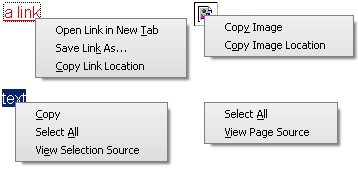
This script is the result of an experiment to see how many context-menu items I could remove from firefox without causing myself any inconvenience. Amazingly, almost all of them turned out to be expendable. The biggest surprise was the New Window command, but frankly I don't miss it at all. Most of the time, opening a new tab is perfectly sufficient; and if not, it is just as easy to copy the link's URL and open a new blank window with ctrl-N instead.
Everything else -- navigation, bookmarking, websearch -- turned out to be unnecessary shortcuts for commands more logically located elsewhere in the browser. Now, there is no chance of accidentally clicking "Send Link..." and waiting angrily for the email client to open just so it can be closed.
If you want a particular menu-item back, just find the source-line which corresponds to that item and paste this text in front of it: /*KEEP:
Good luck readjusting your right-click expectations!
Great style that really is useful for removing a bunch of junk I never use that gets in the way.
Also, though I have spent a bit of time trying to remove the Bazzacuda context menu options.
However, I only want it removed when I right click on a picture and have it still there on a context menu when I right click in blank space. Anyone else use Bazzacuda or know maybe how I could do this? I tried: #contentAreaContextMenu>menuitem[id^='baz-'] which I thought would work, but it doesn't. I only want the Bazzacuda context menu to be there when I click on blank space.
Thanks for any help.Here is a pick of it, its the "Save Images From Tabs" part. I only want that to appear when I right click on blank space, but it appears whenever I right click.
http://xs433.xs.to/xs433/08466/untitled158.jpg
really helps me!
too much removed :( but a good idea
This is JUST what I have been looking for! I love un-cluttered simplicity!
Nice~!!!
Oll Korrect and awesome. :)
2 author:
Try to open new tabs with middle mouse button click, it's better then Ctrl+C/Ctrl+N/Ctrl+V/Enter.
Select and drag-n-drop to tabbar better too. :)2 Soul745:
Change line ~ before #context-viewimage, /*-- View Image */ ~ to ~ /*KEEP: before #context-viewimage, /*-- View Image */ ~.
I think henrah's CSS well comments, also they write little HowTo in the description.
Everyone can show or hide menu-items manually, w/o asking author...
Awesome, but I would like to have "View Image" back.
.ad {
/* Your ad can be here instead. 10K unique visitors for $5/day. Mail me. */
}