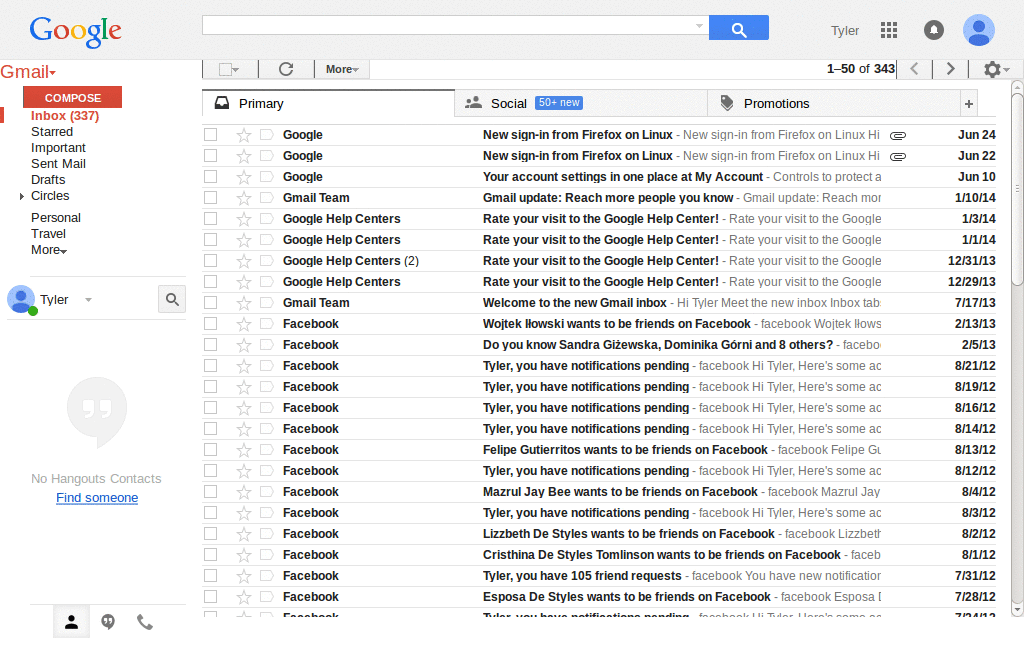
userstyles.org - GMail New Look Very Dense (Margin/Padding removal)

More screenshots:
Author TiCPU
Created Aug 30, 2011
Updated Apr 4, 2012
Installs (this week) 1

Installs (total) 514
Average rating OK
I hate margins, paddings and any space I can lose to white space, so here's the solution.
Don't forget to set your style to compact in the theme options for best appearance.
To remove adverts, use the setting shown below.

Screenshot from Google Chrome and Chrome in privacy mode with Terminal theme from Google.
To use this style, install Firefox and Stylish.
GMail New Look Very Dense (Margin/Padding removal)
115940
53092
google

More Info

2012/04/04: 1.7.4 Problem with personnal menu being to high. Remove Invite a friend.
2012/02/20: 1.7.3 Remove search border height so buttons below are clickable.
2012/02/17: 1.7.2 Remove search border.
2012/02/07: 1.7.1 Sublabel expand arrow was missing.
2012/02/07: 1.7.0 Remove "Invite to GMail" which is annoying to me, add setting to remove ADs.
2011/11/21: 1.6.8 Some letters don't perfectly fit, change subject font-size to 75% from 80%.
2011/11/16: 1.6.7 Bug fixes and new screenshot.
2011/11/16: 1.6.6 Reduced line height a bit a made some text appear back on screen (g/p truncated).
2011/11/15: 1.6.5 Removed the roundness of buttons and added side borders.
2011/11/15: 1.6.4 Make chat status 50% larger.
2011/11/15: 1.6.3 Remove useless line on top.
2011/11/14: 1.6.2 Unbreak search field overlapping buttons.
2011/11/14: 1.6.1 Removing the GMail logo again, really saves a ton of space.
2011/11/14: 1.6 Copes with changes in GMail.
2011/11/02: 1.5 Include margin from conversations.
2011/11/02: 1.4 Update to GMail New Look.
2011/09/04: 1.3 Also includes the top part of search: for multiple inboxes.
2011/08/30: 1.2 Include E-Mail line height.
2011/08/30: 1.1 Also include line height for chat.
2011/08/30: 1.0 Initial submission.

Feedback

Discussions

Ask a new question or add a review for this style.