The recommended way to install user styles is to use Firefox with Stylish.
If you already have Firefox with Stylish, make sure this site is allowed to run JavaScript.
You've installed this user style in Stylish. To uninstall it, open the Tools menu, choose Add-ons, click the User Styles panel on the top, click on the entry for this user style, and click Uninstall.
Like customizing Firefox? Customize your new tabs with New Tab King.
You've installed this user style in Stylish. To uninstall it, open the Tools menu, choose Stylish, and remove the entry from there.
You've installed this user style in Stylish, but a newer version is available.
To uninstall this user style, open the Tools menu, choose Add-ons, click the User Styles panel on the top, click on the entry for this user style, and click Uninstall.
Like customizing Firefox? Customize your new tabs with New Tab King.
The recommended way to install this user style is to .
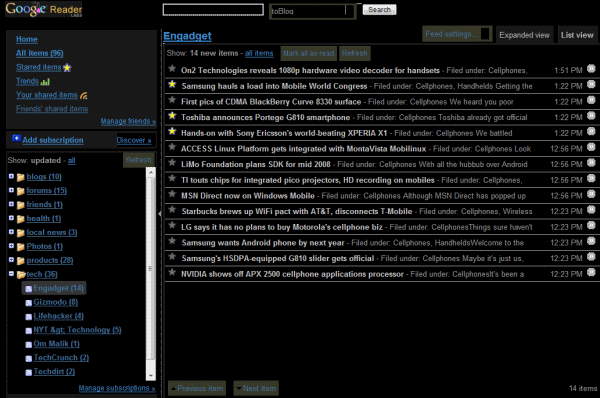
I took the style created by oltra & Ka Yue, and tweaked it a bit more to my liking. Specifically:
02/09/2008: for the list view, I made the font colors a bit less bright, made the titles bold, and increased the line-spacing 02/09/2008: for each entry I changed the font size back to normal and made it so that images show up.
I think that's it. It's a work in progress which I hope to add to by stealing other bits and pieces from some of the other Dark Google Reader scripts out there - watch out script writiers, no one is safe!
Levi
What follows is a change log of what has been updated along with the date:

02/11/2008: I've substituted images so far for: the star - both the highlighted and non-lighted versions - to make them look better than the default, which were designed for a white background. 02/11/2008: Added some more descriptive comments in the script - I'm hoping to add more to help newbies out with editing various parts of this style 02/11/2008: Changed the name to be more succinct - "Another Dark Google Reader Style." 02/11/2008: Added before and after images.
(NOTE: For Whatever Reason, Userstyles.org resizes the before and after images on your browser screen. To see a larger version, just right click on one and choose "view image" from the menu (in Firefox - IE doesn't seem to have this functionality).