| Author | banthaz |
|---|---|
| Created | Jun 3, 2011 |
| Updated | Feb 2, 2012 |
| Installs (this week) | 1 |
| Installs (total) | 167 |
| Average rating |
|
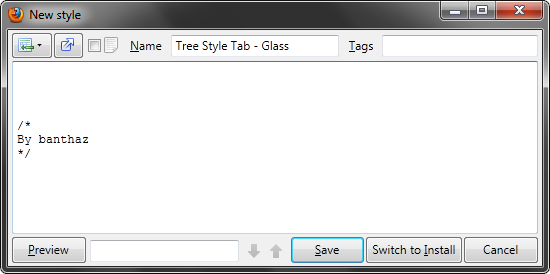
Gives more space to the code textbox.
More Info
Depending on which language you use and some other things (like the look of buttons etc), you might have to tweak some values in the beginning of the code. See instructions there.
You can use the following code if you have installed the “It's All Text!” extension, but don't want the “Open in external editor” button:
#stylish #itsalltext
{
display: none !important;
}
If you want to remove the “Wrap lines” checkbox, you can use this:
#wrap-lines
{
display: none !important;
}
Version 2.1.2 (Feb 02 2012)
Fixed: In Firefox 10, the Findbar was incorrectly positioned.
Fixed: In Firefox 10, the Findbar had an extra border-looking background.
Version 2.1.1 (Dec 31 2011)
Fixed: Some minor things.
Version 2.1 (Dec 26 2011)
Fixed: Now looks good with Orion.
Improved: Now supports hiding of the “Wrap lines” checkbox (and the “Insert” button) easily.
Version 2.0 (Jun 23 2011)
Changed: No longer hides the “Switch to install button”.
Changed: Everything above the code textbox is now placed on one line.
Added: Compatibility with the “Open in external editor” button.
Added: The "Insert" and "Open in external editor" buttons and the "Wrap Lines" checkbox now have icons instead of labels.
Version 1.1.1 (Jun 23 2011)
Improved: Better selector for the removal of the “Switch to Install” button. The “Switch to Edit” button is still available.
Version 1.1 (Jun 17 2011)
Added: Removes padding of the whole window.
Improved: Translation is no longer required to make it work.
Improved: The findbar no longer overlaps other buttons when the window is narrow.
Version 1.0 (Jun 03 2011)
First release.
You can use the following code if you have installed the “It's All Text!” extension, but don't want the “Open in external editor” button:
#stylish #itsalltext
{
display: none !important;
}
If you want to remove the “Wrap lines” checkbox, you can use this:
#wrap-lines
{
display: none !important;
}
Version 2.1.2 (Feb 02 2012)
Fixed: In Firefox 10, the Findbar was incorrectly positioned.
Fixed: In Firefox 10, the Findbar had an extra border-looking background.
Version 2.1.1 (Dec 31 2011)
Fixed: Some minor things.
Version 2.1 (Dec 26 2011)
Fixed: Now looks good with Orion.
Improved: Now supports hiding of the “Wrap lines” checkbox (and the “Insert” button) easily.
Version 2.0 (Jun 23 2011)
Changed: No longer hides the “Switch to install button”.
Changed: Everything above the code textbox is now placed on one line.
Added: Compatibility with the “Open in external editor” button.
Added: The "Insert" and "Open in external editor" buttons and the "Wrap Lines" checkbox now have icons instead of labels.
Version 1.1.1 (Jun 23 2011)
Improved: Better selector for the removal of the “Switch to Install” button. The “Switch to Edit” button is still available.
Version 1.1 (Jun 17 2011)
Added: Removes padding of the whole window.
Improved: Translation is no longer required to make it work.
Improved: The findbar no longer overlaps other buttons when the window is narrow.
Version 1.0 (Jun 03 2011)
First release.
Feedback
Discussions
Ask a new question or add a review for this style.