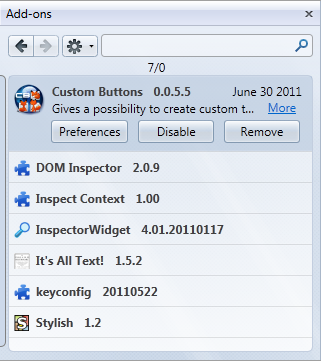
userstyles.org - Add-ons Manager - In the Sidebar

Author banthaz
Created Jun 3, 2011
Updated Apr 23, 2012
Installs (this week) 6
Installs (total) 904
Average rating Good
The Add-ons Manager optimized for usage in the sidebar.
To optimize the “Get Add-ons” section for the sidebar, use Add-ons Manager - In the Sidebar - Companion.

If you prefer using the Add-ons Manager in a tab, but would like a more compact layout, this style could still be something for you.
To use this style, install Firefox and Stylish.
Add-ons Manager - In the Sidebar
27093
48731
browser

More Info

How to use the Add-ons Manager from the sidebar:
Alternative 1: Via a bookmark, with the address “about:addons”, set to open in the sidebar.
Alternative 2: Via some extension that can execute JavaScript code (like “keyconfig”, “Custom Buttons” and “FireGestures”) with the following code:
var sidebar = document.getElementById("sidebar");
var sidebarBox = document.getElementById("sidebar-box");
var sidebarSplitter = document.getElementById("sidebar-splitter");
if(sidebar.contentDocument.location != "about:blank" &&
document.getElementById("sidebar-title").value == "Add-ons") {
if(sidebarBox.hidden) {
sidebarBox.setAttribute("sidebarcommand", "viewWebPanelsSidebar");
sidebarBox.hidden = sidebarSplitter.hidden = false;
} else {
sidebarBox.removeAttribute("sidebarcommand");
sidebarBox.hidden = sidebarSplitter.hidden = true;
content.focus();
}
} else {
openWebPanel("Add-ons","about:addons");
sidebarBox.width = 333;
}
In the next last line you can specify the width of sidebar when the Add-ons Manager is opened. Thanks to dorando, the author of the Keyconfig extension, who made the above script.

Some useful, extra CSS that I recommend:

The following code removes the bottom link in the Stylish section:
#userstyle-footer
{
display: none !important;
}

This makes Stylish's sorting buttons more compact, like the rest of the sorting buttons in the Add-ons Manager:
#userstyle-sorting
{
padding-top: 0 !important;
padding-bottom: 0 !important;
}
#userstyle-sorting button.sorter
{
margin-top: 5px !important;
margin-bottom: 4px !important;
}

The “Scriptish” extension's section has an “Open Folder” button on each add-on, which makes other more important buttons harder to access, when using the sidebar. Use this to remove it (it's still available at the Add-on Detail Pages):
.addon .addon-control.button_scriptish_userscript_show
{
display: none !important;
}

Use the following code to set a min-width of the sidebar. 225px seems to be the thinnest that works with the Add-ons Manager:
#sidebar-box
{
min-width: 225px !important;
}

If you want to remove the max-width of the sidebar, use this Javascript code, via en extension such as “userChromeJS” or “Custom Buttons”:
document.getElementById("sidebar").style.maxWidth = "none";

Version 1.2.6 (Apr 23 2012)
Improved: When the Add-ons Manager is wide enough, the categories won’t collapse into a “popup bar”, since there’s no reason to. Thanks to 2k1dmg!

Version 1.2.5 (Feb 02 2012)
Fixed: In Firefox 10, the “Update available” icon was incorrectly positioned.

Version 1.2.4 (Jan 03 2012)
Improved: Now handles settings directly in the Add-on description page better.
Improved: Add-on detail pages can now have less width.

Version 1.2.3 (Dec 23 2011)
Improved: In the Extensions section, the “Settings” button is always shown, even if the extension hasn’t got a settings screen (it’s faded instead, then), to reduce mis-clicking on the “Disable” button.
Some CSS code on this page was also updated.

Version 1.2.2 (Dec 18 2011)
Improved: Now handles settings directly in the Add-on description page better.

Version 1.2.1 (Jul 03 2011)
Improved: In the Available Updates section no “Update available” icon is added.

Version 1.2 (Jun 30 2011)
Changed: Add-ons with updates now gets an image, instead of a text message.
Improved: A little cleaner and more simple code.
Fixed: Minor things.
The Javascript and CSS code on this page was also updated.

Version 1.0.1 (Jun 21 2011)
Quick fix for Firefox 5.

Version 1.0 (Jun 03 2011)
First release.

Feedback

Discussions

Ask a new question or add a review for this style.