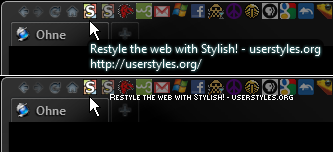
Displays bookmark name (not url) upon bookmark hover. Designed for larger numbers of bookmarks and darker background themes. With style applied, Firefox system tooltips are disabled for bookmarks only. Ideally created for use with icon only bookmark style. http://userstyles.org/styles/47286/ff4-bookmark-icon-only-hover-selector

Screenshot shows FF4 system tooltip and the same hover with a Quicktip. NOTE: Unless the code is modified, some text cropping may occur. Simple text alignment preference modification instructions are available in the More Info section (below) and commented in the code.
Inspired by some userstyles discussions, influenced by makando's affirmation and from another idea that came to life thanks to the work of foxxyn8.
http://forum.userstyles.org/discussion/26811/request-quick-tab-tooltip-display
http://forum.userstyles.org/discussion/26822/tabs%3A-combine-styles-single-tab-favicon-close-on-hover
Screenshot shows FF4 system tooltip and the same hover with a Quicktip. NOTE: Unless the code is modified, some text cropping may occur. Simple text alignment preference modification instructions are available in the More Info section (below) and commented in the code.
Inspired by some userstyles discussions, influenced by makando's affirmation and from another idea that came to life thanks to the work of foxxyn8.
http://forum.userstyles.org/discussion/26811/request-quick-tab-tooltip-display
http://forum.userstyles.org/discussion/26822/tabs%3A-combine-styles-single-tab-favicon-close-on-hover
Advertisement
| Author | Ohne Mitleid |
|---|---|
| License |
|
| Created | May 24, 2011 |
| Updated | May 26, 2011 |
| Installs (this week) | 3 |
|---|---|
| Installs (total) | 369 |
| Show CSS |
Notes
05-26-2011
The default values for X are set to 999 (right align). To optimize for personal alignment preference, change the three instances of 'X' as follows:
Right align all Quicktip text: set the three instances of X for -n+X, n+X values higher than the total number of bookmarks
Left align all Quicktip text: set the three instances of X for -n+X, n+X values to zero
"Flip" point (half of total number of bookmarks displayed suggested): set X for -n+X, n+X values to the designated point in the bookmark row to make the text "flip" to the opposite side of the cursor
Example of "Flip": 44 bookmarks are displayed. 999 was replaced three times in the code with 22, half of the bookmark total. Quicktips (1 to 22) will now display text to the right of the cursor until the 23rd + bookmarks are hovered, then Quicktips will display to the left.
06-25-2011 - Tested functional with FF5.
09-30-2011 - Tested functional for FF7.
The default values for X are set to 999 (right align). To optimize for personal alignment preference, change the three instances of 'X' as follows:
Right align all Quicktip text: set the three instances of X for -n+X, n+X values higher than the total number of bookmarks
Left align all Quicktip text: set the three instances of X for -n+X, n+X values to zero
"Flip" point (half of total number of bookmarks displayed suggested): set X for -n+X, n+X values to the designated point in the bookmark row to make the text "flip" to the opposite side of the cursor
Example of "Flip": 44 bookmarks are displayed. 999 was replaced three times in the code with 22, half of the bookmark total. Quicktips (1 to 22) will now display text to the right of the cursor until the 23rd + bookmarks are hovered, then Quicktips will display to the left.
06-25-2011 - Tested functional with FF5.
09-30-2011 - Tested functional for FF7.
Feedback
Discussions
No discussions posted yet. Be the first to ask a question or review this style.