Deleted!
Tab Color Underscoring active/read/unread (Fx3.6 ) (24722) now works for 3.6 and 4.0, so this style is no longer useful. Use Tab Color Underscoring active/read/unread (Fx3.6 ) instead.
| Author | David McRitchie |
|---|---|
| Created | Apr 11, 2011 |
| Updated | Apr 11, 2011 |
| Installs (this week) | 2 |
| Installs (total) | 79 |
Tab underscoring has been replaced temporarily with tab background since Firefox 4.0 has messed up tabs for me.
Tab Color Underscoring active/read/unread (Fx3.6 ) (24728) has been fixed use it INSTEAD.
You must first install TabVisted 2.5 from the author's (Dickvl) site. This was supposed to be builtin to 4.0 as I understood it but it never was.
https://bugzilla.mozilla.org/show_bug.cgi?id=487242
http://kb.mozillazine.org/User:Dickvl/TabVisited
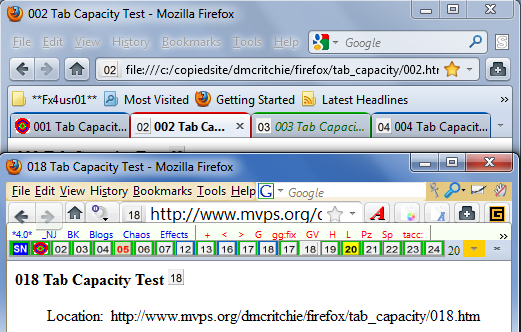
Colors the bottom border (or currently the background) of a tab with RED for active tab, BLUE for a normal tab, GREEN for a still unread tab, MAGENTA(FUCHSIA) for loading/reloading tab. In other words distinguishes tabs as active tab, viewed tab, unviewed tab. Selection with "Multiple Tab Handler" extension uses a lighter blue background. Background color will still show up even if tabs on the tabs bar have been squeezed down so much that only the favicon can be seen, and currently underscores don't show up at all.

Tab Color Underscoring active/read/unread (Fx3.6 ) (24728) has been fixed use it INSTEAD.
You must first install TabVisted 2.5 from the author's (Dickvl) site. This was supposed to be builtin to 4.0 as I understood it but it never was.
https://bugzilla.mozilla.org/show_bug.cgi?id=487242
http://kb.mozillazine.org/User:Dickvl/TabVisited
Colors the bottom border (or currently the background) of a tab with RED for active tab, BLUE for a normal tab, GREEN for a still unread tab, MAGENTA(FUCHSIA) for loading/reloading tab. In other words distinguishes tabs as active tab, viewed tab, unviewed tab. Selection with "Multiple Tab Handler" extension uses a lighter blue background. Background color will still show up even if tabs on the tabs bar have been squeezed down so much that only the favicon can be seen, and currently underscores don't show up at all.
More Info
Based on Tab Color Underscoring active/read/unread (Fx3.6 ) (24728) with the only difference being the addition of a background color with the same color as intended for underscoring. The underscoring is not working in Firefox 4.0. The background color won't interfere with "Perma Tabs Mod" which won't work in Firefox 4.0 and you would use app-tabs (builtin) instead.
Consider this style to be a TEST for now until the supporting code which can be installed from comment 6 of bug 487242 becomes part of Firefox.
If you get the following error for [JavaScript Application]
TypeError: Components,classes['@mozilla.org/webshell;1)'] is undefined
then you did not install the TabVisited extension in bug 487242#c6
Currently 2010-10-20 the Firefox Nightlies (Minefield) show tab favicon changes: (CW is clockwise, CCW is counter-clockwise) not an indication of whether page is read or not though.
CCW and gray: we have sent the request and are waiting for the server to respond.
CW and blue: we have started getting data back from the server and are working on rendering the page.
=================================================
An unread tab is one that has been opened in the background such as with a mouse shortcut, and will also be seen for tabs restored from a terminated session.
When a tab is opened in the background the current tab remains active (Ctrl+Shift+click)
When a tab is opened in the foreground the the new tab becomes active (Ctrl+click).
The mouse shortcuts that I use above are reversed from Firefox's default because I checkmark the option at Tools, Options, Tabs, [x] When I open a link in a new tab, switch to it immediately.
My method of reading most web pages is to stay within the article, opening links in the background at the far right of the tabs bar, when I have finished reading all of the originally selected pages, I start reading the new pages in the same manner, new tabs to the a right after all they are secondary material. I try not to build up layers within a tab, so that I can tell for sure when I am finished with a tab. Especially when reading Blogs where I start with several blogs by opening them from a folder on my bookmarks toolbar.
If "private browsing" for the active tab in particular can be determined might add an dotted black border at top of tab. [Unfortunately Private Browsing is all or nothing it is not per tab].
border-top: dotted 2px #FF6600 !important;
This style can be used together with Tabs Bar Minimal Size (9043) by David McRitchie.
(This style will show magenta underscore while loading, pictures shown are same as used in Tab Color Underscoring active/read/unread)
Updates to code since 2008-07-24 (base code)
2010-01-31 this new style to work with Firefox 3.6
2010-02-07 color loading/reloading tab
2011-04-11 new style for 4.0 with background (temp)
Consider this style to be a TEST for now until the supporting code which can be installed from comment 6 of bug 487242 becomes part of Firefox.
If you get the following error for [JavaScript Application]
TypeError: Components,classes['@mozilla.org/webshell;1)'] is undefined
then you did not install the TabVisited extension in bug 487242#c6
Currently 2010-10-20 the Firefox Nightlies (Minefield) show tab favicon changes: (CW is clockwise, CCW is counter-clockwise) not an indication of whether page is read or not though.
CCW and gray: we have sent the request and are waiting for the server to respond.
CW and blue: we have started getting data back from the server and are working on rendering the page.
=================================================
An unread tab is one that has been opened in the background such as with a mouse shortcut, and will also be seen for tabs restored from a terminated session.
When a tab is opened in the background the current tab remains active (Ctrl+Shift+click)
When a tab is opened in the foreground the the new tab becomes active (Ctrl+click).
The mouse shortcuts that I use above are reversed from Firefox's default because I checkmark the option at Tools, Options, Tabs, [x] When I open a link in a new tab, switch to it immediately.
My method of reading most web pages is to stay within the article, opening links in the background at the far right of the tabs bar, when I have finished reading all of the originally selected pages, I start reading the new pages in the same manner, new tabs to the a right after all they are secondary material. I try not to build up layers within a tab, so that I can tell for sure when I am finished with a tab. Especially when reading Blogs where I start with several blogs by opening them from a folder on my bookmarks toolbar.
If "private browsing" for the active tab in particular can be determined might add an dotted black border at top of tab. [Unfortunately Private Browsing is all or nothing it is not per tab].
border-top: dotted 2px #FF6600 !important;
This style can be used together with Tabs Bar Minimal Size (9043) by David McRitchie.
(This style will show magenta underscore while loading, pictures shown are same as used in Tab Color Underscoring active/read/unread)
Updates to code since 2008-07-24 (base code)
2010-01-31 this new style to work with Firefox 3.6
2010-02-07 color loading/reloading tab
2011-04-11 new style for 4.0 with background (temp)
Feedback
Discussions
Ask a new question or add a review for this style.