(No screenshot available)
| Author | TakatoMatsuki |
|---|---|
| Created | Apr 9, 2011 |
| Updated | Apr 9, 2011 |
| Installs (this week) | 2 |

| Installs (total) | 109 |
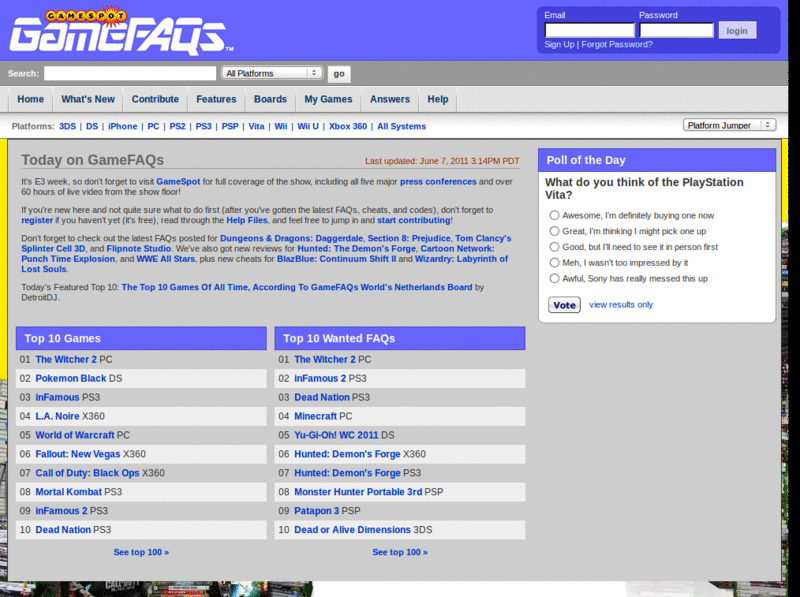
SpotFAQs Light is the light theme from GameSpot. You can use it right now by selecting it as your "Site Display Style" on GameFAQs.
"SpotFAQs Light Extras" enhances SpotFAQs Light, and supports the extra benefits and features of Firefox/Chrome and GameFOX/GameChrome.
For more information on SpotFAQs, check out http://www.takatocss.co.cc/spotfaqs.html
You may also be interested in GameFAQs - SpotFAQs Dark Extras, which is the same as this but with darker colours.
***** SETTINGS *****
• "Site Display Style" must be "SpotFAQs Light" - http://www.gamefaqs.com/user/site.html
• "Message Poster Display" must be "Left of Message" - http://www.gamefaqs.com/boards/settings.php
• GameFOX: Tick "Block ad servers" - Tools > GameFOX > Main > Page
• GameFOX/GameChrome: Enable "Essentials" and "Ad-blocking" - Tools > GameFOX > Style
"SpotFAQs Light Extras" enhances SpotFAQs Light, and supports the extra benefits and features of Firefox/Chrome and GameFOX/GameChrome.
For more information on SpotFAQs, check out http://www.takatocss.co.cc/spotfaqs.html
You may also be interested in GameFAQs - SpotFAQs Dark Extras, which is the same as this but with darker colours.
***** SETTINGS *****
• "Site Display Style" must be "SpotFAQs Light" - http://www.gamefaqs.com/user/site.html
• "Message Poster Display" must be "Left of Message" - http://www.gamefaqs.com/boards/settings.php
• GameFOX: Tick "Block ad servers" - Tools > GameFOX > Main > Page
• GameFOX/GameChrome: Enable "Essentials" and "Ad-blocking" - Tools > GameFOX > Style
More Info
***** LATEST UPDATE - 2011-04-08-20-02 *****
• First release of SpotFAQs Light Extras
Feedback
Discussions
No discussions posted yet. Be the first to ask a question or review this style.