Deleted!
This style has been deleted.

(No screenshot available)
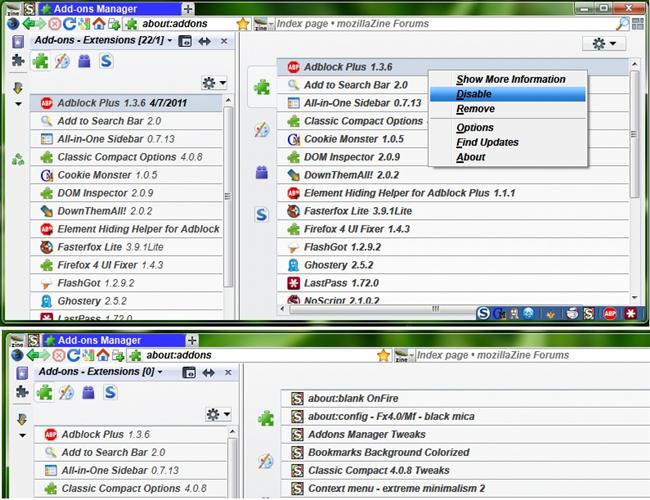
This strips the add-ons manager. Removes buttons, add-on incompatibility warning, removes enable compatibility check link and is reduced to be compact. Strictly right click accessible or double click for add-on options in AIOS not Firefox's addon manager any longer, when add-ons are highlighted, they do not bounce, they stay still. Not only very useful for All-in-One Sidebar but also for Add-ons Manager.
Used some code and altered it from Firefox 4 or newer - Compact Addons Manager by darschne
Found some useful code that I used from forums.mozillazine.org
Code for the AIOS & Firefox's dropdown release notes moved, supplied from/by Luckymouse found here > http://forum.userstyles.org/discussion/30444/aios-addons-update-section-style-request#Item_3
Thanks Luckymouse for the code!
Used some code and altered it from Firefox 4 or newer - Compact Addons Manager by darschne
Found some useful code that I used from forums.mozillazine.org
Code for the AIOS & Firefox's dropdown release notes moved, supplied from/by Luckymouse found here > http://forum.userstyles.org/discussion/30444/aios-addons-update-section-style-request#Item_3
Thanks Luckymouse for the code!
More Info
| Author | MozillaUser233 |
|---|---|
| Created | Mar 29, 2011 |
| Updated | Mar 27, 2012 |
| Installs (this week) | 4 |
| Installs (total) | 587 |
Install with Stylish.
Credits
To darschne for Firefox 4 or newer - Compact Addons Manager
Update:
April 16th, 2011.
Added:
Remove Global Warning Container.
Added:
Optional option to remove new Stylish 1.1.2 links added to Add-ons Manager & All-in-One Sidebar-Stylish. Removes Go to userstyles.org link, Write New Style Link, Removes userstyle top container where the links were held at. Remove /* */ before and after the code located at bottom of style.
Update:
April 23rd, 2011.
Added an optional option at the bottom of this style to remove the header spacer in add-ons manager and AIOS, this option moves the check for updates box & search all addons box to the left instead of it being to the far right. Being more convenient. I've also made the style separate found FF13 - More Convenient Add-ons Update & Search Box .
--
03/03/2012
Just removed "FF4" and "Firefox 4" terms out of the style. Nothing else changed.
--
--
Changed title FF10 > FF11.
03/27/2012
Firefox's addons update manager release notes drop down moved above release notes.
AIOS addons update manager release notes drop down moved above release notes.
--
--
04/05/2012
Updated description as Firefox's addon manager double click for options no longer is available. I believe when I put this style together, at the time it was functional. But still functional for AIOS.
--
--
Credits
To darschne for Firefox 4 or newer - Compact Addons Manager
Update:
April 16th, 2011.
Added:
Remove Global Warning Container.
Added:
Optional option to remove new Stylish 1.1.2 links added to Add-ons Manager & All-in-One Sidebar-Stylish. Removes Go to userstyles.org link, Write New Style Link, Removes userstyle top container where the links were held at. Remove /* */ before and after the code located at bottom of style.
Update:
April 23rd, 2011.
Added an optional option at the bottom of this style to remove the header spacer in add-ons manager and AIOS, this option moves the check for updates box & search all addons box to the left instead of it being to the far right. Being more convenient. I've also made the style separate found FF13 - More Convenient Add-ons Update & Search Box .
--
03/03/2012
Just removed "FF4" and "Firefox 4" terms out of the style. Nothing else changed.
--
--
Changed title FF10 > FF11.
03/27/2012
Firefox's addons update manager release notes drop down moved above release notes.
AIOS addons update manager release notes drop down moved above release notes.
--
--
04/05/2012
Updated description as Firefox's addon manager double click for options no longer is available. I believe when I put this style together, at the time it was functional. But still functional for AIOS.
--
--
Feedback
Discussions
No discussions posted in the last year. See older discussions. Ask a new question or add a review for this style.