Now included in Lifehacker's Better GMail 2 Firefox Extension: http://lifehacker.com/346013/better-gmail-2-gets-four-new-features-plus-skins
Thanks guys!
A compilation of designs and tweaks (thanks to Paulfox and lan @ userstyles.org, marteau @ userscripts.org, and countless others (who I just can't remember, but appreciate) from whom I snipped bits of code).
This is my first style. I'm not a programmer, and my code might not be consistent, so please be kind. ;-)
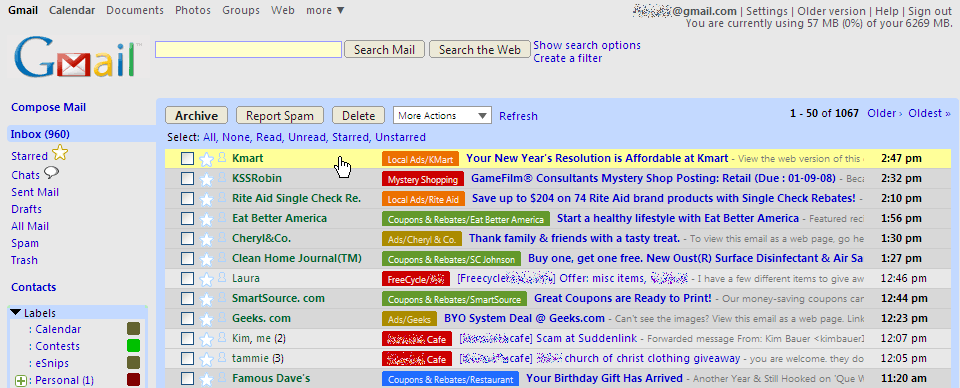
A larger version of the screenshot: http://img245.imageshack.us/img245/6121/gmail3uq8.png
Specifically, here is a list of all the items this style will change:
* Default font is changed to Segoe UI, Tahoma, or Verdana.
* Background for interface (not individual messages) is changed to light gray.
* GMail logo is replaced by one which does not have the Beta graphic.
* Storage info/usage is moved to the top right.
* Buttons are rounded and are light gray, with yellow hover effect.
* The blue line below the header bar at the top of the page is removed.
* Links in the header bar use a smaller font size, have a gray-black color, have no underlines, and use a yellow hover effect. New features messages remain red but not underlined.
* Newer, older, and oldest links have no underlines and use a yellow hover effect.
* Search options and add a filter links use a larger font size, have a darker blue color, have no underlines, and use a yellow hover effect.
* Input fields (search boxes) are redesigned to have a light yellow background.
* Links in the navigation menu, labels box, chat/contacts box, and invites box have a slightly darker blue color, have no underlines, and use a yellow hover effect.
* Width of the labels box is increased.
* Labels box borders are changed to light blue instead of being light green.
* Background of the top area of the chat/contacts box is changed to match the border of this box.
* Invites box borders are changed to light blue instead of being even lighter blue.
* For those of you who use the Google Reader Integrator script (http://userscripts.org/scripts/show/14030), the background of the feeds box and the spacer below the GMail messages list is changed to light gray, and links within the feeds box have no underlines and use a hover effect.
* In the more actions box, the "hide more actions" and "apply label" separators are hidden, and the entire list of more actions uses a hover effect.
* Most other links within GMail (except for settings interface) are changed so that they are blue in color, have a consistent font size, have no underlines, and use a yellow hover effect.
* In the messages lists (inbox, starred, etc.), the color of the sender's name is changed to dark green, the color of the subject is changed to blue, the background of unread messages is changed to dark gray, and the background of read messages is changed to light gray. In addition, a hover effect is used as you scroll down the list to highlight individual messages, and the font size of the snippets beside the subject is reduced.
* When individual messages are displayed, the ads to the right of the messages are hidden. The message body is widened accordingly. The useful links (new window, print all, etc.) are displayed in bold in a centered row above the message itself. The reply text area below the message is also widened.
* When individual messages are displayed, the font color of the subject header is changed to blue. The font color of the from, to, etc. indicators is changed to purple and bolded. The font color of the sender's actual address is changed to dark green and bolded. In addition, the background of the display/don't display images warning is changed to yellow-orange with a yellow hover effect.
* The username in the header bar, the chat/contacts box, the invites box, and the footer can be hidden. Go to the bottom of the script and simply comment out those items which you wish to hide. By default, I hide everything but the username in the header bar.
I'm a huge fan of this style, but it's fallen behind on a few bug fixes and tweaks, so I've decided to post my version. http://userstyles.org/styles/6209
I initially found this skin via Lifehack's "Better Gmail 2" Firefox add-in. One of the options was this skin. I like it a lot...but, not having Contacts and Chat made is unusable for me. So, not knowing about this scripting language, I still learned there's a very easy fix..
1. First you need to NOT be using the sking from Better Gmail Add-in. If you have it. I'd suggest just selecting 'no skins'.
2. Install the add-in that manages these scrips. It's called Stylish. https://addons.mozilla.org/en-US/firefox/addon/2108
3. Load the Blues and Gray script by just clicking the "Load into Stylish" box under the "Install Options" earlier in this (Blues and Grays) page.
4. In Firefox, click on Options in the Stylish add-on.
5. Ok, here's the key - comment the line that hides the chat/contacts link. To do this:
a. highlight the Blues and Gray's script and click Edit
b. near the bottom of the box containing the scripting code, locate this:
/* HIDE CHAT/CONTACTS BOX */
div[class="XoqCub a3hTGd"] { display: none !important; }
c. Ok, all that work to do this simple step. Comment out this line by putting /* */ at the beginning and end of the code line. That is:
/* div[class="XoqCub a3hTGd"] { display: none !important; } */
This style is amazing !!
There is tho, a new 'blue line' at the top of the page,
could you please explain how to turn It into Grey ? (make It disappear)
Here's a workaround for chat: It works if someone else sends to you first. Also, if you save your chats, you can open an old one and 'reply to xxxxx in chat' and it opens up a window.

I really love this skin but it hides my Quick contact list. Any way around that?
Love the skin, but the chat box doesn't work with the skin. Can that be fixed?
I like this very much, but my custom logo for GFYD does not show up using this skin. Can you fix this? This is the ONLY reason I'm not using this skin yet.
VERY nice work.(mmh, I don't like green too much, but it can be modified.)
I really like the design but I have one concern and maybe I am wrong on this but isn't covering up the Google ads on the side against the Terms of Use policy? I prefer not having those ads there but I wouldn't want to loose this skin because of Google cant get a few pennies off of my ad clicks.
nevermind, I didn't read through the entire description, my fault!
i think this looks really nice!
Whoa! That's a lot of tweaks you have in there.
Looks really nice.