The recommended way to install user styles is to use Firefox with Stylish.

If you already have Firefox with Stylish, make sure this site is allowed to run JavaScript.
You've installed this user style in Stylish. To uninstall it, open the Tools menu, choose Add-ons, click the User Styles panel on the top, click on the entry for this user style, and click Uninstall.
You've installed this user style in Stylish. To uninstall it, open the Tools menu, choose Stylish, and remove the entry from there.
You've installed this user style in Stylish. To uninstall it, click the wrench icon, Extensions, click Options beside the entry for Stylish, and click delete for the appropriate entry.
You've installed this user style in Stylish, but a newer version is available.
To uninstall this user style, open the Tools menu, choose Add-ons, click the User Styles panel on the top, click on the entry for this user style, and click Uninstall.
The recommended way to install this user style is to .
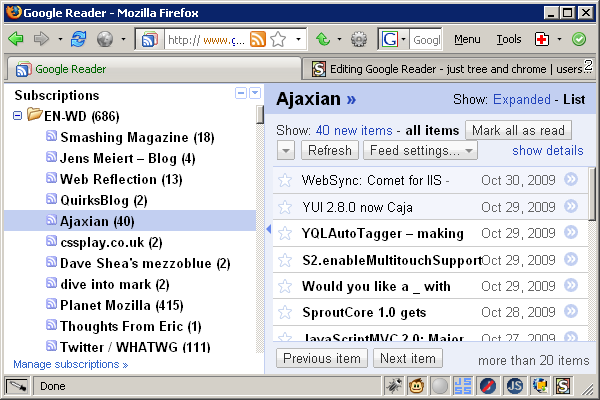
Hides everything except the left subscriptions tree and the reading "chrome".
Notes: The tree remains collapsible (click the divider or press "u") -- its side-effect is re-rendering content, so it may be useful while toggling this userstyle on the fly [works nice in FF3].
Background: Just backup of simple and quick scratch, which came up quite useful; probably there are some similar or even better versions out there ( http://userstyles.org/styles/search/google%20reader ), but it was easier for me to write this one instead of finding another.
I am quite loyal Bloglines old-school-user-interface-user who started messing with Google Reader (again, for at least tenth time), and cannot stand its bloated UI. (Try it on 800×600 ;] )(update: switched to gR 'definitely').
Changelog: 2008-09-15: + screen shots (600×400 px), code clean up 2009-11-02: updated for current gR, simplified, un-obsoleted 2010-02-15: fixed dropdowns menus ("Settings"…); shown "Add a subscription" stuff in sidebar (uncomment second selector to hide it again if you want).