userstyles.org - GlassFox - a clean theme

Author SuperPutte
Created Mar 11, 2011
Updated Apr 22, 2012
Installs (this week) 45
Installs (total) 3,626
Average rating Good
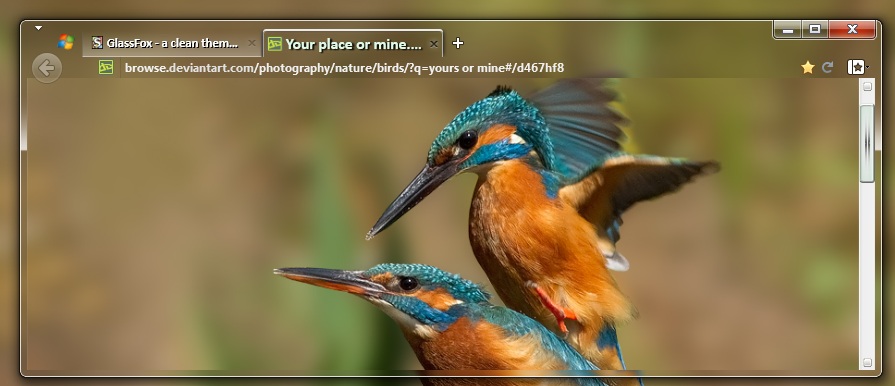
Take a walk on the glass side.... GlassFox - a complete theme
- Maximum transparency
- The tabs have 3D effect
- Changed "Firefox-button"
- And a lot more....

Tested on latest Nightly builds (currently FF14).
If you use an older version please consider this style instead http://userstyles.org/styles/64499/glassfox-a-clean-theme-versions-up-to-ff13
To use this style, install Firefox and Stylish.
GlassFox - a clean theme
84197
45089

More Info

GlassFox is a modded theme - mainly based on http://userstyles.org/styles/36813/drifus-firefox-4-project-aero-clean

Created with focus on transparency AND visibility. That is a bit of a tradeoff, because I wanted a very glassy appearance.

Have a look and see if it attracts you!!

* More clear focus on the active tab, a "3D effect":
- Imagine that the tabs is illuminated from above, and that inactive tabs is bended backwards
- When you then hover over a tab, you will see this tab raise up, to a semi-mode
- And when you click on a tab to select it, you will see the full 3D effect
* Changed default tab-width min and max size (100px and 180px), edit the file if desired
* Changed font (Calibri), it's marked in the file where you can choose an another font if desired
* Changed text-color on tabs as in screenshot
* Almost hidden "Firefox-button" (visible as a tiny dropmark, expand as a small button when you hover + click in the upper left corner)
* Hidden statusbar
* Replaced throbber icon
* Plus some other small stuff

Please restart after installation.

ADDONS TO THIS THEME:

#1 If you would like semi-transparent menus in combination - highly recommended - check this out.... GlassFox - transparent menus http://userstyles.org/styles/53809/glassfox-transparent-menus?r=1316474807

#2 Transparent findbar, addonbar & bookmark/history sidebars (who are hidden until you hover). Install GlassFox - findbar, addonbar & sidebar (autohide) http://userstyles.org/styles/60327/glassfox-findbar-addonbar-sidebar-autohide

#3 Maybe time to change the scrollbar's look? Why not install a matching GlassFox - the scrollbar http://userstyles.org/styles/60328/glassfox-the-scrollbar?r=1328288891

#4 If you prefer a "stamped 3D effect" on the inactive tabs, then install GlassFox - stamped tabs http://userstyles.org/styles/46157/glassfox-stamped-tabs?r=1302031937

#5 Since some backgrounds combined with clear glass sometimes makes it harder to view the tabs, you can also install GlassFox - dimmer on/off: http://userstyles.org/styles/45654/glassfox-dimmer-on-off?r=1301129353

#6 And if you want to change the text color on the tabs, install also GlassFox - change text color http://userstyles.org/styles/45746/glassfox-change-text-color

OTHER INFO:

Works great with this old favorite http://userstyles.org/styles/20586/neon-link-focus
Tip 1: Looks best on medium or dark backgrounds, avoid too bright colored wallpapers.
Tip 2: Get rid of those ugly white diagonal stripes behind all aero glass with this http://garbanzox.deviantart.com/art/AeroPlain-for-Windows-7-125999931

Enjoy!

Ps.
If you have other suggestions, critics, etc how I can improve the theme, please write to me at: aaa_dp_aaa@hotmail.com

Feedback

Discussions

Ask a new question or add a review for this style.