userstyles.org - Find Bar - like Google Chrome II

More screenshots:
Author KuRmA
Created Mar 9, 2011
Updated Apr 24, 2011
Installs (this week) 7
Installs (total) 1,494
Average rating OK
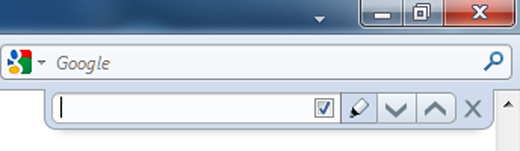
Puts the find bar to the top right similar to Google Chrome.
To use this style, install Firefox and Stylish.
Find Bar - like Google Chrome II
585
45007
browser

More Info

COMPATIBILITY:

Tested on FF4 beta 11 12 and FF4 RC, Windows 7. It is meant for the default theme with tabs on top. The position does not adjust for any additional tool-bars opened such as the bookmarks toolbar. So if you are using small icons on the navigation bar you will need to move the find bar up - exact instructions are in the code.

FEATURES:

Puts the find bar to the top right like Google Chrome.
Adds the back/forward options etc. to quick find.
Increases the text box length.
'Phrase not found' - the white background changes to the toolbar color.
Highlight button lights up when selected.

OPTIONS - in the code:

Remove matching case and highlight.
Revert 'Phrase not found' text box background color to red.


OTHER THEMES:

If you request nicely - a thumbs up will help - I'll modify the style for other themes.


CHANGE-LOG:

3/10/11 Fixed issue with addon bar.
3/11/11 Fixed extra buttons appearing on the edit window of Stylish and Stylish Custom.
3/13/11 Fixed button icons not displaying initially when Firefox starts. Also fixed match case check box unresponsive with no text in the text box. Added instructions in the code for Find Bar Tweaks users.
4/24/11 Hopefully fixed problem of labels still showing in Windows XP - I suppose I should thank gracefool for the fix even if I had to go the fixed style to get it.


ISSUES:

Find Bar Tweaks users - see my comment in the comments section what to modify in the code.

Feedback

Discussions

Ask a new question or add a review for this style.