userstyles.org - Find Bar - like Google Chrome

More screenshots:
Author KuRmA
Created Mar 2, 2011
Updated Mar 11, 2011
Installs (this week) 9
Installs (total) 909
Average rating OK
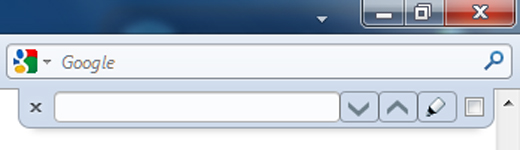
Moves the Find bar to the top right with a style like Google Chrome
To use this style, install Firefox and Stylish.
Find Bar - like Google Chrome
585
44781
browser

More Info

This is the plainer styling of its twin 'Find bar - like Google Chrome II'.


COMPATIBILITY:

Tested on FF4 beta 11 12 and FF4 RC, Windows 7. It is meant for the default theme with tabs on top. The position does not adjust for any additional tool-bars opened such as the bookmarks toolbar. So if you are using small icons on the navigation bar you will need to move the find bar up - exact instructions are in the code.

FIND BAR TWEAKS users - to resolve conlicts see my comment in the comment section below.


FEATURES:

Puts the find bar to the top right with a style like Google Chrome.
Adds the back/forward options etc. to quick find.

Increases the text box length.
'Phrase not found' - text box lights go out - i.e background flips from white to the toolbar color.
Highlight button lights up when selected.

OPTIONS - in the code:

Remove matching case and highlight.
Revert 'Phrase not found' text box background color to red.


OTHER THEMES:

If you request nicely - a thumbs up will help - I'll modify the style for other themes.


CHANGE-LOG:

3/6/11 Changed the position in full-screen mode

3/7/11 Tweaked the text box border. Added drop shadow on the web page.

3/8/11 Icons like Google Chrome, and blue text box color for phrase not found - to revert it back to red see instructions in the code.

3/10/11 Compatibility for 'Find Bar Tweak' addon - appearance of the clear button for this addon added to the code. Also fixed problem with the addon bar.

3/11/11 Fixed problem of style adding extra buttons in Stylish edit window.


ISSUES:

Find Bar Tweaks conflicts - see my comment in the comments section for a fix.

When Firefox loads and the find bar pops down for the first time only, the icons will be missing until the text field has some input. Also match case will only work if the text field has input. It's a minor issue - no fix as yet.

POSTING PROBLEMS

If you have a problems with this style it could be your setup. Start by updating the style.
Remember this style has not been tested on Firefox 3. And the positioning will have to be adjusted depending on which version of FF4 you are running.
The style may be conflicting with another style - especially an addon bar style - try disabling these first and see what happens.
It could be a conflict with a Firefox addon that modifies the find bar - such as Find Bar Tweaks. Disable such addons to see if that is the problem.
It could be a process running on your computer - try running the computer in safe mode and see if the problem persists.
Please post your problem giving as much information as necessary and show a screen shot. I will do my best to help you.

Feedback

Discussions

Ask a new question or add a review for this style.