If you need a style that works for Google Search, Reader, and AdSense Reports, please give Google: no ads and compact a try.
I recommend users to install Gmail *2* small attachment icons, too. It makes Gmail's attachment icons look prettier.
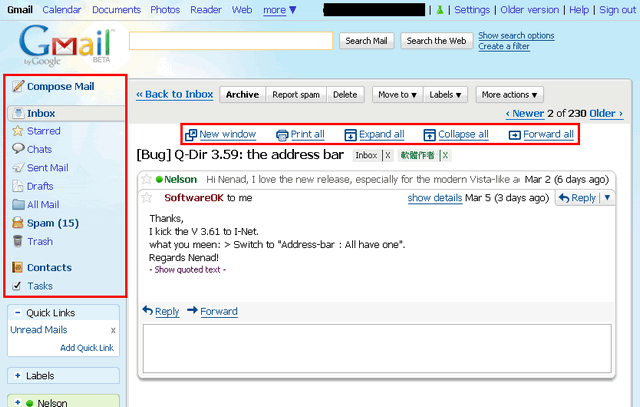
The icons in left sidebar is from Gmail *Mobile me*, thanks to Nic\o/.
Attention:
1. It works only for Gmail 2.0, but not for other Google services.
2. It works best with Gmail "Tree" theme.
3. It doesn't work with Gmail Labs "Right-side chat" and "Right-side labels" features.
4. The "Invite a friend" area must be placed at the *last* position of the sidebar, so that it can be removed.
For more detail, please visit my gallery
http://picasaweb.google.com/chiahsien/StylishForGmail20
ChangeLog:
2009-07-03,
Update for Gmail recently update, not complete yet.
2009-06-06,
Fix: Gmail changed its HTML codes, so I changed mine.
2009-04-20,
Fix: Icons incorrectly displayed in "Chat" window.
Add: Hover effect in Settings.
2009-04-14,
Fix: mail can't display when opening in new window.
2009-04-12,
Fix: wrong icons in compose mail window.
2009-04-04,
Add icon for "Quick Links".
2009-04-02,
Fix: Icon for "Task" link is missing.
2009-03-23,
Remove "Invite a friend" area from the left sidebar. Notice: the "Invite a friend" area must be placed at the *last* position of the sidebar.
2009-03-13,
Fix: top "useful link" is too wide in search mode.
2009-03-11,
When "Show details" is enabled, the mail body can fit window width, too.
2009-03-08,
Add icons in sidebar.
2009-03-05,
Re-write from scratch.
Don't support Gmail 1.0 anymore, sorry.
Because Gmail support theme changing, this style doesn't look good under every theme. Sorry.
I like this! It looks great.
Great script.
But for some reason the "Compose Mail" icon isn't showing up.
Nice style :) thank you for your credits !
Hello--
Nice stuff in here. But...
The useful links don't appear. These:
/* Show the useful links (New window, Print all, etc.) in a row */
table[class="PwUwPb XoqCub MMcQxe"] td[class="eWTfhb"]>div[class="XoqCub"] {
width: 98% !important;
position: absolute !important;
text-align: center !important;
right: 0 !important;
}
table[class="PwUwPb XoqCub MMcQxe"] td[class="eWTfhb"]>div[class="XoqCub"] div {
display: inline !important;
}
table[class="PwUwPb XoqCub MMcQxe"] td[class="eWTfhb"]>div[class="XoqCub"] span img {
margin-left: 1em !important;
}This happens whenever the ads are hidden, i.e. whne this is not commented out:
/* Block the ads table in the message window */
td[class="eWTfhb"]>div[class="XoqCub"]>div[class="XoqCub"]:last-child {
display: none !important;
}Help?
Very good counterpart for Gmail Air Skin that doesn't work with Gmail 2.
I added chat hiding for myself from Gmail - Hides Invites & Chat Boxes and little from Gmail Air SkinThat's what I've added:
.a3hTGd, .a3hTGd+div, .I94Sdc, .I94Sdc+div { display:none; }
/* Gmail Air Skin */
* {
font-family: tahoma, verdana, lucida sans, helvetica, arial !important;
}/* messages (unread) */
table.tlc tr.ur td {
font-size: 13px !important;
}
/* messages (unread - snippet) */
table.tlc tr.ur td span.p {
font-size: 13px !important;
}/* messages */
table.tlc tr td {
font-size: 13px !important;
padding-top: 3px !important;
padding-bottom: 3px !important;
}/* Spam not bold */
.PQmvpb {
font-weight: lighter !important;
}/* buttons */
button {
font-size: 13px !important }
Very nice, exactly what I was looking for, thank you!
You are the BEST, number 1 !!
It works great with R-milk, Thanks !!
I'm glad to see parts of my code in yours :)
Only together we can make the world a little bit better i think. I all my code is open for everyone to use, so ...
*handshake* We rock the web, together!