userstyles.org - Gmail - MacOSX

More screenshots:
Author earnjam
Created Dec 30, 2010
Updated Jan 13, 2011
Installs (this week) 30
Installs (total) 5,994
Average rating OK
//**** Notice ****\\

With the launch of Google's new Gmail Themes, this style has been completely broken. I might attempt to rebuild it in the future, so I'm leaving it up for now.

THIS STYLE DOES NOT FUNCTION PROPERLY ANYMORE

//*****************\\

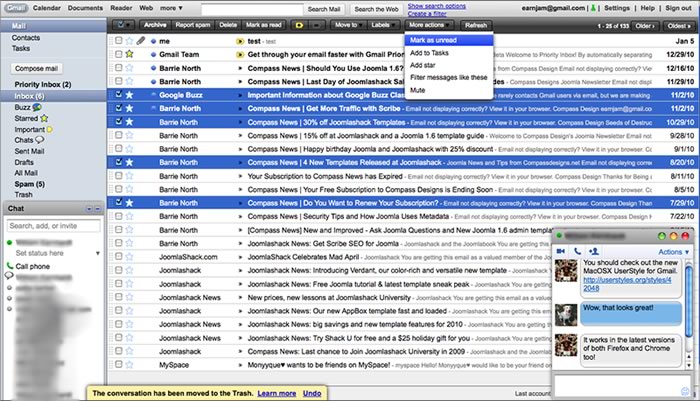
I noticed the only good MacOSX theme for Gmail had not been updated in quite some time and did not work with the latest builds of Firefox or Chrome, so I decided to build one. This is a complete UserStyle for Gmail to make it take on the appearance of a native MacOSX application. I used a lot of the same theme elements from my Toodledo style, Toodledo - MacOSX version 2.

To use this style, install Firefox and Stylish.
Gmail - MacOSX
76728
42048
google

More Info

======= Notes ========
For the optimal experience:
- Under Settings> Themes, you should have the "Classic" theme selected.
- Under Settings> Labs, you should have "Right-side chat" disabled.
- Under Settings> Labs, you should have "Pictures in chat" enabled.
======================

== Updates ==
1/13/11 (Bug Fixes from Google's updates)
- Fixed Inbox/folder toolbars

1/10/11 (updates shown in the image on left)
- Added buttons to Compose Message and restyled to match Apple Mail (send, save draft, discard, reply, reply all, forward, chat button icons added)
- Tweaked some background colors and menus to better reflect default MacOSX colors.
- Styled search bar to reduce space required

1/8/11 - Moved Login code to top to make it easier to customize login screen background image

1/6/11
- Added styling similar to iChat to chat windows ( Pop-Out/Minimize/Close buttons, chat bubbles, window chrome )
- Changed Toolbar to match Snow Leopard gradients and buttons
- Fixed bug with Search Options and Create Filter pop up from Search Bar.
- Fixed bug with toolbar on Single Contact view
- Fixed bug with Tasks window width
- Integrated Google Login: Mac OS X Snow Leopard by m.mike kondo directly into the theme and fixed the display problems it had for Gmail.
- Integrated the loading screen from Gmail: Mac OS X Snow Leopard by m.mike kondo.
- Icons added to left sidebar (not shown in screenshot below...will update that later)

1/5/11 - Small update from a user request
- Adjusted message highlighting to match blue from Mail.app
- Added blue unread message dot to left side of unread messages (removed ugly yellow highlighting)
- Fixed bug with Trash and Spam folders displaying incorrectly

Feedback

Discussions

Ask a new question or add a review for this style.