It´s a quite outdated style and don´t gonna be updated by me.
google is changing it´s styles continuously and I don´t have any time to solve the broken css over and over again.
Install
The recommended way to install user styles is to use Firefox with Stylish.
If you already have Firefox with Stylish, make sure this site is allowed to run JavaScript.
You've installed this user style in Stylish. To uninstall it, open the Tools menu, choose Add-ons, click the User Styles panel on the top, click on the entry for this user style, and click Uninstall.
You've installed this user style in Stylish. To uninstall it, open the Tools menu, choose Stylish, and remove the entry from there.
You've installed this user style in Stylish. To uninstall it, click the wrench icon, Extensions, click Options beside the entry for Stylish, and click delete for the appropriate entry.
You've installed this user style in Stylish, but a newer version is available.
To uninstall this user style, open the Tools menu, choose Add-ons, click the User Styles panel on the top, click on the entry for this user style, and click Uninstall.
The recommended way to install this user style is to .
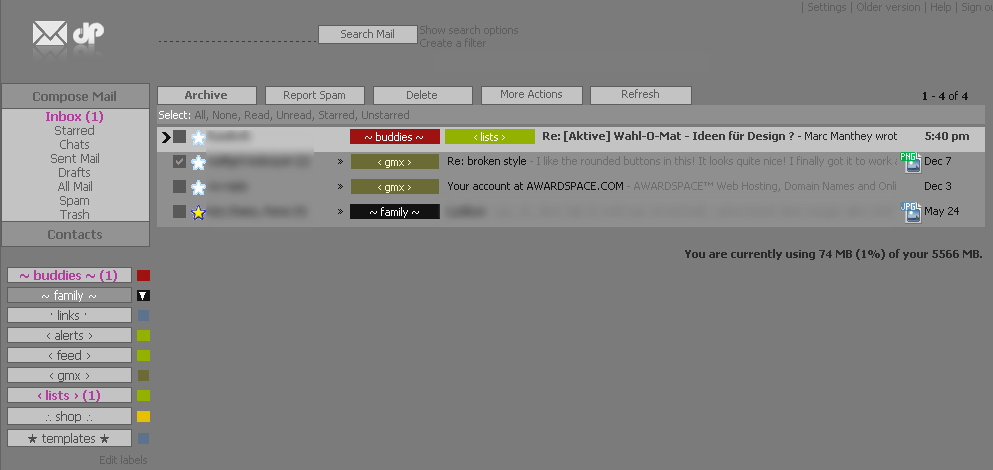
- for the new gmail (+ new labels) - super-clean layout - styled: inbox, contacts, settings, ... - descriptions in code for easy editings (- attachment-icons made by "Moktoipas" are not included and can be found here: http://userstyles.org/styles/3957 ) (- label color palette made by "Moktoipas" is not included and can be found here: http://userstyles.org/styles/4347)
*update: big screenshot of conversation-view + richtext-reply: http://img229.imageshack.us/img229/1675/replyviewxc4.png - seperated background, so it´s possible to change to any color or background-imagepattern you like without messing around