| Author | hsrstud |
|---|---|
| Created | Nov 12, 2010 |
| Updated | May 6, 2012 |
| Installs (this week) | 5 |
| Installs (total) | 729 |
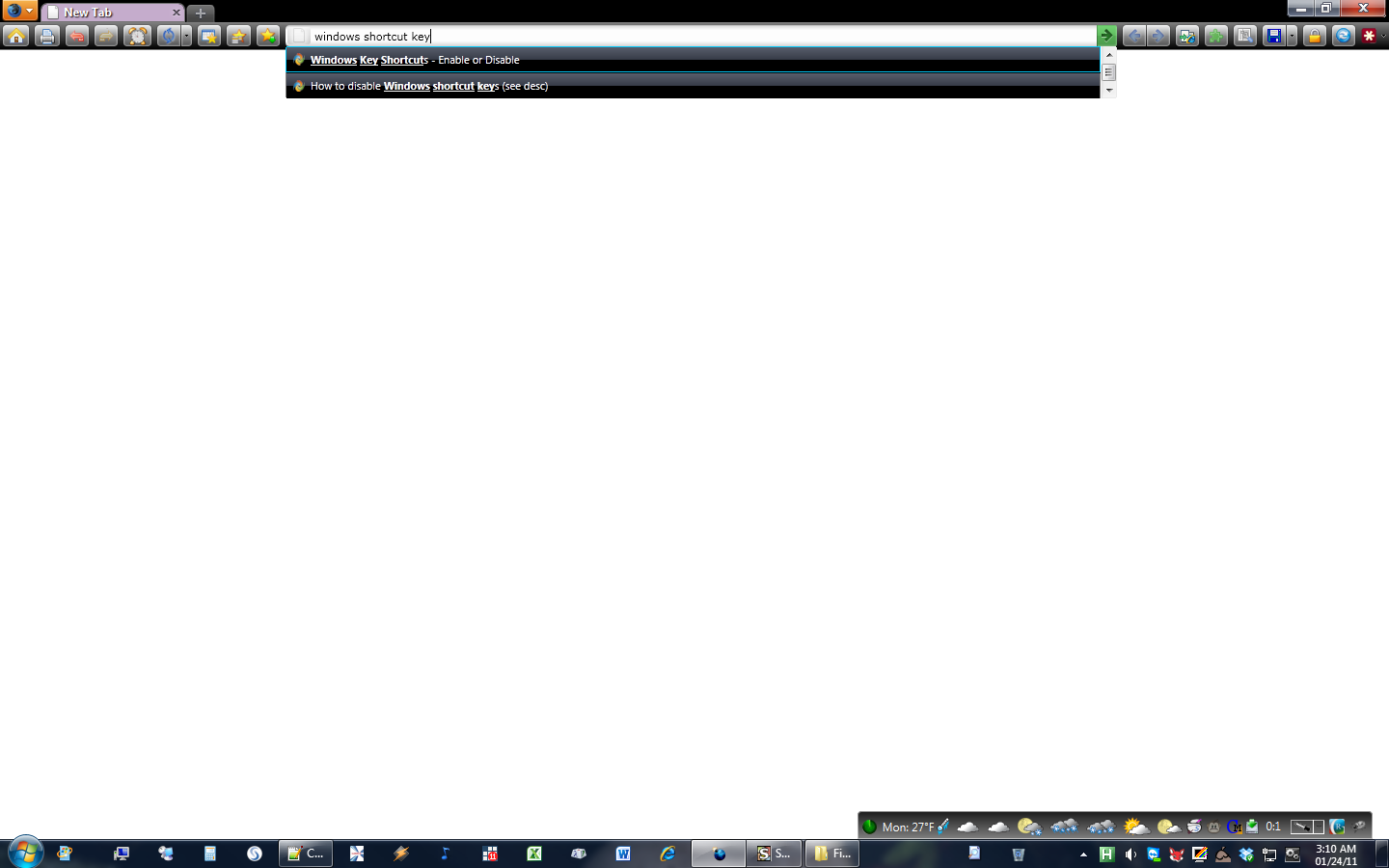
This style attempts to maximize screen real estate with some aesthetics. Specifically, it does the following:
1. Slims navigation bar
2. Adds gradient to url bar
3. Restyles drop down menus (including url bar drop down)

4. Restyles Firefox application button
5. Makes a few of the default toolbar buttons more colorful
6. Slims and sharpens tab bar
7. Removes "list all tabs" and "group tabs" buttons
8. Autohides status/add-on bar (hover over bottom right-hand corner of Firefox window to make it appear)
If you don't like one of these features, simply delete it from the style's code under the relevant heading.
1. Slims navigation bar
2. Adds gradient to url bar
3. Restyles drop down menus (including url bar drop down)
4. Restyles Firefox application button
5. Makes a few of the default toolbar buttons more colorful
6. Slims and sharpens tab bar
7. Removes "list all tabs" and "group tabs" buttons
8. Autohides status/add-on bar (hover over bottom right-hand corner of Firefox window to make it appear)
If you don't like one of these features, simply delete it from the style's code under the relevant heading.
More Info
I use this style with (roughly in order of importance):
1. The default theme AND tabs displayed above the url bar
2. Dark persona or (http://userstyles.org/styles/33773)
3. Custom toolbar buttons add-on (http://codefisher.org/toolbar_button/)
4. Colorful tabs add-on (https://addons.mozilla.org/en-US/firefox/addon/1368/)
5. Find as you type add-on (https://addons.mozilla.org/en-US/firefox/addon/3650/)
6. Organize status bar add-on (https://addons.mozilla.org/en-US/firefox/addon/1759/)
Note: Restart your browser for the tab bar to display properly.
Worked off of mNiosu's style (http://userstyles.org/styles/60503/auto-hide-add-on-bar-with-styled-find-bar) to incorporate the add-on bar auto hide functionality.
Updates:
1/6/12 - Reduced height of tab bar, made some modifications to Firefox app menu button, and fixed display of cross for new tab button when hovered over
1/8/12 - Made background of add-on manager grey and fixed issue with new tab button overlaying the add-on manager
1/16/12 - Fixed color add-on bar
2/5/12 - Fixed height of pinned tabs and Firefox button
3/8/12 - Repositioned cross in new tab button and tab close buttons
5/6/12 - Changed auto hide code for add-on bar using mNiosu's style, since the code I was using no longer worked
1. The default theme AND tabs displayed above the url bar
2. Dark persona or (http://userstyles.org/styles/33773)
3. Custom toolbar buttons add-on (http://codefisher.org/toolbar_button/)
4. Colorful tabs add-on (https://addons.mozilla.org/en-US/firefox/addon/1368/)
5. Find as you type add-on (https://addons.mozilla.org/en-US/firefox/addon/3650/)
6. Organize status bar add-on (https://addons.mozilla.org/en-US/firefox/addon/1759/)
Note: Restart your browser for the tab bar to display properly.
Worked off of mNiosu's style (http://userstyles.org/styles/60503/auto-hide-add-on-bar-with-styled-find-bar) to incorporate the add-on bar auto hide functionality.
Updates:
1/6/12 - Reduced height of tab bar, made some modifications to Firefox app menu button, and fixed display of cross for new tab button when hovered over
1/8/12 - Made background of add-on manager grey and fixed issue with new tab button overlaying the add-on manager
1/16/12 - Fixed color add-on bar
2/5/12 - Fixed height of pinned tabs and Firefox button
3/8/12 - Repositioned cross in new tab button and tab close buttons
5/6/12 - Changed auto hide code for add-on bar using mNiosu's style, since the code I was using no longer worked
Feedback
Discussions
No discussions posted yet. Be the first to ask a question or review this style.