| Author | rob64rock |
|---|---|
| Created | Nov 7, 2010 |
| Updated | Mar 31, 2012 |
| Installs (this week) | 9 |
| Installs (total) | 617 |
For Firefox versions 3.x and up to the latest Firefox Beta, Aurora, Nightly builds.
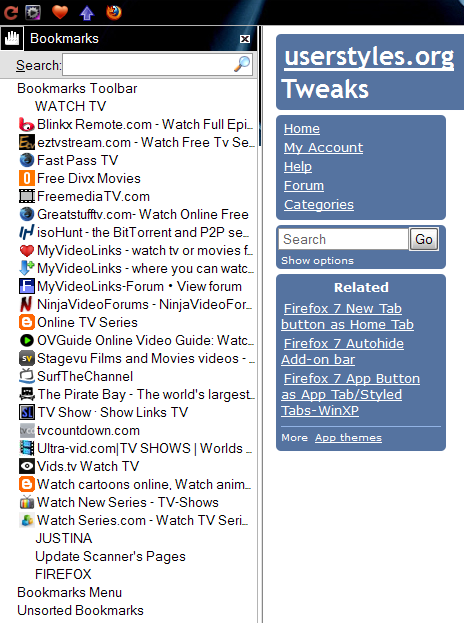
This is my personal use Bookmark Toolbar and Sidebar userstyle for Firefox. This userstyle allows you to replace folder icons on the Bookmarks Toolbar with ones of your own and shows bookmarks text on hover, Hides useless Toolbar buttons drop-markers on the Bookmarks Toolbar, and the Bookmarks Sidebar contents are moved to the Left-Edge of window.
Tested on Firefox versions 3.x and up to the latest Firefox Beta, Aurora, Nightly builds.
***!Important!*** - Read this article:
http://forums.wincustomize.com/308561 to learn how to replace folder icons on the Bookmarks Toolbar with icons(16X16) of your own using this userstyle.
To customize or fix Firefox Beta, Aurora, and Nightly builds, you can also have a look at my other styles: rob64rock
This is my personal use Bookmark Toolbar and Sidebar userstyle for Firefox. This userstyle allows you to replace folder icons on the Bookmarks Toolbar with ones of your own and shows bookmarks text on hover, Hides useless Toolbar buttons drop-markers on the Bookmarks Toolbar, and the Bookmarks Sidebar contents are moved to the Left-Edge of window.
Tested on Firefox versions 3.x and up to the latest Firefox Beta, Aurora, Nightly builds.
***!Important!*** - Read this article:
http://forums.wincustomize.com/308561 to learn how to replace folder icons on the Bookmarks Toolbar with icons(16X16) of your own using this userstyle.
To customize or fix Firefox Beta, Aurora, and Nightly builds, you can also have a look at my other styles: rob64rock
More Info
Updated 03-31-2012
Included the updated code for Fx 14.0a1 from style:
Firefm Statusbar Buttons Borders Restored - Fx 4+
Updated 03-20-2012
Due to Bug 693510 - drop support for prefixes from border-radius* and box-shadow
Updated 01-29-2012
Restored [Ext]Firefm old status-bar icon buttons borders, also removed style Autohide Dropmarkers code, now only redundant toolbar button drop-markers are hidden by default.
Updated 12-08-2011
Added custom Bookmark Toolbar folder icons for some RSS feed folders.
Updated 11-10-2011
Adjusted the position of bookmarked sites in the Bookmarks Sidebar to be nearer the Left-Edge of window.
Updated 02-07-2011
Bookmark Item Text on Hover now more visible when using moderately dark themes.
Updated 12-30-2010
Now compatible with [Ext]UI Fixer:
https://addons.mozilla.org/firefox/addon/firefox-4-ui-fixer
Modified code from Userstyles:
Article: http://forums.wincustomize.com/308561 to learn how to replace folder icons on the Bookmarks Toolbar with icons(16X16) of your own using this userstyle.
Smart Bookmarks Bar -all icon only & text on hover
Sidebar Bookmarks: Remove Twistys and their Space
Normalize the Add-on Bar - Fx 4+
Included the updated code for Fx 14.0a1 from style:
Firefm Statusbar Buttons Borders Restored - Fx 4+
Updated 03-20-2012
Due to Bug 693510 - drop support for prefixes from border-radius* and box-shadow
Updated 01-29-2012
Restored [Ext]Firefm old status-bar icon buttons borders, also removed style Autohide Dropmarkers code, now only redundant toolbar button drop-markers are hidden by default.
Updated 12-08-2011
Added custom Bookmark Toolbar folder icons for some RSS feed folders.
Updated 11-10-2011
Adjusted the position of bookmarked sites in the Bookmarks Sidebar to be nearer the Left-Edge of window.
Updated 02-07-2011
Bookmark Item Text on Hover now more visible when using moderately dark themes.
Updated 12-30-2010
Now compatible with [Ext]UI Fixer:
https://addons.mozilla.org/firefox/addon/firefox-4-ui-fixer
Modified code from Userstyles:
Article: http://forums.wincustomize.com/308561 to learn how to replace folder icons on the Bookmarks Toolbar with icons(16X16) of your own using this userstyle.
Smart Bookmarks Bar -all icon only & text on hover
Sidebar Bookmarks: Remove Twistys and their Space
Normalize the Add-on Bar - Fx 4+
Feedback
Discussions
Ask a new question or add a review for this style.