The recommended way to install user styles is to use Firefox with Stylish.
If you already have Firefox with Stylish, make sure this site is allowed to run JavaScript.
You've installed this user style in Stylish. To uninstall it, open the Tools menu, choose Add-ons, click the User Styles panel on the top, click on the entry for this user style, and click Uninstall.
You've installed this user style in Stylish. To uninstall it, open the Tools menu, choose Stylish, and remove the entry from there.
You've installed this user style in Stylish. To uninstall it, click the wrench icon, Extensions, click Options beside the entry for Stylish, and click delete for the appropriate entry.
You've installed this user style in Stylish, but a newer version is available.
To uninstall this user style, open the Tools menu, choose Add-ons, click the User Styles panel on the top, click on the entry for this user style, and click Uninstall.
The recommended way to install this user style is to .
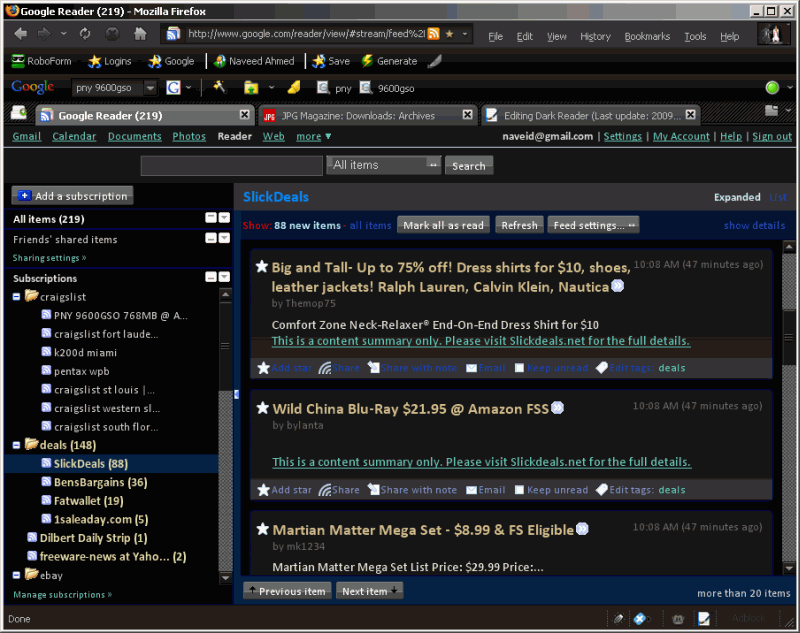
A black Google Reader. Screenshot is with the Night Launch Theme. Please email comments and suggestions to navmed AT g m a i l DOT com
[2010/03/20] Fixed x people liked this (only change). I know there should be more, but this is all I have time for right now [2009/01/08] Fixed list view, home page and removed unnecessary blue link buttons at end of title [2009/01/05] Fixed link colors for black background, made unread items more visible [2009/01/04] Works with new changes in Google Reader [2008/08/31] Fixed Firefox 3 bugs for search box and other bugs. Happy Ramadan! [2008/04/02] Fixed google change for selected feed [2007/12/29] Made search background black as well (used to be partially white) [2007/12/18] Fixed current item background, because of Google's changes [2007/11/19] Added black background for eBay RSS feeds