userstyles.org - Drifus - Firefox project - aero clean
Author Drifus Dreskeke
Created Sep 13, 2010
Updated Mar 15, 2012
Installs (this week) 21
Installs (total) 4,120
Average rating Good
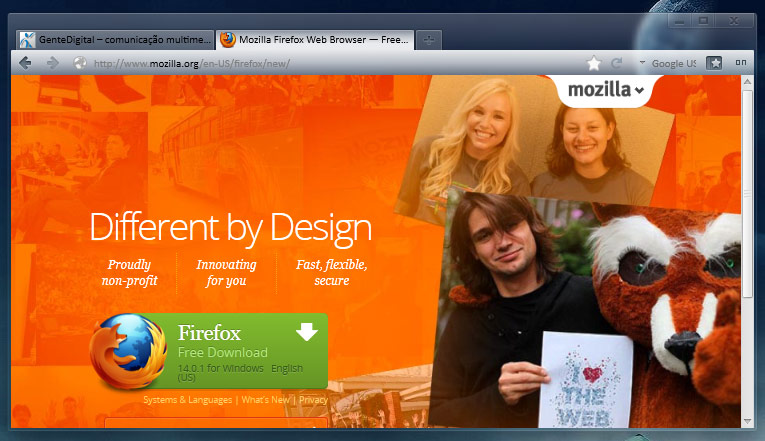
I made some customizations to Firefox, aiming for a clean, slim and functional aero look.
Target: Windows 7 with glass enabled.
Tested with Firefox 11.

### FEATURES ###
- Slim. 10 pixels taller than IE 9 in normal mode;
- Borderless;
- Transparent, without losing usability;
- Transparent Firefox button, just 1 pixel in maximized mode and tabs on tittle bar - mouse over on the very top left side near first tab to access the menu;
- Support for double clicking tabbar open new tab;
- Top space for aero snaps when in maximized mode and tabs on title;
- Auto-hide add-on Bar more Facebook friendly;
- Find Bar customized according to add-on Bar;
- Great integration with clean customized aero themes like Shine 2.0.

*** USE SMALL ICONS due back/forward mouse hover.

Do not look so good on the desktop too white or completely black.
To use this style, install Firefox and Stylish.
Drifus - Firefox project - aero clean
62017
36813
browser

More Info

Changelog:

- March.15.2012
* Changed throbber code (searching_16.png to base64)

- December.31.2011
* Compatibility and fixes for Firefox 9
* Some features are now optional
* Added option for customized AdBlock Plus icon (on/off style)
* Added option for inverted icons
* Dropped clean stop-reload-go button. No longer needed

- March.09.2011
* Drop tweaks for Status-4-evar. The owner includes color customization and fix the height issue
* Some fixes and polishing due RC landed
* Round corners more square to better integrate with the new tabs
* Identity-box/urlbar favicon improved

- feb.26.2011
* Minor fix for the addon Status-4-Evar

- feb.15.2011
* Fixes, due to the latest Firefox trunk (Add-on Bar and tabs)
* Removed tweaks of the tabbar buttons and scrolls buttons - Firefox UX team did a great update there

- feb.11.2011
* Minor fixes, due to latest Firefox trunk

- feb.08.2011
* Many changes in order to fit it to the new pre-beta releases
* less rounded
* more slim
* a little bit less transparent
* Invisible button that is visible with mouse over. And when in maximized mode, it becomes thinner
* no borders around content area
* auto-hide add-on Bar Facebook friendly
* super slim add-on Bar Option - If you don't like autohide add-on Bar. See the instructions within the code
* codes for tabs on bottom
* more room for aero snaps functions when in maximized mode and tabs on title

- oct.22.2010
* fixed - titlebar and appmenu button margin due the new margin from Mozilla UI Team
* fixed - margin of the back button when window maximized

- oct.21.2010
* polished some codes
* removed hide dropmarker from back/forward button (b8pre already removed)
* remove some margins and padding
* added padding-left navbar
* added mouse hover on tabbar not selected
* added mouse hover left gradient on urlbar and search bar
* changed tabbar select and non select transparency, better integration
* changed firefox appmenu button - Now the button is invisible, but still there. Visible on mouse hover only
* improved some cosmetics
* throbber style - using places/searching_16.png from default theme

- oct.15.2010
* fixed Firefox button (arrow) position on maximized window
* removed background of the combined go/reload/stop button in location bar
* removed some margins and paddings of the navbar and search bar
* add-on Bar more slim - if you don't use Autohide add-on Bar style
* removed progress lines style

- jul.10.2010
* suitability for beta 7 and pre8
* fix issue with Tab bar dragging
* new - naked app menu button
* new - URL and search bar squared
* new - custom add-on Bar
* new - custom progress bar color
* new - custom back/forward button

Thanks to:
foxxyn8 - fixes and suggestions
SoapyHamHocks and dert07 - css base for the add-on bar
neowin.net users
Firefox team

Feedback

Discussions

Ask a new question or add a review for this style.