userstyles.org - Gmail: color the Compose mail button

Deleted!

I won't be using anything from Google anymore, and I won't be updating my styles for the Google+ infected apps.

More screenshots:
Author mod_wastrel
Created Aug 19, 2010
Updated Apr 6, 2011
Installs (this week) 0
Installs (total) 643
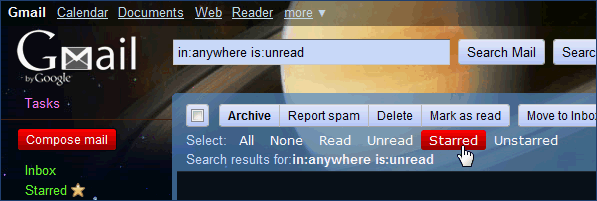
For the "new" Gmail, color the 'Compose mail' button and make it "thinner" (hide the border) to make it either stand out from or blend in with your theme. Red with white text by default; select one of the color options in the code or pick your own. See the color chart with GCal: gadget header gradient color (hsl) if you need some visual assistance with choosing colors.

I've also included code (commented out by default) to set the background color of the Select links ( Gmail: Select "links" restored ) on hover to match [if you're using that style], with or without a gradient.

*** NOTE *** This style is currently not coded to work in Google Chrome [WebKit].

31Aug2010: If you're using Gmail's new [beta] Priority Inbox feature and you set the background color for the Select links, then you'll have to edit this style's source to change ':nth-child(6)' to ':nth-child(7)'.

[ Gmail: color the Compose mail button ]
To use this style, install Firefox and Stylish.
Gmail: color the Compose mail button
838
35775
google

More Info

Updates...
06Apr2011: Google changed one of the classes in Gmail (.n3 -> .nM)
23Aug2010: improved the code for hiding the border - no color-picking/editing required
22Aug2010: added code for text shadow (disabled - uncomment the code to enable it); button text with shadow: http://a.imageshack.us/img178/7192/gmailcolorcomposeselect.png

The Before screenshot shows some color examples in the code; the After screenshot shows the optional coloring of the Select links using the same gradient/color.

Feedback

Discussions

Ask a new question or add a review for this style.