Gmail Dark-Grey No-Nonsense

Gmail Dark-Grey No-Nonsense
3525
****½
By Julius
Last updated Sep 30 2007
127 installs this week, 4105 total.

CRAP, Google has radically changed their way of using styles !
If I ever find a way to bypass that, I'll update it. For now, just go to edit this style and Disable it..

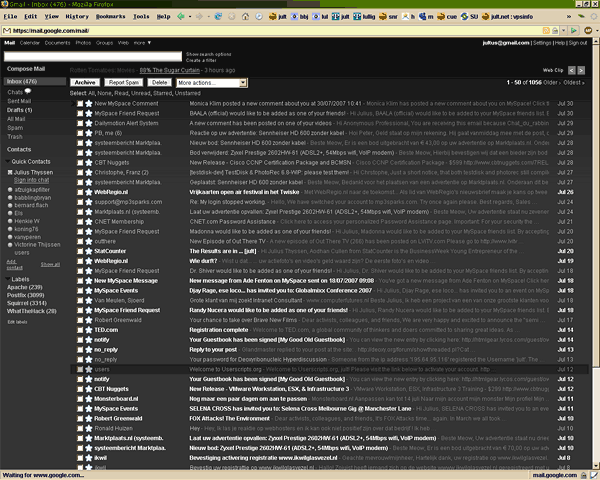
Combining http://userstyles.org/styles/3049 http://userstyles.org/styles/3050 http://userstyles.org/styles/172 and some others.
Also based on some Dark Gray code from Dargoth;
- a little less dark fonts, as well as no snow-whites (less contrast)
- not such a HUGE Search-bar
- monospaced non-html and compose font
- light-grey centered logon screen
- some screen-economics, and many other patches.

- Corrected problem with missing "submit" (Next step) buttons when Adding new e-mail etc. (thanks Jaap!)

This will probably be updated regularly (it's the one I use myself).

Screenshot

Install options

Feedback

Reviews

wolfgrrl said on Nov 12 2007

Can you please PLEASE fix this for the new Gmail? I would LOVE to be able to use this. *****

mr_stubble said on Nov 07 2007

This script is GREAT. I've found a way to get around it not working with gmail's new gmail code:
1) Either click "older version" at the top of gmail every time you log in OR
2) Install the redirector addon for firefox: https://addons.mozilla.org/en-US/firefox/addon/5064
After restarting Firefox after install of redirector, enter the following settings under Tools > Redirector > Add:
Example URL: https://mail.google.com/mail/?shva=1
Pattern: https://mail.google.com/mail/?shva=1
Redirect to: https://mail.google.com/mail/?ui=1
x Wildcard
Hit OK and Close and you're done! Log out of gmail, then back in. Once you see your inbox, you should be good to go!
Credit for this workaround given to rjk from the thread at http://groups.google.com/group/Gmail-Problem-solving/browse_thread/thread/752a930d375f1d16/4fa43ac680b44038 *****

bhang said on Nov 07 2007

I totally agree. This is an XLNT gmail theme. Too bad it stopped working... and too bad I don't know where to start when it comes to fixing it. Actually it works on and of, but an update is surely needed. Anyone? ****

Yuna.Fire. said on Nov 06 2007

I absolutely loved this!!! My very fist intro to gmail, and the dark style really had me head over heels in love. Unfortunately, it seems to have stopped working all of a sudden. I don't know why. Its loaded into Stylish, I haven't edited the code... :/ I haven't updated firefox recently either. In fact, I think I installed this after the latest update. help? Eh, either way, very awesome style! ****

TeeAhr1 said on Oct 31 2007

Great job! One beef: the message text now seems unnecessarily huge. How can I get rid of this? ****

Niko said on Sep 26 2007

This is one of the best dark themes for Gmail, hands down!
I just hope you can stay updated with the bug fixes of the other scripts. ^_~ *****