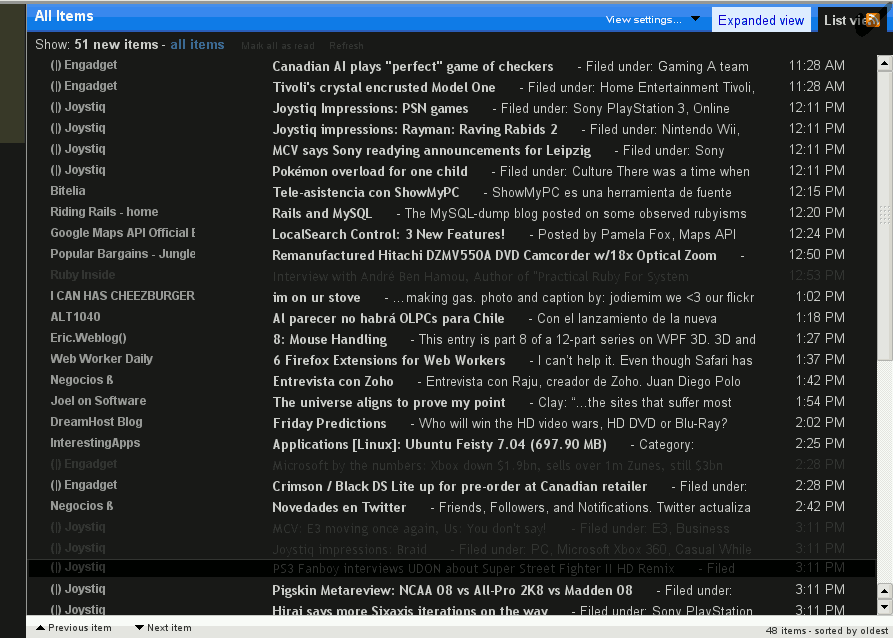
Google Reader Dark OSX

Google Reader Dark OSX
3403
2948

Install

The recommended way to install user styles is to use Firefox with Stylish.

If you already have Firefox with Stylish, make sure this site is allowed to run JavaScript.

By Ivan el Magnifico.
Created Jul 20 2007, last updated Jul 21 2007.
3 installs this week, 1163 total.
Average rating: Bad

I've abandoned this project because I don't have time to update it, so don't install it because it doesn't work on the current version of Google Reader.

Changelog:
1.10a
- Fixed color on "Home" when no unread items are shown.
- Fixed colors of information bar when changing sort order by oldest items.

1.10
- Fixed Expanded view. A thick black border is shown for the non-current items. I haven't found the element causing that, but it's not too bothersome I think.
- Home view streamlined. Matching colors and removing tips box and Google messages. Using more readable fonts.

1.01
- A few improvements. The buttons on the bottom of the sidebar no longer get covered up by the footer.
- Changed the alignment of the feed names to the right - on the list view (tell me what you think of this).

I just took parts of several other styles and tried to glue them together:

- Google Reader Dark by oltra
- Google Reader - Modified "Slate Series"
- Google reader para ler
- OS X Style Google Reader

There are some things that don't work well, like the auto-hiding sidebar (I can't seem to resize the footer to give space to the sidebar).

Most probably this won't work at all on anything else than Firefox 2.

I suck at color design, so if anyone has better suggestion as to the color combinations, please comment!

Also, I had to hide some icons from the interface because they aren't transparent and look awful on this color scheme. If anyone can create some that work on a dark background, do help out :)

I hope you like it!

Before
After

Discussions [Start new]

Mail the admin.