The recommended way to install user styles is to use Firefox with Stylish.
If you already have Firefox with Stylish, make sure this site is allowed to run JavaScript.
You've installed this user style in Stylish. To uninstall it, open the Tools menu, choose Add-ons, click the User Styles panel on the top, click on the entry for this user style, and click Uninstall.
Like customizing Firefox? Customize your new tabs with New Tab King.
You've installed this user style in Stylish. To uninstall it, open the Tools menu, choose Stylish, and remove the entry from there.
You've installed this user style in Stylish, but a newer version is available.
To uninstall this user style, open the Tools menu, choose Add-ons, click the User Styles panel on the top, click on the entry for this user style, and click Uninstall.
Like customizing Firefox? Customize your new tabs with New Tab King.
The recommended way to install this user style is to .
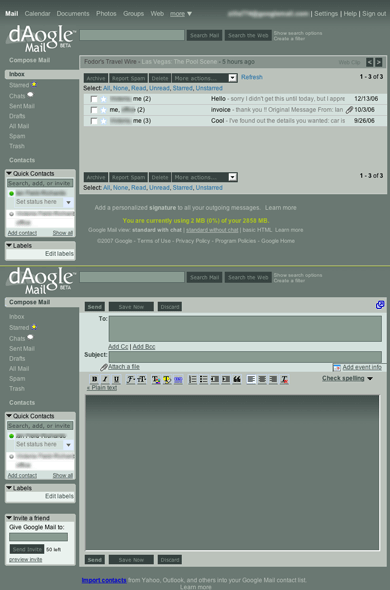
This changes your gmail account to match the deviantART page style :)
-----------
CURRENT VERSION:
Version 2.02a: 15th August 07
• fixed url colour in messages not displaying correctly • fixed reply font colours • fixed global default reply, quote and href colours (not really noticable, but fixed it just to make sure ;) )
Version 2.02: 6th August 07
• Revamped a lot of the interface. • 'read' 'not read' selectors now work properly
Version 1.03: 31st May 07 - Added support for log in screen
Version 1.02: 31st May 07 - Fixed Contacts screen - Fixed Compose Mail screen - Fixed minor screen glitches - Added styled drop down menus - Added support for contacts popouts
Version 1.01: 29th May 07 - Beta version of the gmail skin - Lots of bugs to fix, this is a WIP - Removed Ads